What are you working on for Duke right now? "Post about whatever Duke related stuff you're doing"
#7991 Posted 15 August 2017 - 04:59 PM
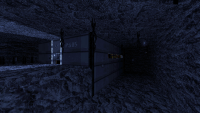
More generally speaking, a lot of the images you put up show fairly rectangular areas, which as a concept are only moderately interesting from an architectural viewpoint.
#7992 Posted 15 August 2017 - 05:42 PM
Based on my experience, for lighting as such, (fluorescent lights) the light beams look off. Even in a high humidity area. Another catch is that they don't create sharp shadows on the floor, since those lamps are not directional.
It looks cool though, but that's about it.
Maybe, make some spot lights in the centre, and they can have a beam and shadows.
Just saying.
This post has been edited by Hank: 15 August 2017 - 05:44 PM
#7994 Posted 16 August 2017 - 04:10 AM
BTW, I want to ask for another advice if you don't mind (and also show another pic).
The theme of the map I'm working on right now is the underground cave planet. I already got the idea for a general look of the map, but I can't decide whether it should use jetpack or scuba gear in its inventory.
#7995 Posted 17 August 2017 - 02:52 AM
Sanek, on 16 August 2017 - 04:10 AM, said:
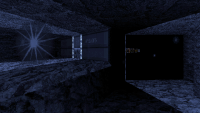
Never mind, I've already decided that I will go without underwater gig. From water-filled caves we'll go into deep freeze invorement! It's still be blue because it's so cold down there!
And I'm sorry for double-posting. I can't edit my post somehow.
#7996 Posted 18 August 2017 - 07:49 AM
Tea Monster, on 28 July 2017 - 05:43 AM, said:

We tried some of that on the HHR mod, but having to shoot MD3's through NPherno buggered that all up :'(
I've been using this trick for quite a long time. But yeah, it's useless for MD3, at least with existing exporter for 3ds max
#7997 Posted 18 August 2017 - 07:51 AM
#7998 Posted 18 August 2017 - 03:17 PM
One is this thing: https://github.com/fedackb/yavne.
And this: http://www.farfarer...._help/index.htm
The other is a new add-on from the GSoC: https://wiki.blender...C_2017/Proposal
Blenderartists thread: https://blenderartis...ing-Tools/page9
If it gets into master, it looks like it will be a much improved solution.
Roma, I didn't know that there was an exporter for Max - nothing modern anyway.
This post has been edited by Tea Monster: 18 August 2017 - 03:21 PM
#8000 Posted 19 August 2017 - 08:32 AM
Tea Monster, on 18 August 2017 - 03:20 PM, said:

"Damn, i'm lookin' good!"
#8003 Posted 23 August 2017 - 03:23 PM
#8004 Posted 26 August 2017 - 04:26 AM
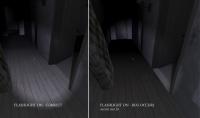
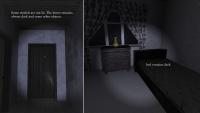
Some feedback about lighting issues I can't get rid of. You probably remember I was working lastly on controlling SE49 with lightswitch+SE12 to turn it on in the game. In the beginnings it seemed to work properly : )
I also have been using the flashlight (by Darkus) - in replacement of SE12+Lightswitch system - but I still have the same lighting issues with sectors (and also with models that aren't lit). Sectors are lit properly some time, then not anymore.
In fact troubles occurs each time a light source is turned on or off in the game whatever the sytem used.
I have tried to change some parameters on the affected models like cstat 2048 or spritenoshade commands... but unsuccessfully.
Is there possibly a solution or is it also a Polymer issue ?
PS : beside the flashlight, I put separate SE49 in each room to illuminate barely the room when it's not supposed to be lit (Some examples, the player must be able to see something even if the flashlight is not found yet! There are also some moonlight emulation, ...). I was afraid finally those light sources interfers with the "controllable" light source but removing those additionnal sources doesn't fix the problem - excepted maybe for the sector issue - and I'm even not sure of that.
This post has been edited by David B.: 26 August 2017 - 04:30 AM
#8005 Posted 26 August 2017 - 08:03 AM
For the models that don't light properly, load them into a program called Npherno. Then choose to "rebuild normals". Then resave the model. That has corrected problems a number of times for me in the past.
This post has been edited by Mark.: 26 August 2017 - 08:06 AM

#8007 Posted 26 August 2017 - 10:50 AM
Mark., on 26 August 2017 - 08:03 AM, said:
If that fixes it, use them for now but hold on to your originals.
#8008 Posted 26 August 2017 - 10:55 AM
Tea Monster, on 26 August 2017 - 09:43 AM, said:
#8009 Posted 26 August 2017 - 11:01 AM
Hendricks266, on 26 August 2017 - 10:50 AM, said:
Nevertheless I have rebuild the normals a second time for the bed and the door models and saw a very small difference but not relevant.
I going now to try an exporter from 3ds max to see if there is some improvements.
#8010 Posted 26 August 2017 - 11:04 AM
Mark., on 26 August 2017 - 08:03 AM, said:
For the models that don't light properly, load them into a program called Npherno. Then choose to "rebuild normals". Then resave the model. That has corrected problems a number of times for me in the past.
Edit : light per surface is set to "5"' in the Polymer settings. I suppose that's what you were talking about. I pushed it to ten, the same for shadows with no results.
I have exported a model (bed) directly from 3ds max, but no improvement in the game.
This post has been edited by David B.: 26 August 2017 - 11:13 AM
#8011 Posted 26 August 2017 - 11:08 AM
r_pr_maxlightpasses 12
is what Mark uses.
I feel like we should default that setting to infinity instead of what it is now. Any objections?
#8012 Posted 26 August 2017 - 11:22 AM
Hendricks266, on 26 August 2017 - 11:08 AM, said:
r_pr_maxlightpasses 12
is what Mark uses.
I feel like we should default that setting to infinity instead of what it is now. Any objections?
I have tried it, no changes regarding the issue.
#8013 Posted 26 August 2017 - 11:49 AM
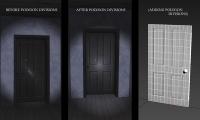
For me it should come from the model rendering. Here's maybe a clue.... Well the result is not satisfying yet but I have added meshes divisions on the model to see what happens.
Edit : It seems the least detailed the model is, the worst it is rendered. Why is that ?
This post has been edited by David B.: 26 August 2017 - 11:53 AM
#8014 Posted 26 August 2017 - 12:53 PM
This post has been edited by Mark.: 26 August 2017 - 12:55 PM
#8015 Posted 26 August 2017 - 05:50 PM
#8016 Posted 27 August 2017 - 12:54 AM
Mark., on 26 August 2017 - 12:53 PM, said:
#8018 Posted 28 August 2017 - 07:59 AM
Mister Sinister, on 28 August 2017 - 07:48 AM, said:

When did you start working on this? It seems like you started it a couple of weeks ago and just can't stop mapping, isn't it?
I mean, we all knew that feeling when you have start the map and make huge progress every day because you have the inspiration and energy to do that.

Help
Duke4.net
DNF #1
Duke 3D #1