Duke4.net Forums: EDuke32 2.0 and Polymer! - Duke4.net Forums

Jump to content

  • 213 Pages +
  • « First
  • 72
  • 73
  • 74
  • 75
  • 76
  • Last »
  • You cannot start a new topic
  • You cannot reply to this topic

EDuke32 2.0 and Polymer!  "talk about the wonders of EDuke32 and the new renderer"

User is offline   Skulldog 

#2180

View PostTX, on Mar 8 2011, 12:06 PM, said:

No. Autoload is deprecated and should probably be removed altogether.


Remove it , that would work for me.

0

User is offline   Hendricks266 

  • Weaponized Autism

  #2181

View PostTX, on Mar 8 2011, 11:06 AM, said:

No. Autoload is deprecated and should probably be removed altogether.

What is better?
0

User is offline   TerminX 

  • el fundador

  #2182

Putting files in their own separate mod dirs and loading them using the included drop-down selector in the startup window.
0

User is offline   Danukem 

  • Duke Plus Developer

#2183

But if you remove it now, a whole generation of Duke players who strained their tiny brains to understand the concept of the autoload folder will think the HRP is broken and will flood the forums asking how to make it work again.

Nah, just kidding. There aren't enough Duke players left to flood the forums.
0

User is offline   TerminX 

  • el fundador

  #2184

View PostDeeperThought, on Mar 8 2011, 11:37 PM, said:

Nah, just kidding. There aren't enough Duke players left to flood the forums.

You'd be surprised. Server logs for dukeworld.duke4.net show 5000+ hits on eduke32_current.zip so far this month and 26500+ hits on stuff within the synthesis directory. I have no idea what these numbers would look like when adjusted for non-unique visitors but it's still going to be a pretty decent number.

Edit: WGR2 is doing pretty well too. WGR2_SIEGEBREAKER.zip is getting a download at least every couple of minutes, to the tune of more than 25000 log entries referencing it so far. Good job!

Edit 2: looks like fissile.duke4.net has moved 80 gigs of data so far this month.
0

User is offline   Skulldog 

#2185

View PostTX, on Mar 9 2011, 12:17 AM, said:

Putting files in their own separate mod dirs and loading them using the included drop-down selector in the startup window.


Then you would have to put Hrp packs in each mod dierectory or the main dierectory with no way to turn if off without removing the hrp files.
That would make the eduke directory 50 gigs or so. It would be better to remove checkbox and use a combobox with option of None, or any folder in
the main directory. Add a command for users and mod devs -hrp_dir None or -hrp_dir [dir name] Autoload is good thing to have.

This post has been edited by Skulldog: 09 March 2011 - 07:39 AM

0

User is offline   Danukem 

  • Duke Plus Developer

#2186

I want to call attention to this serious crash bug which affects the vanilla game now. The thread is badly named and may have gone unnoticed:

http://forums.duke4....?showtopic=3591
0

User is offline   Hendricks266 

  • Weaponized Autism

  #2187

View PostSkulldog, on Mar 9 2011, 09:37 AM, said:

Then you would have to put Hrp packs in each mod dierectory or the main dierectory with no way to turn if off without removing the hrp files.
That would make the eduke directory 50 gigs or so. It would be better to remove checkbox and use a combobox with option of None, or any folder in
the main directory.

No, you put it in the root.

View PostSkulldog, on Mar 9 2011, 09:37 AM, said:

Add a command for users and mod devs -hrp_dir None or -hrp_dir [dir name] Autoload is good thing to have.

-j

Look at the new batch file code I wrote for my add-on HRPs, before I even knew autoload was on the chopping block:

:arguments
set args=
if exist polymer_hrp\ set args=%args% -jpolymer_hrp
if exist duke3d_voxel.zip set args=%args% -gduke3d_voxel.zip
if exist duke3d_hrp.zip set args=%args% -gduke3d_hrp.zip
if exist hrp_update.zip set args=%args% -ghrp_update.zip
if exist maphacks.zip set args=%args% -gmaphacks.zip
if exist eduke32_mus.zip set args=%args% -geduke32_mus.zip
if exist "%addondir%" set args=%args% -j"%addondir:\=/%"
if exist "%addonhrpdir%" set args=%args% -j"%addonhrpdir:\=/%"
set args=%args% -gnwinter.grp -hnwinter.def
if "%editor%"=="1" set args=%args% -namesfile NWNames.h
if not "%editor%"=="1" set args=%args% -xNWEDuke.con
if "%dp%"=="1" (
set args=%args% -hnw_dp.def
if not "%editor%"=="1" set args=%args% -xNWDP.con
)
if "%xxx%"=="1" (
if exist xxx_lite.zip set args=%args% -gxxx_lite.zip
if exist xxx_pack.zip set args=%args% -gxxx_pack.zip
set args=%args% -hnw_xxx.def
if "%dp%"=="1" (
set args=%args% -hnw_dp_xxx.def
if not "%editor%"=="1" set args=%args% -xNWDPXXX.con
) )
set args=%args% %*
if "%dp%"=="1" set args=%args% -jDukePlus

set exe=%exename%
if "%debug%"=="1" set exe=%exename%.debug

if exist %exe%.bat (
call %exe%.bat %args%
) else (
start %exe%.exe %args%
)


This post has been edited by Hendricks266: 09 March 2011 - 09:01 AM

0

User is offline   Skulldog 

#2188

So all the hrp packs and Polymer_hrp packs are used in Nwinter Plus with no problems?
0

User is offline   fgsfds 

#2189

Can you add option to enable\disable dynamic lighting with polymer? It's annoying to add or remove r_pr_lighting from settings.cfg each time.
0

User is offline   The Commander 

  • I used to be a Brown Fuzzy Fruit, but I've changed bro...

#2190

Have you tried making the settings.cfg read only?
0

User is offline   fgsfds 

#2191

That's not the point. I often have to enable or disable lighting, and for that I need to add this in config or type it in console. It's not too hard of course, but this option may be useful.
0

User is offline   Danukem 

  • Duke Plus Developer

#2192

View Postempyrock, on Mar 16 2011, 10:34 AM, said:

That's not the point. I often have to enable or disable lighting, and for that I need to add this in config or type it in console. It's not too hard of course, but this option may be useful.


If it was in the menu it would be buried in the renderer options submenu, so using the console might actually be quicker anyway (unless you type slowly).
0

User is offline   TerminX 

  • el fundador

  #2193

Bind some keys to enable/disable it.
0

User is offline   Gambini 

#2194

I can´t tell exactly when this happened (surely when the new polymer hud was introduced): The shrinker and the expander now blink constantly when actually, the only thing that should blink is that red/green stone they have inside.

Also, i´m pretty sure i said this before but can´t remember in which post: the default r_shadescale that approachs the most to the all-life-duke-nukem is 1.14. The one in use currently has to be 0.99 or 1.00 which are both a lot better than what it used to be a few months ago,* but still 1.12-1.18 range makes a lot more justice to good shaded maps, because it has better contrast without those strange pitchblack textures (well, just as it used to be).

I also have been experimenting and noticed that one tad of contrast in polymost/polymer (0.05) makes it look a lot better. Too bad it doesn´t make difference in the screenshots since these settings overrule the screen. or i would show how better it looks.

So the thing is: Can contrast be changed in the core of the 32 bits rendereres to be 0.05 instead of 0.0? It´s worth a try, textures look a lot less washed and the feeling is a lot more 8bit-ish.

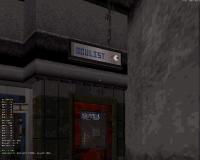
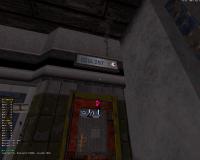
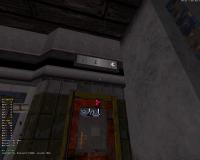
Another thing: Can the clipping plane of decal sprites be adjusted in polymer? See the images below, 1st is software renderer, 2nd is Polymost and 3rd is Polymer. The background white thing is made of sprites and they´re positioned slightly behind the letter sprites. Also notice that sort of spiderweb between T and the eye, the only case where it is misaligned is Polymer too.

*that was a mistake, the current shadescale is still 1.3 which is awfull.

Attached thumbnail(s)

  • Attached Image: Osoftware.JPG
  • Attached Image: Opolymost.JPG
  • Attached Image: Opolymer.JPG


This post has been edited by Gambini: 16 March 2011 - 07:18 PM

0

User is offline   Danukem 

  • Duke Plus Developer

#2195

Gambini is right about all of the above. The only tweak I would be concerned about is changing the default contrast, because in my experience while .05 does look better, some things become a little too dark unless you also increase brightness by a notch or two.
0

User is offline   Plagman 

  • Former VP of Media Operations

#2196

I'm not sure I follow the shrinker thing; someone else was talking about a shrinker problem at some point in the past, so maybe it's related. Either way sounds like a game problem.

For changing the default shadescale, I think TerminX said changing it would make some other stuff look wrong. I don't have an opinion since I haven't closely tried; the current method of trying to match old Duke3D brightness kind of sucks, I'd rather write something that's exactly right for ART and stick with Polymer for lighting for high-resolution content.

Fixing the clipping problem you mentioned is way more involved than just tweaking a parameter, but it's planned.
-1

User is offline   The Commander 

  • I used to be a Brown Fuzzy Fruit, but I've changed bro...

#2197

View PostPlagman, on Mar 17 2011, 05:22 PM, said:

I'm not sure I follow the shrinker thing; someone else was talking about a shrinker problem at some point in the past, so maybe it's related. Either way sounds like a game problem.

I posted last month at some point that the expander goes completely black when not using the HRP which looks totally wrong.
0

User is offline   0815Jack 

#2198

is there a way to disable the light definitions in the maphack files, but leave the hardcoded ones active?

i tried r_pr_lighting "0" but this disables all.....
0

User is offline   Gambini 

#2199

Quote

For changing the default shadescale, I think TerminX said changing it would make some other stuff look wrong. I don't have an opinion since I haven't closely tried; the current method of trying to match old Duke3D brightness kind of sucks, I'd rather write something that's exactly right for ART and stick with Polymer for lighting for high-resolution content.


It would be wise to put that stuff that TerminX said would look wrong Vs what looks wrong now in a balance. At least before that solution for 8bits art is implemented. As it is right now, the original art is neglected in favor of third party packs.

Quote

I'm not sure I follow the shrinker thing; someone else was talking about a shrinker problem at some point in the past, so maybe it's related. Either way sounds like a game problem.


The shrinker´s hud 8bits art and its alt weapon, the expander. go black and go bright again just like the stone inside should do. I dare to say it´s something related to the hardcoded light that it casts in Polymer.

Quote

Fixing the clipping problem you mentioned is way more involved than just tweaking a parameter, but it's planned.


I know shit about coding but would not be enough to just shift the offset of these sprites toward the angle they aim? I remember i once had a very similar problem with the old Won version of Half Life, when using opengl. There was a commandline that could be added to the .ini file which would move the decal farther from the wall.
0

User is offline   Mike Norvak 

  • Music Producer

#2200

Ho ho ho ho...... ;) finally I've got a new GTS 250 grafic card. Let's try Polymer!!!! <---- Hope it be as good as they say it is. ;) BTW in addition to Duke Nukem Eternity and Of Pigs and Men, which maps do u recommend me?

This post has been edited by Norvak: 21 March 2011 - 07:09 AM

0

User is offline   The Commander 

  • I used to be a Brown Fuzzy Fruit, but I've changed bro...

#2201

If you are using the SVN version of the HRP most of the original maps all have light map hacks.

This post has been edited by The Commander: 20 March 2011 - 09:29 PM

0

User is offline   Micky C 

  • Honored Donor

#2202

My second map, libraryl is a decent looking polymer map (especially considering it was my second ever map), just go into the maps section of MSDN and control-f for it. You can also search for my first map (Action Time on 7) which is also an ok looking polymer map, but is very noobish in all the other departments.
0

User is offline   Mike Norvak 

  • Music Producer

#2203

Okay, i tried a few maps with some dynamic lighting improvements (but not designed specially for polymer and i'm not convinced at all. Isn't so bad but everything looks too fancy and crude imo. And as various veteran mappers say, it messes things up about how a DukeNukem map should look. I'll try Of pigs and Men and those maps u tell me Micky.

This post has been edited by Norvak: 21 March 2011 - 08:39 AM

0

#2204

I think you tried it ages ago, but hey, it's likely been updated since and I feel like running some shameless self-promotion, so you could always give my first map a shot, it is Polymer only, http://forums.duke4....?showtopic=3093
0

User is offline   fgsfds 

#2205

It happened after 1848 revision.

This post has been edited by empyrock: 23 March 2011 - 12:51 AM

0

#2206

There's too much light on my screen for me to see what's wrong right now, but I immagine it's a texture problem?

Delete the files "textures.cache" and "textures" from the EDuke32 folder, this usually makes such issues go away.

I've been thinking for a while of making a simple .exe that removes the cache files as well as doing some other general 'house-keeping'
0

User is offline   fgsfds 

#2207

No, it's not texture problem. It works even without hrp. Maybe here it visible better. It's transparent texture (looks like 2456.jpg) in main menu. And I repeat that the problem has appeared in 1848 and later revisions.

This post has been edited by empyrock: 23 March 2011 - 06:05 AM

0

User is offline   TerminX 

  • el fundador

  #2208

It's helixhorned's fault. ;)
0

User is offline   Helixhorned 

  • EDuke32 Developer

#2209

Ah yes, I half-expected my half-baked 'r_shadescale_unbounded' implementation to break stuff. OTOH, you could say that it isn't a bug at all, try "r_shadescale 0" in the menu for example.

Anyway, I changed r_shadescale_unbounded so that it will allow to display tiles as totally black whenever the original renderer would have too.
0

Share this topic:


  • 213 Pages +
  • « First
  • 72
  • 73
  • 74
  • 75
  • 76
  • Last »
  • You cannot start a new topic
  • You cannot reply to this topic


All copyrights and trademarks not owned by Voidpoint, LLC are the sole property of their respective owners. Play Ion Fury! ;) © Voidpoint, LLC

Enter your sign in name and password


Sign in options