Duke4.net Forums: Mapping questions thread - Duke4.net Forums

Jump to content

  • 27 Pages +
  • « First
  • 23
  • 24
  • 25
  • 26
  • 27
  • You cannot start a new topic
  • You cannot reply to this topic

Mapping questions thread

#721

In the versions of eduke I use Noshade won't work if the sector's sky is parallaxed
Sprites under a sky would need a tiny sector drawn just for them to set their shade although 2 touching parallaxed ceilings with differing shades make an aurora borealis looking effect at their border
0

#722

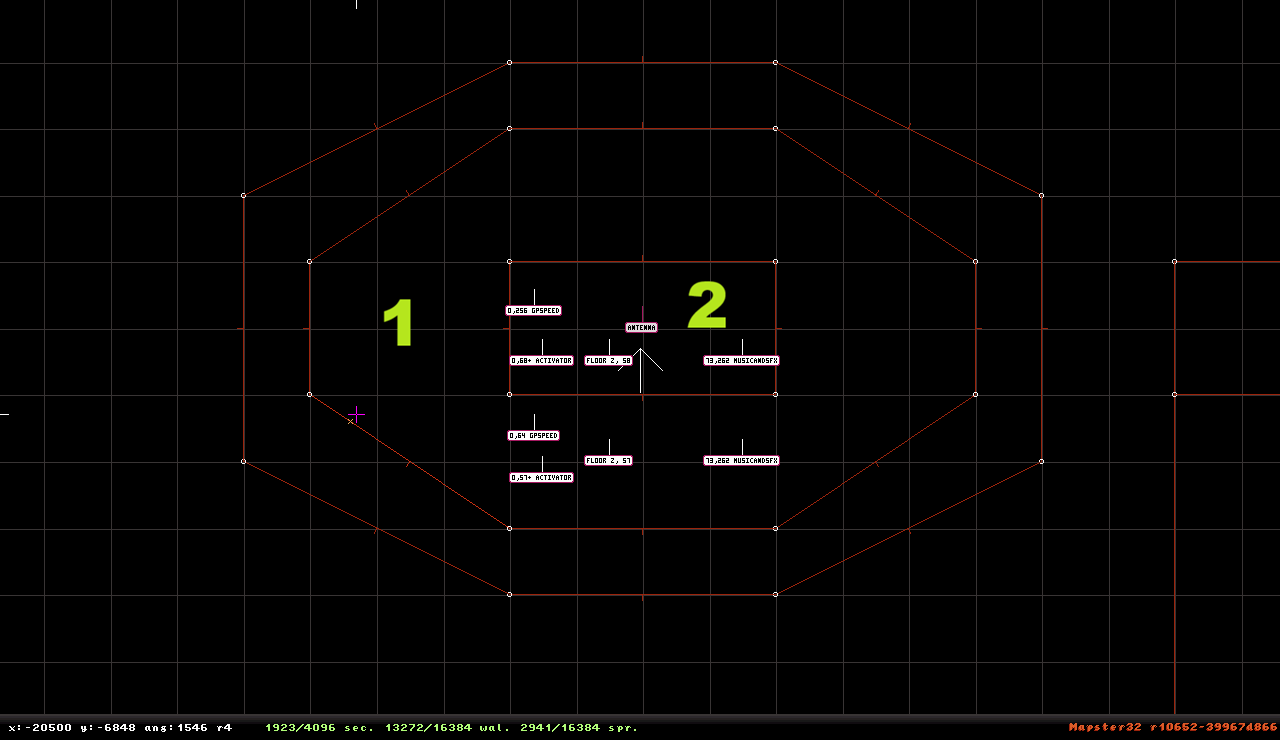
I want 2 rising sectors to rise from their floor up to the height of their sector effectors but I can only get number 1 working, number 2 doesn't do anything. Why not? Some issues with the height of surrounding sector? Also, is this possible with just 1 switch? Like masterswitch does it in steps? Thanks! Around 3000 walls left but I still need to do 5 million things... :(

Posted Image
0

User is online   ck3D 

#723

You don't need hitags on the SE31's, only on SE13's (in your screenshot the SE hitag in sector 2 does not even match Activator like they do in sector 1 but that shouldn't make a difference regardless of intent). SE31 works in a way where any activation within the sector will trigger it.

GPSPEED value has to match one that can cleanly divide the height offset of the SE from floor (in Build units) by 8, or the effect will either not function precisely, or not function at all. Here your value of 256 should work in most cases where sector/sprite height wasn't altered enough to break the default pattern of powers of two Build expects, but if it was finely changed (and there is nothing wrong with that) e.g.. using mouse controls, then you need to adjust the GPSPEED math to match, I'm pretty sure that must be it.

Your effect is possible with just one activation, just use the same channel for trigger and all Activators and no SE hitags. It has nothing to do with whether you use Activator or Masterswitch, the difference between those is Activator is never deleted and can be triggered back off then back on etc... but is instant, whereas Masterswitch is possible delay (without the need for an external contraption which you do need to delay Activators), but gets deleted once the channel is run once (replacing lock(s) with manual operation of e.g.. door, elevator... when possible).

This post has been edited by ck3D: 13 March 2026 - 12:29 PM

0

#724

Yeah I was using 2 switches hence the 2 different lotags, now I found out I used a wrong one. 68 instead of 58, was a typo. Works now, just need to make it work with 1 switch now. And if I can't: whatever! :P Thanks ck3d! :D
0

User is online   ck3D 

#725

In case you didn't see it (depending on timing), I've edited my post above yours to explain the switch thing to you.
0

User is offline   Aleks 

#726

You should generally always get rid of hitags on SE31 sprites as they contribute to effect delay which is only triggered from the SECOND operation onwards (unless this is what you want to do, which can also be a case in more complex effects). This is an extremely obscure mechanic, but worth knowing about and reminding people every now and then.
1

#727

Alright I got it working with one switch now, just using the same lotag for both sectors and different speeds as intended, thanks! SE hitags removed as well. :P

Now I want Duke to fall from his starting position (like ejection seat from his crashing plane), with some falling damage if possible and not from the very top of the map, just from a certrain height, but I don't remember if this was ever used or how to make it since the brown start position arrow doesn't seem to be editable like a normal sprite or I don't know how. :/
0

User is online   ck3D 

#728

Resetting the player start position with Scroll Lock takes Z into account so if you just fly up to wherever you want the player to start in 3D mode and then press the key in 2D mode once there it will work. Game doesn't care if there is floor directly below you when it loads nor will it snap you down (unless Duke is insta-shrunk, which can be used in general to bypass stuff in Z e.g.. mid-air teleporters), it just checks whether or not you're in valid space. See E1L1 start.

This post has been edited by ck3D: 15 March 2026 - 02:04 AM

0

#729

Haha yes, thanks again ck3d! I was so stupid not thinking of how easily it could work the way I wanted it and now it just seems so obvious. I also completely forgot about the (tiny) drop Duke does in E1L1. Stupid me lol

This post has been edited by Puke Fukem: 15 March 2026 - 02:43 AM

0

User is offline   blizzart 

#730

View Postck3D, on 08 March 2026 - 01:06 PM, said:

[...] and since there is no visual indicator of it unless pointed at, it is wise (but quick) to regularly double check the setting is correct (useful to know before copy-pasting/assembling spritework). That also is how you can have (non full-)visibility in a map (so fog, including fogpals) and full bright sprites that will pop from distance in most any conditions, by setting that flag and then giving the sprite(s) a negative shade value, personally I like using -8, -16, -32, -48, -64 depending on area scale.


You can check that by pressing '+X for the shade preview. If you haven´t pressed N on the sprite, the sprite would use the sector´s shade.
1

#731

Another day, another corpse, err problem. Today Mapster crashed for the very first time saying: "out of memory" and something with bytes, I failed to make a screenshot but what are the reasons? And how to prevent this? Luckily I save manually from time to time, autosave is super annoying. I'm afraid I will have to reconstruct some parts of my city map to improve performance. Can't think of any other than this now since "out of memory" isn't a very helpful error description. It was a longer mapping session but my computer is still kinda new and "out of memory" sounded more like a joke to me. Any info is appreciated, thanks!
0

User is offline   Aleks 

#732

View PostPuke Fukem, on 16 March 2026 - 12:09 PM, said:

Another day, another corpse, err problem. Today Mapster crashed for the very first time saying: "out of memory" and something with bytes, I failed to make a screenshot but what are the reasons? And how to prevent this? Luckily I save manually from time to time, autosave is super annoying. I'm afraid I will have to reconstruct some parts of my city map to improve performance. Can't think of any other than this now since "out of memory" isn't a very helpful error description. It was a longer mapping session but my computer is still kinda new and "out of memory" sounded more like a joke to me. Any info is appreciated, thanks!

Keep the log file the next time it happens and try posting it, otherwise it is difficult to guess.
0

User is online   ck3D 

#733

I have zero idea but it sounds a bit similar to an issue I started having recently in my Alien Armageddon folder, thanks to Dan's help I could alleviate/solve the issue by deactivating advanced features the mod normally loads (for instance voxels), that was done by commenting the corresponding lines out of duke3d.def code but that may be AA specific. I know PF is working on a Polymer map, it's possible you may have a bunch of memory-expensive assets loaded without even realizing how heavy they are, remember Build refreshes and recalculates everything with every frame and so Mapster32 can push harder than even some video editing software.

This post has been edited by ck3D: 17 March 2026 - 12:17 PM

0

#734

View PostAleks, on 17 March 2026 - 11:05 AM, said:

Keep the log file the next time it happens and try posting it, otherwise it is difficult to guess.


Will do, I did not check that. :(

View Postck3D, on 17 March 2026 - 11:11 AM, said:

I have zero idea but it sounds a bit similar to an issue I started having recently in my Alien Armageddon folder, thanks to Dan's help I could alleviate/solve the issue by deactivating advanced features the mod normally loads (for instance voxels), that was done by commenting the corresponding lines out of duke3d.def code but that may be AA specific. I know PF is working on a Polymer map, it's possible you may have a bunch of memory-expensive assets loaded without even realizing how heavy they are, remember Build refreshes and recalculates everything with every frame and so Mapster32 can push harder than even some video editing software.


Yeah thanks, so far it didn't happen again and yes it's an Polymer map but I try not to place too many excessive lighting or too many sprites all around. I added a new wall to block some area from a bigger one to hide some sprites and lighting effects and it improved performance a bit. I also learned a bit about fogpals and that you can apply them to floors and adjust visibility. They even work on walls as I once mentioned but a fogpal building wall looks unrealistic, guess it could work in some cave though.

This post has been edited by Puke Fukem: 17 March 2026 - 02:26 PM

1

User is offline   Mark 

#735

I've been getting the out of memory crash in Mapster a lot in the last couple of years. I've really been pushing it with Polymer and tons of high res textures with height and normal maps. I thought it was just a matter of increasing texture cache but no matter how high I set it I will get crashes in longer sessions or if I do a lot of undo's while mapping. Even with my 32 GB of ram and a very large windows cache file. Since I use an eduke revision from 2021 to avoid game breaking ( to me ) bugs I didn't bother making a bug report. I just add it to the pile of other Polymer related bugs.

This post has been edited by Mark: 21 March 2026 - 09:04 AM

0

User is offline   Mark 

#736

BTW, I'm thrilled to see another Polymer user. I was getting lonely. :P

This post has been edited by Mark: 21 March 2026 - 09:07 AM

0

#737

Interesting Mark, so many undos can crash your Mapster? Asking because I also do quite a lot of undo series from time to time in one session and so far it went fine. Still no other crash yet,
And I am glad you're looking forward to another Polymer map, but you'll need the recent eDuke32 version to play it properly I'm afraid. So far there are some pretty neat looking lighting effects and stuff, but I really need much more time to finish this city map. :( I have to reconstruct more or less bigger portions or move them elsewhere to make Polymer run smooth enough. There is huge open area and it still has many unfinished walls and yet frames per second drop there already. It's not unplayable, but also not very smooth.

On topic: can I make destructible building sectors, the tight ones between the walls, sloped without them having gaps in their walls before the building is destroyed? I can't get it to work, one earthquake also doesn't slope properly, meaning it is already sloped before the quake hits the spot but I will get to fix that somehow soon, haven't tried it.
0

User is online   ck3D 

#738

SE13 flattens the sector floor/ceiling to SE height until triggered so no in theory you can't change that, but you can 'break' the intended effect on purpose by just using 'incorrect' firstwalls for the slopes / maybe messing with SE height and see how that can alter the supposed flatness. I don't think it is a good idea in practice though as you most likely will end up in tiny cracked sectors Duke can still enter and get squished in, instead of a sophisticated-looking crack that I'm assuming you are after.

SE2 earthquake is very easy, SE needs to be placed near firstwall pointing at the direction the sector will shift and placed at base floor Z (so pre-slope state), slope then will form upon trigger but there is a limit to how steep it can get (can play with that a little by adjusting sector size and thus scale of slope).

I am surprised you know of the Infosuite but still need to ask about this since SE behavior is thoroughly documented, but I think I get it. Maybe so far you have only been looking at the Effects page, but those subpages do not really explain the logic behind them, moreso show basic practical applications. As a complement, you might want to also check the References section of the Infosuite, especially the SE & Sector Tags subsection. For some reason, a lot of important info regarding what each effect precisely does is exclusive to their description in there, but absent from the Advanced FX pages where they are more loosely taught.

This post has been edited by ck3D: 22 March 2026 - 01:02 AM

0

User is offline   Aleks 

#739

View PostPuke Fukem, on 22 March 2026 - 12:48 AM, said:

On topic: can I make destructible building sectors, the tight ones between the walls, sloped without them having gaps in their walls before the building is destroyed? I can't get it to work, one earthquake also doesn't slope properly, meaning it is already sloped before the quake hits the spot but I will get to fix that somehow soon, haven't tried it.

You just need to carve your slopes "up" or, to be more direct: floor slope has to be negative and ceiling slope has to be positive. If, for example, you want the hole to look like a hexagon, so you make two adjacent sectors which will slope for the hole, make sure the first wall for both of them is set as the middle wall between them and not the outer edge walls. SE13 will lower/raise your sector's ceiling/floor so that they both are at the same heights at pre-map, so you can also see "experimentally" what works.
1

#740

Thank you guys, I think this will fix it. Has to be firstwall and/or SE height. ;) Ck3d, yeah I frequently use the InfoSuite but sometimes things turn out to be still a mystery until I find out how lol

Earthquake is fixed already, but there is more than one. ;)
0

User is online   ck3D 

#741

Yeah that is what I was trying to say about the Infosuite, it has all of the content one needs but its design is a bit deceptive, in that the most popular section (Advanced FX) will hand you fish, but the slightly more obscure one (References > SE/Sector Tags) will teach you how to fish. The former explains to the reader how to make an effect once (mostly), the latter explains the actual process that is going on and what exactly each SE is doing and how to adjust it (and so after a while you realize you don't have to separate all the possible effects in your head, and all the possible dynamics rely on control over just the same few things). Personally I don't think there should be such a separation in the teaching of method, so I've been thinking about a possible alternative for a little while.

This post has been edited by ck3D: 23 March 2026 - 12:56 AM

0

#742

View Postck3D, on 23 March 2026 - 12:52 AM, said:

Yeah that is what I was trying to say about the Infosuite, it has all of the content one needs but its design is a bit deceptive, in that the most popular section (Advanced FX) will hand you fish, but the slightly more obscure one (References > SE/Sector Tags) will teach you how to fish. The former explains to the reader how to make an effect once (mostly), the latter explains the actual process that is going on and what exactly each SE is doing and how to adjust it (and so after a while you realize you don't have to separate all the possible effects in your head, and all the possible dynamics rely on control over just the same few things). Personally I don't think there should be such a separation in the teaching of method, so I've been thinking about a possible alternative for a little while.

Yeah and you're an excellent teacher! You're right, most of the times I use Advanced FX on the InfoSuite, but I also need References quite often. Thanks for pointing out SE and sector tags there, a page I definitely need to read more often lol :P
0

User is online   ck3D 

#743

Happy to be of help, References section I believe is a frequent go-to for all mappers regardless of how experienced, I don't think so many people map without a tab with the page open (or of the EDuke Wiki Keyboard Commands listings ready to Ctrl F), as clearly as one progressively learns to understand what the engine likes or expects, there always is going to be the one little detail you might forget. But yeah, it sounds like you soon will realize that all SE/dynamic stuff around levels (moving sectors, rooms, lights, etc.) just comes down to nailing a few precise concepts down, not so much practicing a huge list of exercises and learning every single SE, there just is so much overlap that is redundant and suffices to intimidate a lot of people away, but if you focus on the shared patterns becomes ten times more simple and reassuring.

This post has been edited by ck3D: 23 March 2026 - 04:17 AM

1

#744

Okay I got the slopes fixed finally, it was a mix of wrong firstwalls and ceiling slopes which was funny because the ceiling is the night sky.

Anyway, now these:

1) how do I fix flickering textures? When being in a certain sector and looking at a specific wall being in another non-adjacent sector their sprites can dis- and reappear even if you stand still and just use mouselook to look around, not a big deal but it really bothers me. Must have messed up some sectors there. It's not HOM I think (so far there is only 1 mirror in the whole map and it's completely elsewhere and should be fine), but something is wrong. I could fix the same problem elsewhere in the map but I have no idea what I did there and can't reproduce it. I've tried joining some sectors where the problem occurs but that didn't help. :(

2) Is it safe to build room furniture and all interior stuff out of sprites only? I have less than 1000 walls left now and would love to use more walls since sprites can flicker, sometimes show gaps and monsters seem to partially walk through them which sucks. I did that in 1 room now, but I'm not really happy with the result, half of them are ok but then the other half looks or feels like artificial. Dunno how to describe it. :D Anyway, if all fails I can regain some hundred walls and rebuild stuff of sectors instead of sprites, but no more. Can we have another 16k walls please? ;)

It's also annoying Duke likes to climb on any low hanging sprites like a low placed wall crack, even if the sprite is unblocked. :confused:
0

User is online   ck3D 

#745

1/ Maybe you are hitting the MAXSPRITESONSCREEN limit? Can only have 4096 sprites rendering on screen at once or you'll get disappearing bulks of them (only visually; invisible enemies still operate, etc.), that includes gameplay-spawned sprites (blood, bullet holes, bullets etc.). Any sector that is partially visible even in the slightest bit counts as loaded, including all of the sprites it contains now adding to the current frame's tally (but can use obfuscation with white walls to help). Since you aren't using TROR it can not be a bunch thing (well there is a maximum # of sprites per bunch, but good luck hitting it now) so it must be something simple, maybe Polymer limitation (someone else would have to chime in), remember drawing distance in that renderer in particular is terrible/difficult to work with when making anything average-to-large scale. Loading my Shrapnel City remake in Polymer can't even load the end of the very first city block.

Or maybe your sprites just belong to an incorrect sectnum (or generally can be seen from a different sector than the one they are placed in). Sometimes late sector split after spritework is done can cause that, to fix just need to select all affected sprites in 2D mode and click one (don't even move it) to reset to proper/default. In general (using default non-expert mode), it is very common you will run into instances where simply selecting/clicking (again, not even dragging/moving) something in the editor, be it wall, sector order, sprite sectnum, matching SOS/TROR etc... will reset the attribute depending on what the engine assumes is intended given the current context that it is being presented to recheck (for instance sprite X/Y/Z, sector Z, overlapping vertexes etc.)

2/ Yeah that is common practice and somewhat safe, just be mindful of general sprite behavior e.g.. tripmines won't attach onto them (so avoid placing any anywhere near to avoid temptation), shrunk Duke automatically clips through sprites (so avoid placing Newbeasts or mirror/Shrinker nearby), etc. Remember to make them blockable and hittable and should be good, proper collision is crucial if you're going to go that route (but thankfully easy to watch).

This post has been edited by ck3D: 25 March 2026 - 09:51 AM

0

User is offline   Aleks 

#746

View Postck3D, on 25 March 2026 - 07:58 AM, said:

Or maybe your sprites just belong to an incorrect sectnum (or generally can be seen from a different sector than the one they are placed in). Sometimes late sector split after spritework is done can cause that, to fix just need to select all affected sprites in 2D mode and click one (don't even move it) to reset to proper/default. In general (using default non-expert mode), it is very common you will run into instances where simply selecting/clicking (again, not even dragging/moving) something in the editor, be it wall, sector order, sprite sectnum, matching SOS/TROR etc... will reset the attribute depending on what the engine assumes is intended given the current context that it is being presented to recheck (for instance sprite X/Y/Z, sector Z, overlapping vertexes etc.

I think it's the other way around, non-expert mode automatically "fixes" sprite positions every once in a while (during saving and/or switching between 2D and 3D mode). But regarding the original post, if a sprite is larger than the sector it is place in (i.e. part of it sticks out from this sector and you would expect it to be seen without rendering the sector itself), it won't show without the sector. So just avoid doing that or play around with sectnums (expert mode on) manually to assign them in the bigger/parent sector.

Regarding 2, a good way of fixing collision within spriteworks is to make the spritework itself un-blocked, but place one view-aligned sprite in the middle of the spritework, change its Y length so that it is as high as required and then changing its clipdist (Alt+D I think? Or directly through F8 menu) to encompass the furniture piece, you will see a circle around the sprite indicating its clipdist. This also fixes the issue of Duke randomly climbing up sprites.
1

User is online   ck3D 

#747

View PostAleks, on 25 March 2026 - 10:38 AM, said:

I think it's the other way around, non-expert mode automatically "fixes" sprite positions every once in a while (during saving and/or switching between 2D and 3D mode).


I think you're describing a different thing, the random reordering of sprite stuff that seems to randomly occur and can recheck sectnum based on sprite pos, rearrange spritenum (possibly messing up security camera order) etc. I remember that used to be a problem back when working on OGBB2 but honestly as of late I've been using non-expert mode and been doing just fine with manually assigned sectnums (and sloped sprites - I think I remember that used to be a problem too). So maybe had to do with the versions of Mapster we were using? Was a couple of years back we started work on the map now so surely some of us have updated EDukes since then (personally I don't think I have in quite a few months now) or gotten better at manipulation methods.

I was describing how clicking a sprite or wall or selected sector usually will just correct whatever the editor picks up supposedly is 'wrong' with it during automatic check, e.g.. if you have overlapping vertexes but white walls it will join the walls if you select the sector or click one of the vertexes (no need to move anything), or if you have TROR somewhere matching the wrong layer of sectors can just delete the connection with backspace in 3D mode, move floor to intended Z then simply select bunch to check matching walls (at the right height this time) again. Clicking sprite buried below floor Z or above ceiling Z will clip it back into player space (wherever it exists and has priority), etc. Bug I was talking about when splitting sectors with existing sprites in it is an editor quirk that maybe was or wasn't fixed but happened for a while recently; seems to happen when the sector containing the sprites is large and/or the spritework is complex, say you split it after the (sprite arte-)fact to draw a shadow and boom half the sprites suddenly belong to the wrong sector out of the two but they haven't moved, just inherited incorrect sectnum relative to pos. When that happens can just select all the affected sprites (even walls in the area, can be a useful anchor if locked onto grid and you really don't want to move anything) and just click without moving mouse, instant recheck. Now obviously that means if you have manually changed sectnum somewhere the check will also reset that.

This post has been edited by ck3D: 25 March 2026 - 11:40 AM

1

#748

Thanks once more guys! Interesting read, new info. No, I haven't reached sprite limit, in fact all sprites are still below 4000 count. The broken sprites I mean are normally visible from other nearby sectiors, but from certain sectors, if you just aim around the sprites vanish and reappear at will - unlike in the other "working" sectors where they are always visible the way it should be. I will check about sprite and sectnum, this could be it.

Aleks, useful info too. I will check about spritework and clipdst. :)
0

User is online   ck3D 

#749

Yeah honestly it's a really quick check (and you'll get used to the method), just select the whole problematic area (walls and sprites using Shift; not whole sectors using Alt since that might not force the check you want in this specific case), even loosely, and click any one of the selected objects once. Go back to 3D mode to check if the sprites now render properly, if yes then issue was sectnum, if not must be something else.

This post has been edited by ck3D: 25 March 2026 - 11:59 AM

0

User is offline   Aleks 

#750

View Postck3D, on 25 March 2026 - 11:33 AM, said:

I was describing how clicking a sprite or wall or selected sector usually will just correct whatever the editor picks up supposedly is 'wrong' with it during automatic check, e.g.. if you have overlapping vertexes but white walls it will join the walls if you select the sector or click one of the vertexes (no need to move anything), or if you have TROR somewhere matching the wrong layer of sectors can just delete the connection with backspace in 3D mode, move floor to intended Z then simply select bunch to check matching walls (at the right height this time) again. Clicking sprite buried below floor Z or above ceiling Z will clip it back into player space (wherever it exists and has priority), etc. Bug I was talking about when splitting sectors with existing sprites in it is an editor quirk that maybe was or wasn't fixed but happened for a while recently; seems to happen when the sector containing the sprites is large and/or the spritework is complex, say you split it after the (sprite arte-)fact to draw a shadow and boom half the sprites suddenly belong to the wrong sector out of the two but they haven't moved, just inherited incorrect sectnum relative to pos. When that happens can just select all the affected sprites (even walls in the area, can be a useful anchor if locked onto grid and you really don't want to move anything) and just click without moving mouse, instant recheck. Now obviously that means if you have manually changed sectnum somewhere the check will also reset that.

Yeah I know what you mean, but I thought this thing happened specifically because of having the sprite auto-assigning "fix" turned off with expert mode. Probably outside of the question at hand, but to continue the discussion, I have noticed this mostly happens to sprites ornamented on (white) walls - so might be something with their position being "sketchy" and too close to non-physical space. Either way, it can be annoying.

I haven't updated EDuke in a while, the current main version for me is r10593 - thanks for the reminder though, gotta do it sometime soon!


0

Share this topic:


  • 27 Pages +
  • « First
  • 23
  • 24
  • 25
  • 26
  • 27
  • You cannot start a new topic
  • You cannot reply to this topic


All copyrights and trademarks not owned by Voidpoint, LLC are the sole property of their respective owners. Play Ion Fury! ;) © Voidpoint, LLC

Enter your sign in name and password


Sign in options