Duke Plus "feedback and general discussion of Duke Plus"
#650 Posted 10 March 2010 - 03:53 AM
EDIT - BTW, those things were done after the second system upgrade that in the process upgraded gcc to 4.3.3.
This post has been edited by LinuxDuker: 10 March 2010 - 04:15 AM
#651 Posted 11 March 2010 - 05:23 PM
Anyhow, forgive this rather noobish question. I want to make sure I'm using the latest version of Dukeplus (2.7?). I've downloaded the latest version from the DukePlus website, and I overwrote the old .CON files with the new ones. However, the UI still says DukePlue 2.0 right before it loads the game. Is this just a glitch? Is there any other way to know which version I'm using?
Thanks.
===Edit:
I may have answered my own question... it says DukePlus 2.0devel 20100122
I'm guessing it's from Jan 22, 2010?
This post has been edited by boosh: 11 March 2010 - 05:44 PM

#652 Posted 11 March 2010 - 06:09 PM
boosh, on Mar 11 2010, 05:23 PM, said:
I'm guessing it's from Jan 22, 2010?
No, it says "EDuke32 2.0.0devel 20100122". It also says "DukePlus 2.0" when you start EDuke32 using DukePlus, even though the actual version is 2.08 -- I will update that again when it reaches 2.1.
EDIT: The actual version number is located in the upper right corner of the screen when you start a game. And if you want to know when files were last updated, just check the "date modified" on the files.
This post has been edited by DeeperThought: 11 March 2010 - 06:17 PM
#653 Posted 11 March 2010 - 07:20 PM
DeeperThought, on Mar 11 2010, 08:09 PM, said:
EDIT: The actual version number is located in the upper right corner of the screen when you start a game. And if you want to know when files were last updated, just check the "date modified" on the files.
Thanks.
On a different note, has anybody reported lack of shadows/certain dynamic lighting effects in DukePlus? Today is the first day that I've actually devoted a ton of time to playing around with the mod, and I noticed in plain ol' eDuke32, I can see all the neat shadows, lighting effects, etc (read: it looks totally badass), but when I run DukePlus, the shadows go away (even though they're still ON in the menu), and some (but not all) of the dynamic lighting effects go away. It still looks badass, just not as badass. And yes, I've confirmed it's still running in 32-bit OpenGL.
I've also noticed those things will disappear in regular eDuke32 if I mess with any of the video options while I'm in game. I'll have to start a new game to get them back, and even then they don't seem to carry level to level.
#654 Posted 11 March 2010 - 08:28 PM
#655 Posted 12 March 2010 - 07:58 AM
DeeperThought, on Mar 11 2010, 10:28 PM, said:

I'll give deleting the .CFG files a shot when I get home from work tonight.
The Polymer box has been checked everytime I play. The weird thing is that it will start out using the Polymer renderer, but if I change any of the graphics options (say, for instance, resolution), it's like it switches to the Polymost renderer without warning, and I can't switch it back to Polymer at that point.
Weird, huh?
#656 Posted 12 March 2010 - 05:25 PM
What you need to remember is that polymer is not a finished renderer, there are still things missing and buggy. But rest assured there are people working on it.
I guess the only solution is not to change the graphics settings, but it's definitely not a dukeplus bug. If you find anything weird happening with polymer and you can't find any other posts about it, this is the official thread to talk about it: http://forums.duke4....?showtopic=1333
#657 Posted 12 March 2010 - 07:42 PM
Micky C, on Mar 12 2010, 07:25 PM, said:
What you need to remember is that polymer is not a finished renderer, there are still things missing and buggy. But rest assured there are people working on it.
I guess the only solution is not to change the graphics settings, but it's definitely not a dukeplus bug. If you find anything weird happening with polymer and you can't find any other posts about it, this is the official thread to talk about it: http://forums.duke4....?showtopic=1333
Thanks, Micky. That's exactly what's happening. Atomic health, fire, missiles, etc. still generate light, but the shadows and other lights disappear.
I'm messing with the video settings a lot trying to figure out what works best for my system. Once I get it there, I probably won't mess with it again.
Sorry this kinda got off topic. I wasn't sure if this was just a DukePlus issue or just a Polymer issue, and I didn't want to double post.
Thanks again, all.
#658 Posted 13 March 2010 - 04:42 AM
Norvak, on Feb 26 2010, 08:12 PM, said:
Check out these maps, that show some freaky bug-effects using DukePlus....
http://www.megaupload.com/?d=Q1EZ9UE2
What do u thing about?
I tested the maps and I found the LFO map filled with useful effects like the platform going back and forth.
@DeeperThought
I may make 2 suggestions about DukePlus :
1) Is it possible to make weapons firing critical hits like in Team Fortress 2 : the more damage you make, the more chances you have to score critical hits and melee attacks (by default) deal crits more often. See what I mean here and
(source : TF2 Wiki).2) Could you add a training map like TF2's tr_walkway (video here) ? I know it may be difficult to do a map like that but I love it !
#660 Posted 13 March 2010 - 08:52 PM
i would really like to see that stuff with dukeplus and the hrp/polymer (since nuclear showdown wasnt compatible with hrp)
#661 Posted 13 March 2010 - 09:23 PM
I get what you're saying though and I agree that it would be nice to have the screen bounce when you fire weapons, and especially nice to have those bombdarts for the pistol. Good times...
#662 Posted 13 March 2010 - 09:27 PM
Nfelli64, on Mar 13 2010, 08:52 PM, said:
i would really like to see that stuff with dukeplus and the hrp/polymer (since nuclear showdown wasnt compatible with hrp)
I did my own screen-jumping recoil in my DNWMD mod before Nuclear Showdown existed, although James has done it better since then (especially in AMC TC). One day, DavoX pointed out to me that if you are competent with a gun, the recoil may move the gun up but it's not going to move your head up (which is what seems to be happening when the whole screen moves). That kind of killed it for me, and I have never desired to add the screen-jumping recoil since.
As for playable arcade machines: I did think about doing that a long time ago, but it's never been a high priority. If a good, reliable mapper had an idea for a level where playing arcade games was a big part of it (maybe a big old fashioned arcade complex and you get the keycards by playing games?) then I would be motivated to do it, but I have plenty to keep me busy in the mean time.
EDIT: Something you may not realize is that the arcade games would take place in parts of the map which are specifically built for that purpose, which means they would not work in old maps, only in levels designed for the arcade game code.
This post has been edited by DeeperThought: 13 March 2010 - 09:33 PM

#663 Posted 14 March 2010 - 03:14 AM
Quote
This is true, but I added it not for realism but more just to make it feel a little more visceral; you don't get anywhere near the same level of feedback when you shoot ingame compared to real life so adding things like making the screen bob a little gives back some of that feeling (at least to me, I live in the UK so I've never fired a weapon)
#664 Posted 14 March 2010 - 04:02 AM
#665 Posted 14 March 2010 - 05:23 AM
DanM, on Mar 15 2010, 01:02 AM, said:
Your life will be complete one you get that wont it.
#666 Posted 14 March 2010 - 05:40 AM
#667 Posted 14 March 2010 - 12:20 PM
DanM, on Mar 15 2010, 12:40 AM, said:
Brilliant Idea
#668 Posted 14 March 2010 - 12:55 PM
Dr. Kylstein, on Mar 6 2010, 09:15 AM, said:
well that's embarrassing. i probably should have mentioned i was using linux; it's something i take for granted nowadays
to solve the problem, in the "DUKEPLUS_RESOURCES/GRAPHICS/WEAPONS/" directory i not only had to rename both "lasergun_pickup.MD3" and "lasergun_1.MD3" to lasergun_pickup.md3 and lasergun_1.md3, but i also had to rename "lasergun_1.JPG" to lasergun_1.jpg because although the errors went away after the first two, the gun was showing up as invisible before i renamed the third file (the skin).
#669 Posted 31 March 2010 - 10:43 AM
I'm new to the eDuke32 port and DukePlus and I've got a little problem I hope we can solve together:
For about 4 weeks now I'm using Win7 Professional. Before (using WinXP) I played my Duke Nukem 3D: Atomic Edition using JonoF's Port which now causes problems running on Win7 (at least at my PC). After that I tried eDuke32 and Duke Plus since I've wittnessed all the cool new stuff. I downloaded all the files together with the "Eternity" Mod as one of those "easy install packs" and later updated to the latest versions of DukePlus 2.07 and eDuke32 2.0.0 devel 20100311.
My Problem is as follows: I can't ride the Skycar.
When I try to enter the Skycar used in "Scar City" my vision shrinks from full screen to a little screen at the lower right of the sight which makes it impossible to fly it. When I try to enter the one in the "Duke Plus Community Build Project" map the only thing that happens is Duke saying "Rockin" and nothing more. I'm standing on top of the Skycar which seems invisible until I'm moving in anydirection. Also the current weapon gets holstered.
What am I doing wrong? What do you need to know in addition to help me?
Hope to read from you soon
Greetings from Germany
Chriss
#672 Posted 31 March 2010 - 11:31 PM
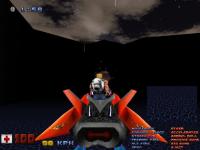
disabling Polymer worked out so far, thanks a lot! But is it correct that Duke's looking out on top of the Skycar? Attached you find a screenshot of how it looks for me ...
#675 Posted 01 April 2010 - 05:51 AM
Spiker, on Apr 1 2010, 10:06 AM, said:
Really? Ouch ...
... jepp got to admit that this screenshot was made using godmode 'caus I just wanted to skip ahead to the scenerie which gives me the Skycar to try out Gambini's/ Plagman's hint
This post has been edited by DerKs: 01 April 2010 - 05:53 AM
#676 Posted 05 April 2010 - 11:25 AM
Duke Plus 2.09 Released
* various bug fixes and tweaks Not many changes this time, just some minor bug fixes and tweaks. I can't say what they are, because I haven't been keeping track. But bug fixes are always a good thing. I never got around to writing an official post about version 2.08, but it was the same sort of update.
#677 Posted 09 April 2010 - 07:35 PM
and i duno but i feel like the blood on walls and floors usta look more realistic but now the wall one looks like the original again and the floor one just seems kinda grainy. i think the one you once used was from sd duke? it felt alot mroe gory
#678 Posted 16 April 2010 - 01:11 PM
#679 Posted 16 April 2010 - 02:07 PM
SalaciusCrumb, on Apr 16 2010, 02:11 PM, said:
You can make him start in a crashing skycar, guided by locators. I haven't coded a way to make him start in a controllable skycar though.
Here are the instructions from the manual:
Quote
Attached is a map that demonstrates the effect.
Attached File(s)
-
xmas2k1.zip (98.9K)
Number of downloads: 529

Help
Duke4.net
DNF #1
Duke 3D #1