Duke4.net Forums: EDuke32 2.0 and Polymer! - Duke4.net Forums

Jump to content

  • 213 Pages +
  • « First
  • 17
  • 18
  • 19
  • 20
  • 21
  • Last »
  • You cannot start a new topic
  • You cannot reply to this topic

EDuke32 2.0 and Polymer!  "talk about the wonders of EDuke32 and the new renderer"

User is offline   Mia Max 

#530

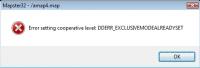
I get a crash when running mapster32 in fullscreen modus too.
It happens when I switch from 3D to 2D modus.

Attached thumbnail(s)

  • Attached Image: error.jpg

Attached File(s)


0

User is offline   WedgeBob 

#531

Okay, n/m, I just renamed C:\DUKE3D C:\DUKE3DHRP, then just placed in a C:\DUKE3D folder with just the normal EDuke32, and just ran Mapster in windowed mode, and no more crash. I suppose I'll do things that way for now, and maybe just use the HRP to finish up my maps by retexturing, that may work now.
0

User is offline   Micky C 

  • Honored Donor

#532

I happened to come across a build of eduke32 with polymer. Now that I already have it, I don't suppose anyone will give me the polymer hrp?
0

User is offline   Jimmy 

  • Outta jail, back in rehab

#533

View PostMicky C, on Jun 21 2009, 04:36 AM, said:

I don't suppose anyone will give me the polymer hrp?

There is no "Polymer HRP", just use the HRP.
0

User is offline   Plagman 

  • Former VP of Media Operations

#534

There is a Polymer HRP. You need to check it out using a SVN client from this address: http://svn.eduke32.com/polymer_hrp/
I also zipped a package from a few weeks ago that you can get there: http://plagman.net/polymer_hrp.zip. Note that you can't just use it as a loadable resource in EDuke32, you'll have to unzip it.
0

User is offline   Jimmy 

  • Outta jail, back in rehab

#535

D'oh. I thought they were going to wait until Polymer was released to start work on it? That's what I read last over at 3DR.
0

User is offline   zchri9 

  • Honored Donor

#536

View PostPlagman, on Jun 21 2009, 09:54 AM, said:

There is a Polymer HRP. You need to check it out using a SVN client from this address: http://svn.eduke32.com/polymer_hrp/
I also zipped a package from a few weeks ago that you can get there: http://plagman.net/polymer_hrp.zip. Note that you can't just use it as a loadable resource in EDuke32, you'll have to unzip it.


Im checking out that dictionary right now using TortoiseSVN.
I have a old build of EDuke32 with polymer (from april or may) where can I get a newer SVN build?
0

User is offline   supergoofy 

#537

go to: http://forums.duke4....p?showtopic=980

you will find info on how to download and compile the source
0

User is offline   Helixhorned 

  • EDuke32 Developer

#538

Hi,
the polymer HRP looks nice so far, but I think 2 things are wrong:
- the water texture's parallax map, which should be more flat IMO (parallaxbias 0.0 parallaxscale 0.16 looks good for me), and
- tile #718's parallax map, which looks completely weird for me.. I've made a very simple one with horizontal lines that are blurred (here is the alpha channel). I use "parallaxbias 0.0 parallaxscale 0.01" there.

If those that are in svn right now look right for you, I'll post a pic of what I mean...
0

User is offline   Stabs 

#539

hey guys ;) thanks for posting that video and thanks for polymer, totally kickass

i was just trying out room over room stuff then & WOW! thats more amazing than the lighting for me.

i made the standard room over room and window on second floor and it had its little visual spaz in mapster
but then took it into game with polymer, and it was gone OMG ;)

now i thought the lighting was great but THIS changes everything

room over room support like this in build?
did you sell your soul to the devil?
0

User is offline   Piano Man 

#540

View PostDanM, on Jun 22 2009, 04:50 PM, said:

hey guys ;) thanks for posting that video and thanks for polymer, totally kickass

i was just trying out room over room stuff then & WOW! thats more amazing than the lighting for me.

i made the standard room over room and window on second floor and it had its little visual spaz in mapster
but then took it into game with polymer, and it was gone OMG ;)

now i thought the lighting was great but THIS changes everything


WHY MUST YOU TAUNT US LIKE THIS.... I SO WANT THIS... SCREW IF IT HAS BUGS... I AT LEAST WANT TO TRY IT OUT....
0

User is offline   zchri9 

  • Honored Donor

#541

View PostPiano Man, on Jun 22 2009, 02:23 AM, said:

WHY MUST YOU TAUNT US LIKE THIS.... I SO WANT THIS... SCREW IF IT HAS BUGS... I AT LEAST WANT TO TRY IT OUT....

I think they should be making SVN's of it public by now.
0

User is offline   Stabs 

#542

i wouldnt say its ready just yet

still needs flashing / pulsating light SE's,
some objects still are not dynamic lights
spotlight can do funny things to lighting in other rooms, even if they are not set to shine that far
gun in hud dosnt reflect the lighting around you
some sprites cast shadows that they shouldnt

point lights are good, you can use alot of them without to much of a performance hit but the way lighting hits things can look a bit odd sometimes, sometimes if they have adjacent sectors the lighting will be really dark in one and light in the other, you have to move em / split sectors to make it display right sometimes

and all round genral optimisation, i may be able to run it ok but i have a quad, so the man with a single core isnt going to be having the time of his life with this just yet (or ever) depending how well it gets tweaked up,

i dont think its a good idea to dump this thing out there with crysis-like requirements for a community that enjoys a 13 year old game, and have the devs annoyed with hundreads of emails starting with "this runs like shit etc etc"
0

User is offline   quakis 

#543

Exactly how close can Polymer look like the 8bit Classic mode, without any use of the lighting system? I only ask because it seems to look like Polymer is the only way to use good ROR.

This post has been edited by quakis: 22 June 2009 - 03:58 AM

0

User is offline   Stabs 

#544

the lights are only there if you put them there (asides from dynamic lights from gun flashes and fire), you could still make maps as you do and use good ROR, probably only playable in 32-bit mode only though

iam guessing in the more final version you'll have the option of disabling spotlights and dynamic lights from fires and such.
0

User is offline   XenoMatriX 

#545

View PostDanM, on Jun 22 2009, 09:50 AM, said:

room over room support like this in build?
did you sell your soul to the devil?


Dude, build has had room over room support since back in the day. The original levels make use of this feature.

This post has been edited by XenoMatriX: 22 June 2009 - 07:15 AM

0

User is offline   Master Fibbles 

  • I have the power!

#546

No, the Duke3D BUILD did not have RoR but SoS. Shadow Warrior had real Room over Room.
0

User is offline   XenoMatriX 

#547

View PostMr.Flibble, on Jun 22 2009, 04:26 PM, said:

No, the Duke3D BUILD did not have RoR but SoS. Shadow Warrior had real Room over Room.


I thought this is what he meant, my bad. so how does ror work? is it similar to sos?
0

User is offline   Master Fibbles 

  • I have the power!

#548

Room over Room is what Shadow Warrior used for translucent water and such. Sector over Sector is when you layer sectors but you can't see the sectors from each other.
0

User is offline   Jimmy 

  • Outta jail, back in rehab

#549

Shadow Warrior didn't have "real" RoR, it was faked, using what is called a stacked mirrors trick.
0

#550

I found a bug or is it a feature with eduke32 and polymer that can possibly prevent music packs from loading. Please go here to see more:

http://forums.duke4....?showtopic=1118

I hope this helps (if it wasn't known before) with the eventual release.
0

User is offline   The Commander 

  • I used to be a Brown Fuzzy Fruit, but I've changed bro...

#551

View PostMr_Blastman, on Jun 23 2009, 05:45 AM, said:

I found a bug or is it a feature with eduke32 and polymer that can possibly prevent music packs from loading. Please go here to see more:

http://forums.duke4....?showtopic=1118

I hope this helps (if it wasn't known before) with the eventual release.


This is not a bug, this is what it is meant to do. Generally the people that have the Polymer build would know this.
0

#552

View PostMr_Blastman, on Jun 22 2009, 01:45 PM, said:

I found a bug or is it a feature with eduke32 and polymer that can possibly prevent music packs from loading. Please go here to see more:

http://forums.duke4....?showtopic=1118

I hope this helps (if it wasn't known before) with the eventual release.


Ah okay. I figured it could be a feature - but could never find any documentation of it on the wiki relating to music. I have added an entry to the installation page which will let others know how to solve this as well.
0

User is offline   supergoofy 

#553

Bug report:

r1438 compiled ok. no errors or warnings.

but r1438 compiled exe is broken. it doesn't even show the startup window.

This post has been edited by supergoofy: 22 June 2009 - 12:02 PM

0

User is offline   Stabs 

#554

View PostXenoMatriX, on Jun 22 2009, 08:14 AM, said:

Dude, build has had room over room support since back in the day. The original levels make use of this feature.


oh its way more than the standard room over room, you can get two floors to see each other without graphics glitching

+1 1438 wont work

This post has been edited by DanM: 22 June 2009 - 12:47 PM

0

User is offline   AdrianG 

#555

Polymer isn't working for me...just looks like polymost but with brightness/gamma incredibly high in some areas. I'll probably be flamed for the chipset i'm trying to run this with (and probably rightfully so, as it is pretty ridiculous), but hey, it supports SM3.0 and the OpenGL extensions Plagman said were used. I'm not expecting more than a fraction of 1 FPS here but I was at least expecting it to render properly when it finally got around to writing a frame to the display buffer.

It looks like my "card" doesn't support the exact version of an OpenGL extension that is being used. Am I just SOL here? I'm pretty sure my drivers are the latest version, but is this even something that a display driver could update? Thanks in advance.

eduke32.log (stuff that looked important in bold):

Quote

EDuke32 2.0.0unstable 20090616
addsearchpath(): Added C:/EDUKE32PLYMER/
OS: Windows XP (5.1.2600) Service Pack 2
Loading opengl32.dll
Loading glu32.dll
Initializing DirectDraw...

...


Warning: Failed including highres/projections.def on line duke3d_hrp.def:7

...

Setting video mode 1024x768 (32-bit fullscreen)
OpenGL Information:
Version: 2.0.1
Vendor: NVIDIA Corporation
Renderer: GeForce Go 6150/PCI/SSE2/3DNOW! (Yeah...I know, I know...)
Cache contains 0 bytes of garbage data
Initializing Polymer subsystem...
PR : Board loaded.

PR : FBO #1 initialization failed.
PR : FBO #2 initialization failed.
PR : FBO #3 initialization failed.
PR : FBO #4 initialization failed.
PR : FBO #5 initialization failed.

PR : Initialization complete.

...


[no OpenAL]

...


Loaded map hack file '/E1L1.mhk'
Cache time: 10650ms
PR : Compiling GPU program with bits 99441...
PR : Failed to compile GPU program with bits 99441!
PR : Compilation log:
Vertex info
-----------
(1) : error C0201: unsupported version 120
(3) : warning C7508: extension GL_ARB_texture_rectangle not supported


Fragment info
-------------
(1) : error C0201: unsupported version 120
(3) : warning C7508: extension GL_ARB_texture_rectangle not supported


OpenGL Information:
 Version:  2.0.1
 Vendor:   NVIDIA Corporation
 Renderer: GeForce Go 6150/PCI/SSE2/3DNOW!
 Maximum anisotropy:	  16.0
 BGRA textures:		   supported
 Non-x textures:		supported
 Texure compression:	  supported
 Clamp-to-edge:		   supported
 Multisampling:		   not supported
 Nvidia multisample hint: not supported
 ARBfp fragment programs: supported
 Depth textures:		  supported
 Shadow textures:		 supported
 Frame Buffer Objects:	supported
 Rectangle textures:	  supported
 Multitexturing:		  supported
 env_combine:			 supported
 Vertex Buffer Objects:   supported
 Shader Model 4:		  not supported
 Extensions:
   GL_ARB_color_buffer_float GL_ARB_depth_texture
   GL_ARB_draw_buffers GL_ARB_fragment_program
   GL_ARB_fragment_program_shadow GL_ARB_fragment_shader
   GL_ARB_half_float_pixel GL_ARB_imaging
   GL_ARB_multisample GL_ARB_multitexture
   GL_ARB_occlusion_query GL_ARB_pixel_buffer_object
   GL_ARB_point_parameters GL_ARB_point_sprite
   GL_ARB_shadow GL_ARB_shader_objects
   GL_ARB_shading_language_100 GL_ARB_texture_border_clamp
   GL_ARB_texture_compression GL_ARB_texture_cube_map
   GL_ARB_texture_env_add GL_ARB_texture_env_combine
   GL_ARB_texture_env_dot3 GL_ARB_texture_float
   GL_ARB_texture_mirrored_repeat GL_ARB_texture_non_power_of_two
   GL_ARB_texture_rectangle GL_ARB_transpose_matrix
   GL_ARB_vertex_buffer_object GL_ARB_vertex_program
   GL_ARB_vertex_shader GL_ARB_window_pos
   GL_ATI_draw_buffers GL_ATI_texture_float
   GL_ATI_texture_mirror_once GL_S3_s3tc
   GL_EXT_texture_env_add GL_EXT_abgr
   GL_EXT_bgra GL_EXT_blend_color
   GL_EXT_blend_equation_separate GL_EXT_blend_func_separate
   GL_EXT_blend_minmax GL_EXT_blend_subtract
   GL_EXT_compiled_vertex_array GL_EXT_Cg_shader
   GL_EXT_depth_bounds_test GL_EXT_draw_range_elements
   GL_EXT_fog_coord GL_EXT_framebuffer_object
   GL_EXT_multi_draw_arrays GL_EXT_packed_depth_stencil
   GL_EXT_packed_pixels GL_EXT_pixel_buffer_object
   GL_EXT_point_parameters GL_EXT_rescale_normal
   GL_EXT_secondary_color GL_EXT_separate_specular_color
   GL_EXT_shadow_funcs GL_EXT_stencil_clear_tag
   GL_EXT_stencil_two_side GL_EXT_stencil_wrap
   GL_EXT_texture3D GL_EXT_texture_compression_s3tc
   GL_EXT_texture_cube_map GL_EXT_texture_edge_clamp
   GL_EXT_texture_env_combine GL_EXT_texture_env_dot3
   GL_EXT_texture_filter_anisotropic GL_EXT_texture_lod
   GL_EXT_texture_lod_bias GL_EXT_texture_mirror_clamp
   GL_EXT_texture_object GL_EXT_texture_sRGB
   GL_EXT_timer_query GL_EXT_vertex_array
   GL_HP_occlusion_test GL_IBM_rasterpos_clip
   GL_IBM_texture_mirrored_repeat GL_KTX_buffer_region
   GL_NV_blend_square GL_NV_copy_depth_to_color
   GL_NV_depth_clamp GL_NV_fence
   GL_NV_float_buffer GL_NV_fog_distance
   GL_NV_fragment_program GL_NV_fragment_program_option
   GL_NV_fragment_program2 GL_NV_half_float
   GL_NV_light_max_exponent GL_NV_multisample_filter_hint
   GL_NV_occlusion_query GL_NV_packed_depth_stencil
   GL_NV_pixel_data_range GL_NV_point_sprite
   GL_NV_primitive_restart GL_NV_register_combiners
   GL_NV_register_combiners2 GL_NV_texgen_reflection
   GL_NV_texture_compression_vtc GL_NV_texture_env_combine4
   GL_NV_texture_expand_normal GL_NV_texture_rectangle
   GL_NV_texture_shader GL_NV_texture_shader2
   GL_NV_texture_shader3 GL_NV_vertex_array_range
   GL_NV_vertex_array_range2 GL_NV_vertex_program
   GL_NV_vertex_program1_1 GL_NV_vertex_program2
   GL_NV_vertex_program2_option GL_NV_vertex_program3
   GL_NVX_conditional_render GL_SGIS_generate_mipmap
   GL_SGIS_texture_lod GL_SGIX_depth_texture
   GL_SGIX_shadow GL_SUN_slice_accum
   GL_WIN_swap_hint WGL_EXT_swap_control


GPU has 512 MB of shared RAM allocated, though I doubt that matters at all as far as my roadblock.

This post has been edited by AdrianG: 22 June 2009 - 10:27 PM

0

User is offline   Plagman 

  • Former VP of Media Operations

#556

View PostAdrianG, on Jun 23 2009, 08:26 AM, said:

It looks like my "card" doesn't support the exact version of an OpenGL extension that is being used. Am I just SOL here? I'm pretty sure my drivers are the latest version, but is this even something that a display driver could update? Thanks in advance.


The graphics driver has total control over which OpenGL extensions are exposed and what version they "report", yeah. What you're experiencing is interesting; do you know exactly which driver version you have installed? The NVIDIA control panel might help you with that. It really ought to work properly on your card.
0

User is offline   Stabs 

#557

http://www.softpedia.com/get/System/OS-Enh...ributable.shtml

thats the latest dx redistributable, might help you out AdrianG
0

User is offline   AdrianG 

#558

View PostPlagman, on Jun 23 2009, 02:12 AM, said:

The graphics driver has total control over which OpenGL extensions are exposed and what version they "report", yeah. What you're experiencing is interesting; do you know exactly which driver version you have installed? The NVIDIA control panel might help you with that. It really ought to work properly on your card.


My current ForceWare version is 86.02. ;) Nvidia doesn't even provide display drivers for the 6xxx Go series (wtf?) which is why I thought I was current, but I'm looking at third party drivers now to see if I can find something more recent. Thanks DanM, but I'm already running DX9.0c.
0

User is offline   Plagman 

  • Former VP of Media Operations

#559

Yeah, a ridiculously old driver would cause the problems you're seeing.
Try installing this: http://www.nvidia.co...86.18_whql.html
The installer might or might not let you install it, though. Let me know how it goes.
0

Share this topic:


  • 213 Pages +
  • « First
  • 17
  • 18
  • 19
  • 20
  • 21
  • Last »
  • You cannot start a new topic
  • You cannot reply to this topic


All copyrights and trademarks not owned by Voidpoint, LLC are the sole property of their respective owners. Play Ion Fury! ;) © Voidpoint, LLC

Enter your sign in name and password


Sign in options