Duke4.net Forums: EDuke32 2.0 and Polymer! - Duke4.net Forums

Jump to content

  • 213 Pages +
  • « First
  • 106
  • 107
  • 108
  • 109
  • 110
  • Last »
  • You cannot start a new topic
  • You cannot reply to this topic

EDuke32 2.0 and Polymer!  "talk about the wonders of EDuke32 and the new renderer"

User is offline   Fox 

  • Fraka kaka kaka kaka-kow!

#3200

Phew, I got a problem when using a custom palette with Eduke32.

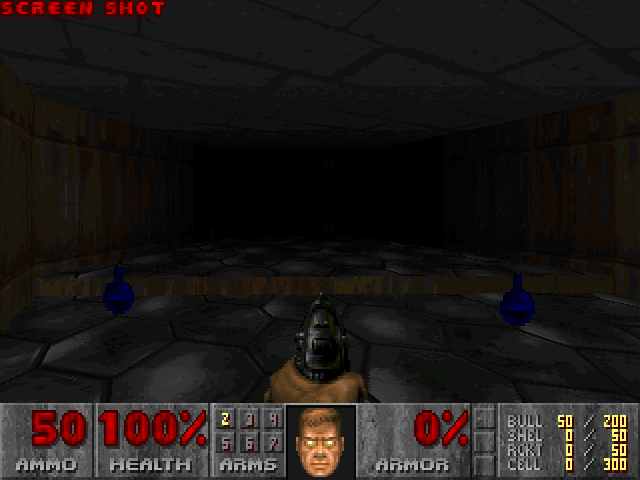
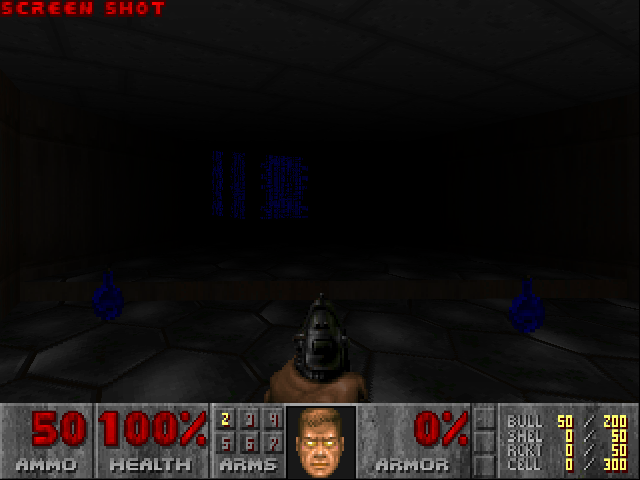
Comparison beetween 8-bit and OpenGL modes:
Posted Image Posted Image

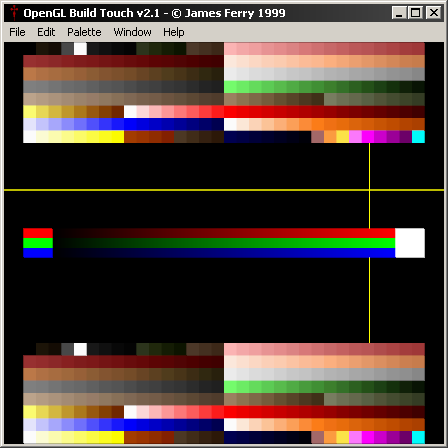
Basically the last 15 colors are hard-coded to glow in the dark, and there is nothing I can do about it.

Posted Image

I don't really get why this is hard-coded, since it would make a lot more sense to have a standard .def file in Eduke32 for this sort of thing.

This post has been edited by Fox: 24 November 2012 - 02:39 PM

0

User is offline   Plagman 

  • Former VP of Media Operations

#3201

Try r_fullbright 0?
1

User is offline   Fox 

  • Fraka kaka kaka kaka-kow!

#3202

Thanks, that solved the problem.

But I don't think that it should be only in the cfg file settings, since they are supposed to be superfluous.
0

User is offline   Plagman 

  • Former VP of Media Operations

#3203

Yeah, it should probably be a knob.
0

User is offline   Mark 

#3204

 Diaz, on 24 November 2012 - 02:29 PM, said:

It all depends. Normal and specular maps affect fillrate, so if you have a crappy videocard, disabling them improves performance if you're being limited by fillrate. If you have a lot of Polymer lights in an area with many normal maps, those apparently will have to be re-drawn many times so performance will drastically decrease. My 8800GT ran some areas at like 20FPS with normal maps enabled and disabling them would make the same area run at 60FPS, until some other bottleneck is hit.

Then I guess for now my Nvidia 9800 GTX card is still chugging away decently. By the way, my comparison was with that FPS sucking, shadow casting flashlight mod running and 22 point lights in the visible above ground areas. A lot more underground but they are isolated from the above ground areas by ceiling doors so I'm not counting them.
0

User is offline   Helixhorned 

  • EDuke32 Developer

#3205

 Fox, on 24 November 2012 - 02:35 PM, said:

Basically the last 15 colors are hard-coded to glow in the dark, and there is nothing I can do about it.

There is now.

r3230 said:

Expose per-tile nofullbright bit (GL modes only) to DEF.

The attribute is set per tile from DEF: either
nofullbrightrange <begintile> <endtile>
or
tilefromtexture <tile> { ... nofullbright ... }
As a special case, the list may only contain "nofullbright", in which case the
texture is not changed. (This is analogous to "texhitscan".)

Example:
// make piggy's eyes fullbright red only when it fires the shotgun
nofullbrightrange 2000 2034
nofullbrightrange 2040 2049
nofullbrightrange 2055 2061


Quote

I don't really get why this is hard-coded, since it would make a lot more sense to have a standard .def file in Eduke32 for this sort of thing.

It's hardcoded because these colors are fullbright in the default classic shade table.
1

User is offline   Mark 

#3206

Sorry for not going to my original thread for this, but I couldn't find it after a few minutes of searching. This is about problems with the normal maps in some of the HRP textures under Polymer lighting. My original post showed a pic of an SE49 point light not casting an even shadow on floor, wall and ceiling. It turned out to actually be a problem with the texture's normal map. I re-made the normal map it and the problem went away. I found some more while mapping today. So far tiles 349 -- 742 -- 757 -- 1189 seem to be affected. There may be more but I haven't run across them yet. Its an odd thing. If a wall with one of these textures is lit up, approching it from one side it is lit up properly. Approach it from the other side and it is not. A one-way normal map.
0

User is offline   supergoofy 

#3207

Something that came to my attention:

http://code.google.com/p/qeffects-gl/

I don't know if it will work with EDuke32, I haven't tested it yet.
0

User is offline   Diaz 

#3208

^ It doesn't for me. Eduke32.exe won't even launch with that dll.
0

User is offline   Jblade 

#3209

I remember there was a OpenGl dll that did work a long time ago, although it had to be manually activated. This was long before the days of Polymer though. It was ok, but just slapping Bloom over the screen looks terrible, it's only really effective when you have control over it.
0

User is offline   MusicallyInspired 

  • The Sarien Encounter

#3210

I remember trying that out ages ago. I used it with HL1 too. But for EDuke32 it would bloom the screen, but there would also be a smaller version of the screen in the bottom right corner taking up about a quarter of the screen and it was un-bloomified. Something like that. Results were terrible.
0

User is offline   Micky C 

  • Honored Donor

#3211

This post is mostly directed towards Plagman I guess.

So I've got a map with almost 900 SE polymer lights, and over 100 con spawned lights in this map I'm currently working on. However I fire it up in-game and the vast majority of lights in the first section of the map simply aren't there. They're clearly there and working fine in mapster, but not in-game. Is there a maximum number of lights you can have in a map that would cause this?

I'm willing to send the map in a PM if there's no clear solution for this. I have no idea what's wrong and it's probably only 2 weeks from release so things are tense.

This post has been edited by Micky C: 27 November 2012 - 03:18 PM

0

User is offline   Diaz 

#3212

What's your r_pr_maxlightpasses value? You could try increasing it... sometimes it looks like Mapster draws more lights than the value reflects, but not the game.
0

User is offline   Micky C 

  • Honored Donor

#3213

There are entire areas where the lights aren't working, and the lights I was adding to it when I noticed they stopped working are so remote it wouldn't make the slightest difference.

I'll try it when I get home anyway.
Edit: Yeah changing it does nothing. Highest I tried was 9. But that makes no difference when there are 0 to start off with Posted Image

This post has been edited by Micky C: 28 November 2012 - 02:05 AM

0

User is offline   Micky C 

  • Honored Donor

#3214

Ok thanks for the lack of response with this significant problem everyone Posted ImagePosted Image

I was reluctant to break the map up into smaller maps (who doesn't like a mega polymer map?), but I did a few tests and the frame rate is actually noticeably better (sometimes double!) when most of the map is cut away even though the chunk that's missing shouldn't be rendered. It's weird, but it's reason enough to break it up, and that ought to solve the problem with the missing lights. Killing 2 birds with 1 stone Posted Image

This post has been edited by Micky C: 29 November 2012 - 12:33 AM

0

User is offline   Jblade 

#3215

The latest snapshot refuses to load for me - it doesn't give me a log or anything, I click to start the exe and even the little startup window doesn't work. I also noticed the zip file only has the Exes and nothing else that's normally in there, is this intentional?

EDIT: Ok nevermind, I take it we don't need the DLLs anymore then? I deleted them and it loaded up fine.

This post has been edited by James: 29 November 2012 - 01:32 AM

0

User is offline   Mark 

#3216

I had the same problem. Thanks for the solution.
0

User is offline   Helixhorned 

  • EDuke32 Developer

#3217

r2341 and below will crash if the URL against which the EDuke32 version is checked (http://eduke32.sourceforge.net/VERSION) is unavailable, like earlier today. I fixed this in r2344, but there's no synthesis build yet. I don't think it's my fault though... r2341 only has exe's in it, and that's wrong :P.

Btw, I'm in favor of removing that check entirely. It serves no purpose now that we (kinda) recommend everyone to download synthesis builds, and I strongly prefer my programs not to access the network unless I tell them to do so. This also might be the cause of some (false positive) heuristic virus checker alerts.

edit:

r2345 said:

Fix build. It was my fault after all since I forgot common.h in r3243.

0

User is offline   Fox 

  • Fraka kaka kaka kaka-kow!

#3218

View PostPlagman, on 21 November 2012 - 10:35 AM, said:

View PostTrooper Dan, on 21 November 2012 - 10:18 AM, said:

Here is a formula that does it properly, which can be implemented in CON

http://www.mathopenr...olygonarea.html

Now, you'd also need to calculate the area of any islands inside the sector and substract it from the area of the outer edge.

How exactly I do that? I have been thinking, I can't figure out the way to diff beetween the sector walls and "island" walls.
0

User is offline   Plagman 

  • Former VP of Media Operations

#3219

Well, when you finish a loop and there are still walls remaining in the sector, you know you're done with the outer loop, don't you?
0

User is offline   Fox 

  • Fraka kaka kaka kaka-kow!

#3220

View PostPlagman, on 29 November 2012 - 10:33 AM, said:

Well, when you finish a loop and there are still walls remaining in the sector, you know you're done with the outer loop, don't you?

But how do I know what is the "outer loop", since the firstwall can be in a island? Or it has something to do with the defined order of wall IDs?
0

User is offline   Plagman 

  • Former VP of Media Operations

#3221

Good point; islands have reverse winding order compared to the outer loop, so checking the angle between all the walls for each loop would tell you.
0

User is offline   Helixhorned 

  • EDuke32 Developer

#3222

The engineeditor has a function named "clockdir" (src/build.c, line 8318 in r3245) that calculates the winding orientation of a loop, given its first wall-point. So if you absolutely need to, you could port it to CON. But, out of curiosity, what do you need the sector area for? Is there no approximation that would suffice?
0

User is offline   Fox 

  • Fraka kaka kaka kaka-kow!

#3223

I just wanted to use the "right" code to calculate the area, but there are other means for what I want to achieve. Since I just want to calculate the area of an sector made of blocks, there are workarounds.

View PostPlagman, on 29 November 2012 - 10:42 AM, said:

Good point; islands have reverse winding order compared to the outer loop, so checking the angle between all the walls for each loop would tell you.

0

User is offline   Hendricks266 

  • Weaponized Autism

  #3224

View PostJames, on 29 November 2012 - 01:29 AM, said:

EDIT: Ok nevermind, I take it we don't need the DLLs anymore then? I deleted them and it loaded up fine.

No, they were omitted (along with all of samples) because when bash scripts execute, changes made to them during their execution do not affect them for that run, so when synthesis.sh svn updated, the new instructions I sent it would not have taken effect until the next run. I asked TerminX to fix it by setting the cronjob to svn update synthesis.sh before it runs and he did.
0

User is offline   Danukem 

  • Duke Plus Developer

#3225

I have used the following method for calculating a rough estimate of sector area: loop through all the wall points of the sector, and save the smallest x coordinate, the largest x coordinate, the smallest y coordinate, and the largest y coordinate in vars. Then use those values to calculate the area of the rectangle formed by the corresponding points. Depending on the shape of the sector and whether it has islands, this method can overestimate the area by a lot, but it's close enough for my purposes for typical sectors.
0

#3226

Why are we discussing about con features here ?

Anyway, i found (not tested, not used) a method for calculating area of any sector with a good approximation, it works by "counting square elements" in the sector : save maximum and minimum x and y as you mentioned, then start two loops (one inside the other) to scan if the point "x,y" is in the sector, spacing x and y with a constant step between sector extension; when the point is in the sector (updatesector) , the "area" var is increased and you'll get the total area at the end of the process after a proper conversion factor.
The same method could be used to calculate a volume just adding the z scaled by 8 ; It's also possible to choose the dimension of the step, or to get it by sector extension, for optimizing the process and choose between speed or accuracy of the method.

Damn, this "mesh" approach remind me computational fluid dynamic lessons...

This post has been edited by RichardStorm: 01 December 2012 - 01:29 AM

0

User is offline   Danukem 

  • Duke Plus Developer

#3227

View PostRichardStorm, on 01 December 2012 - 01:28 AM, said:

Anyway, i found (not tested, not used) a method for calculating area of any sector with a good approximation, it works by "counting square elements" in the sector : save maximum and minimum x and y as you mentioned, then start two loops (one inside the other) to scan if the point "x,y" is in the sector, spacing x and y with a constant step between sector extension; when the point is in the sector (updatesector) , the "area" var is increased and you'll get the total area at the end of the process after a proper conversion factor.


thanks, that sounds like it would be a nice improvement!
0

User is offline   Fox 

  • Fraka kaka kaka kaka-kow!

#3228

That's the plan I already had in mind.
0

User is offline   Plagman 

  • Former VP of Media Operations

#3229

It'd be slow as hell with smaller steps, though. You'd probably only want to be doing at map load, and you're out of luck if sectors change shape after that.
0

Share this topic:


  • 213 Pages +
  • « First
  • 106
  • 107
  • 108
  • 109
  • 110
  • Last »
  • You cannot start a new topic
  • You cannot reply to this topic


All copyrights and trademarks not owned by Voidpoint, LLC are the sole property of their respective owners. Play Ion Fury! ;) © Voidpoint, LLC

Enter your sign in name and password


Sign in options