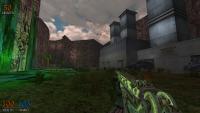
EDuke32 2.0 and Polymer! "talk about the wonders of EDuke32 and the new renderer"
#3140 Posted 26 October 2012 - 08:56 AM
#3141 Posted 26 October 2012 - 01:26 PM
#3142 Posted 26 October 2012 - 03:00 PM
#3143 Posted 26 October 2012 - 03:06 PM
#3144 Posted 26 October 2012 - 03:47 PM
http://sourceforge.n...duke32/bugs/26/
It was just a quick and dirty way of getting it up and running, but it needs to adjust dynamically depending on the scene contents and above a threshold, toggle into a slightly more expensive mode where you get increased depth precision. I'm unsure what you can do before that work is done, though; if I just naively bump the far clip plane distance you'll start to get more depth aliasing elsewhere in the scene. Maybe add fog as a workaround until that's fixed? Sorry I don't have a better solution and for generally dropping the ball on Polymer work.
#3145 Posted 26 October 2012 - 04:26 PM
Plagman, on 26 October 2012 - 03:00 PM, said:
I could do that. But that would have side-effects, and more important I don't want to. The same way I could batch recolor images, but that doesn't means tints or palmaps are not necessary, right?
The problem here is that there are things you can't do depending on the technical scale (art file data) of the image.
#3146 Posted 26 October 2012 - 04:30 PM
Can you explain exactly what you're trying to do and what the side-effects you're trying to avoid are? Maybe another solution will start making more sense then.
#3147 Posted 26 October 2012 - 04:57 PM
I asked in the past if TX could add a cstat to bypass wall xrepeat, but his answer was that nobody is qualified enough to mess with Ken Silverman code (although I am starting to question to that).
#3148 Posted 26 October 2012 - 05:11 PM
Plagman, on 26 October 2012 - 03:47 PM, said:
http://sourceforge.n...duke32/bugs/26/
It was just a quick and dirty way of getting it up and running, but it needs to adjust dynamically depending on the scene contents and above a threshold, toggle into a slightly more expensive mode where you get increased depth precision. I'm unsure what you can do before that work is done, though; if I just naively bump the far clip plane distance you'll start to get more depth aliasing elsewhere in the scene. Maybe add fog as a workaround until that's fixed? Sorry I don't have a better solution and for generally dropping the ball on Polymer work.
Oh I get where your coming from now. The problem is it's impossible to mask or hide. The way it works now is that everything beyond a line perpendicular to the direction the player's facing at a certain distance just stops getting drawn, revealing the skybox. Fog, sectors, sprites all drop drawing so you get kind of a big hole of skybox in the map. I'll keep mapping and assume that it'll get fixed some point in the future I guess.
#3149 Posted 26 October 2012 - 06:30 PM
#3150 Posted 26 October 2012 - 06:31 PM
Fox, on 26 October 2012 - 04:57 PM, said:

I asked in the past if TX could add a cstat to bypass wall xrepeat, but his answer was that nobody is qualified enough to mess with Ken Silverman code (although I am starting to question to that).
So a resizing tilefromtexture wouldn't help at all then, you really do need some custom classic mode rendering code? If you're using one of the GL modes you can set the exact scale through DEF to make your wall fit perfectly.
#3151 Posted 26 October 2012 - 08:52 PM
I would prefer if it wasn't necessary to adjust the scale of the images, but unfortunately something superfluous as the size of a tile determines what you can or not do.
#3152 Posted 29 October 2012 - 04:05 PM
#3153 Posted 29 October 2012 - 04:15 PM
#3154 Posted 29 October 2012 - 07:32 PM
kind of like the re-modelling and such
#3155 Posted 29 October 2012 - 07:53 PM
#3156 Posted 30 October 2012 - 03:39 AM
This post has been edited by Marked: 30 October 2012 - 03:40 AM

#3157 Posted 30 October 2012 - 02:35 PM
EDIT: woah! Ok projectils are actually all kinds of screwed. Last revision I was using was 3095 and they were working fine - but in the latest one, things like rockets and grenades don't appear (but do explode) and even the default explosion doesn't appear. Just gonna test and see if normal unmodded Duke's fine.
EDIT2: Duke's normal projectiles work - I just checked WGR2 and some projectiles appeared and others didn't. From what I can, the projectiles ARE there but they're just completely invisible (and whatever it should spawn isn't visible too) There's no con code for either things I've tested in that would do that.
This post has been edited by James: 30 October 2012 - 03:10 PM
#3158 Posted 31 October 2012 - 01:57 AM
#3159 Posted 31 October 2012 - 12:19 PM
#3160 Posted 31 October 2012 - 03:11 PM
They don't seem to work (well, they don't work for HUD sprites and that seems to extend to models too), and it would be great if the sights in the weapon below could glow!
#3161 Posted 31 October 2012 - 03:22 PM
#3162 Posted 31 October 2012 - 03:35 PM
Hmmmm, nope. The .def part for the sights reads like this:
skin { pal 0 surface 2 file "models/weapons/brifle/ar_c.png" }
glow { pal 0 surface 2 file "models/weapons/brifle/ar_c.png" }
Yep, it's the same file, a semi-transparent .png that should work...
This post has been edited by Diaz: 31 October 2012 - 03:39 PM
#3163 Posted 31 October 2012 - 03:54 PM
#3164 Posted 31 October 2012 - 04:05 PM
It looks like the glow map itself is applied, it's just not fullbright... this is weird, maybe it's just that the .png is way too translucent.
EDIT: yeah, that was it. The .png is just way too translucent. :/
This post has been edited by Diaz: 31 October 2012 - 04:12 PM
#3165 Posted 04 November 2012 - 07:35 AM
http://cubeengine.co...&thread_id=2534
https://github.com/lsalzman/tesseract
I was wondering if, as it's open source, if we could get any hints and tips for optimising or improving Polymer?
A list of the new features:
deferred shading
HDR rendering with tonemapping and bloom
omnidirectional point-light shadowmaps
sunlight cascaded shadowmap
screen-space ambient occlusion
screen-space water reflections (no more reflection plane limits)
refractive alpha cubes
refractive glass material
This post has been edited by Tea Monster: 04 November 2012 - 07:36 AM
#3166 Posted 04 November 2012 - 08:42 PM
#3167 Posted 05 November 2012 - 04:48 AM
Trooper Dan, on 29 October 2012 - 04:05 PM, said:
Yes,
height = 4*tilesizy[sprite[i].picnum]*sprite[i].yrepeat,
but I think the tilesiz* arrays are still inaccessible from CON. In case you don't need to be it tile-generic, you could just substitute the known y size value, of course.
#3168 Posted 05 November 2012 - 07:40 AM
Helixhorned, on 05 November 2012 - 04:48 AM, said:
height = 4*tilesizy[sprite[i].picnum]*sprite[i].yrepeat,
but I think the tilesiz* arrays are still inaccessible from CON. In case you don't need to be it tile-generic, you could just substitute the known y size value, of course.
Right, I asked because there are effects that need to work for any tile in the game of any size. If it was just a few tiles I could do it manually.

Help
Duke4.net
DNF #1
Duke 3D #1