EDuke32 2.0 and Polymer! "talk about the wonders of EDuke32 and the new renderer"
#3170 Posted 06 November 2012 - 11:16 PM
I'm not talking about short-term, but maybe at some point in the future.
I think of it as a very powerful tool. In fact Doom 3 lights were almost exclusively point lights with texture projections, but they were cubic instead of spherical. They could make them project a sphere anyways...
#3173 Posted 07 November 2012 - 11:25 PM
#3174 Posted 10 November 2012 - 03:45 AM
This post has been edited by Diaz: 10 November 2012 - 03:47 AM
#3175 Posted 10 November 2012 - 08:22 PM

And frankly the screen resolution option is quite confusing now. You should be able to select the aspect ratio first with the options <8:5> <8:6> <16:9>, and select the resolution next.
This post has been edited by Fox: 11 November 2012 - 06:51 AM
#3176 Posted 11 November 2012 - 01:51 AM
#3177 Posted 11 November 2012 - 10:22 AM
Fox, on 10 November 2012 - 08:22 PM, said:

For stretching the background tile in the start menu, there's hud_bgstretch, which controls passing bit 1024 to the respective rotatesprite call. However it's unrelated to any aspect correction done when rendering a screne.
I disagree with your two suggestions: there's already precise aspect correction control using various cvars; you just have to know their names and meaning. More importantly, a mod should be resolution-agnostic and never have to assume a particular screen configuration at the user's end.
What is planned though is a finer control over CON's showview, also as far as aspect is concerned.
Quote
It was simply the easiest way of integrating that option into the existing menu system.
EDIT: A related question is, how necessary is correction for non-square pixels in our days? It's probably somewhat useful to people that need to run EDuke32 at lower, non-native resolutions for performance reasons, but OTOH it does make life more complicated. I've been considering of deprecating that functionality, but I'd like to have some input first. (Note: the classic way of determining aspect -- assuming a 8:5 resolution is displayed on a 4:3 screen -- isn't directly touched by that.)

#3178 Posted 11 November 2012 - 02:14 PM
Helixhorned, on 11 November 2012 - 10:22 AM, said:
Since this is still Duke 3D, there is no way around it. What is missing right now is a different vertical and horzintal zoom for rotatesprite.
Helixhorned, on 11 November 2012 - 10:22 AM, said:
My mods always are, but yet I had like to have use the 320 x 200 resolution.
#3179 Posted 16 November 2012 - 04:42 AM
If the sectnum where a sprite is placed is not directly visible, the sprite won't be drawn. This is good and helps performance, but sometimes I'm using big models that span across more than one sector; and if the sector where the "center" of the model (the sprite) is located is not visible, the model will disappear, even though the player is still looking at one of the sectors the model "occupies".
Would it be possible to add some sort of .def flag so models are always drawn? I guess we could turn them into actors and code them to change cstat to visible or invisible when the player is far enough or inside a certain sector where no parts of the model are visible, so performance is not hindered much.
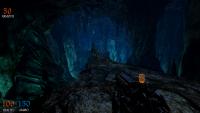
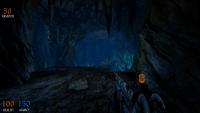
Below are a couple of pictures of what I try to achieve - some models disappear here when the player looks in certain directions, at certain places. It's not something terrible, but would look neater if it didn't happen!
This post has been edited by Diaz: 16 November 2012 - 04:51 AM
#3180 Posted 16 November 2012 - 04:59 AM
#3181 Posted 16 November 2012 - 05:20 AM
#3182 Posted 16 November 2012 - 05:25 AM
Diaz, on 16 November 2012 - 04:42 AM, said:
If the sectnum where a sprite is placed is not directly visible, the sprite won't be drawn. This is good and helps performance, but sometimes I'm using big models that span across more than one sector; and if the sector where the "center" of the model (the sprite) is located is not visible, the model will disappear, even though the player is still looking at one of the sectors the model "occupies".
Would it be possible to add some sort of .def flag so models are always drawn? I guess we could turn them into actors and code them to change cstat to visible or invisible when the player is far enough or inside a certain sector where no parts of the model are visible, so performance is not hindered much.
Below are a couple of pictures of what I try to achieve - some models disappear here when the player looks in certain directions, at certain places. It's not something terrible, but would look neater if it didn't happen!
First of all, these screens are very impressive. There is a quality standard, and everythings fits together, and on top of it the atmosphere.
About the sector problem, it doesn't relate much with performance as it does with how the structures are rendered. The game will first determine whenever the sector is visible or not to determine if it should draw the sprites.
But I agree that there should have a cstat so a model won't depend on the sector. However keep in mind that it won't work well with "false ROR", since two sectors would occupy the same space.
#3183 Posted 16 November 2012 - 07:28 AM
#3184 Posted 16 November 2012 - 07:47 AM
That and some per-poly collision (or simpler collision meshes, as most engines use) and we will have total artistic freedom.
#3185 Posted 16 November 2012 - 09:42 AM
Anyone noticed the same thing ?
/EDIT: This happens while running the vanilla duke without HRP, doesn't matter if with/without CON or DEF modifications.
This post has been edited by RichardStorm: 16 November 2012 - 09:58 AM
#3186 Posted 16 November 2012 - 11:15 AM
#3187 Posted 18 November 2012 - 08:07 AM
EDIT: Alright, it's fixed!
This post has been edited by Diaz: 18 November 2012 - 08:19 AM
#3188 Posted 21 November 2012 - 07:29 AM
#3189 Posted 21 November 2012 - 08:02 AM
#3190 Posted 21 November 2012 - 10:18 AM
Plagman, on 21 November 2012 - 08:02 AM, said:
I do have some code that sort of does that, but I don't recall ever posting it. Maybe it was Mblackwell?
EDIT: Here is a formula that does it properly, which can be implemented in CON
http://www.mathopenr...olygonarea.html
This post has been edited by Trooper Dan: 21 November 2012 - 10:32 AM
#3191 Posted 21 November 2012 - 10:35 AM
Now, you'd also need to calculate the area of any islands inside the sector and substract it from the area of the outer edge.
#3192 Posted 24 November 2012 - 04:02 AM
It seems areas that relied heavily on shadow are as slow on my new videocard as they were on the old one. Resolution, normal and parallax mapping performance have obviously improved, but not shadows...
#3193 Posted 24 November 2012 - 12:39 PM
#3194 Posted 24 November 2012 - 01:07 PM
#3195 Posted 24 November 2012 - 01:09 PM
This post has been edited by Mark.: 24 November 2012 - 01:11 PM
#3196 Posted 24 November 2012 - 01:45 PM
#3197 Posted 24 November 2012 - 02:27 PM
Diaz, on 24 November 2012 - 01:07 PM, said:
Lights need to redraw stuff that's already known to need to be rendered. Shadows need a full new scene from another point of view, so you have to figure out what to render all over again; that's why it's so painful. Right now all planes on the map are in disjoint buffers so each rendered wall is a different draw call, which is pretty heavyweight on the CPU. I have a local tree where the whole map lives in the same buffer, so you can render several planes in a single draw call by constructing the right index buffer, assuming they share the same material. That means for regular map rendering it'll do all the walking without drawing anything at first, then sort planes by material used and render them as batched, which should be a lot better. For shadows you don't need materials at all (unless you want "cardboard cutout" shadows for sprites, so these will have to have a special flag and be rendered in their own call, still), so we'll be able to do shadows in a single draw call, which should help tremendously.
#3198 Posted 24 November 2012 - 02:29 PM
Mark., on 24 November 2012 - 01:09 PM, said:
It all depends. Normal and specular maps affect fillrate, so if you have a crappy videocard, disabling them improves performance if you're being limited by fillrate. If you have a lot of Polymer lights in an area with many normal maps, those apparently will have to be re-drawn many times so performance will drastically decrease. My 8800GT ran some areas at like 20FPS with normal maps enabled and disabling them would make the same area run at 60FPS, until some other bottleneck is hit.
This post has been edited by Diaz: 24 November 2012 - 02:30 PM

Help
Duke4.net
DNF #1
Duke 3D #1