Duke4.net Forums: What are you working on for Duke right now? - Duke4.net Forums

Jump to content

  • 365 Pages +
  • « First
  • 277
  • 278
  • 279
  • 280
  • 281
  • Last »
  • You cannot start a new topic
  • You cannot reply to this topic

What are you working on for Duke right now?  "Post about whatever Duke related stuff you're doing"

User is offline   Ninety-Six 

#8320

Useful for a cutscene maybe?
0

User is offline   Danukem 

  • Duke Plus Developer

#8321

This conversation reminds me of the sector-based dynamic lighting that I experimented with in 2008. We actually had it running in WGmod, the unreleased predecessor to what become WGR2. Here you can see it in action (once I reach a light source):


All the shading is done by the light scripting. As you can see, it worked pretty well, with a few limitations. The biggest limitation is that for it to look good, sectors all had to be small and of similar shape and size. Even then, you get very blocky lighting -- charming, though. My code was not great at determining line of sight to the light source; if the "center" of the sector could not see the light, the whole sector would stay completely unlit. Also, my code completely ignored floor/ceiling distance and only looked at xy distance. I would have developed it further, but soon after this Polymer became available and we all assumed that it would be pointless to keep using a sector based system. I also had this code in DukePlus for a while, and to be honest I don't remember the exact timeline of when it finally got removed, but it was definitely because of Polymer.

EDIT: William Gee made the map in the video, and Hellbound made the player model and the torch sprites.

This post has been edited by Trooper Dan: 17 April 2018 - 08:25 PM

7

User is offline   Gambini 

#8322

Good times! I also used it in Blown Fuses (a map i built for Dukeplus) Although now i don´t remember if I deleted it for performance reasons. It´s ten years already of that :P
1

User is offline   Micky C 

  • Honored Donor

#8323

View PostNinety-Six, on 17 April 2018 - 05:30 PM, said:

Useful for a cutscene maybe?


I was inspired by this post: https://forums.duke4...post__p__298807

It can be used for the sort of lighting used in that image, although I'd add a few extra sectors to smooth it out so it's not so abrupt. Nowhere near as smooth as my example of course, but smoother than James'. Note he's probably going for classic level design where that kind of discrete shading is standard.

In terms of the visibility issue, the sectors can manually have their visibility increased to avoid the issue in-game.

Otherwise, a similar effect can be achieved with floor-aligned transparent sprites using additive blending, like in the AMC TC episode 2. It doesn't work when the floor is black like shown here, as there's nothing to add. But for full or semi-bright rooms it works quiet well.

This post has been edited by Micky C: 17 April 2018 - 08:55 PM

0

#8324

View PostMicky C, on 17 April 2018 - 08:54 PM, said:

I was inspired by this post: https://forums.duke4...post__p__298807

It can be used for the sort of lighting used in that image, although I'd add a few extra sectors to smooth it out so it's not so abrupt. Nowhere near as smooth as my example of course, but smoother than James'. Note he's probably going for classic level design where that kind of discrete shading is standard.

In terms of the visibility issue, the sectors can manually have their visibility increased to avoid the issue in-game.

Otherwise, a similar effect can be achieved with floor-aligned transparent sprites using additive blending, like in the AMC TC episode 2. It doesn't work when the floor is black like shown here, as there's nothing to add. But for full or semi-bright rooms it works quiet well.


If this lighting effect is sector based then it would explain why in AMC you can't crawl or slide through those lights like in the TV station map, originally I had thought it was just sprites that were left solid but now I realize that you guys are really working like crazy professional graphists O_o
0

User is offline   Jblade 

#8325

those are just sprites, and there's nothing professional about what we do to this engine :P
1

User is offline   Micky C 

  • Honored Donor

#8326

View PostTheDragonLiner, on 17 April 2018 - 10:27 PM, said:

If this lighting effect is sector based then it would explain why in AMC you can't crawl or slide through those lights like in the TV station map, originally I had thought it was just sprites that were left solid but now I realize that you guys are really working like crazy professional graphists O_o


That's been fixed. It's amazing what a small amount of mapster script can do...
1

#8327

View PostMicky C, on 17 April 2018 - 04:55 PM, said:

Unfortunately it is a sector construction, ~5000 walls. It also uses Leezing's EXTClut pack for extra pals. There are many pals that add different amounts of various colours, in this case white. I've used 4 different pals (each with a different white intensity), and shaded them to create a smooth transition.

In addition to the extensive wall use, another limitation is that the brighter bits are simply whiter, not brighter. Meaning that if you turn down the visibility, the bright bits won't darken down to the original texture, rather a blacker version of the white texture. See the example below with low visibility to understand what I mean:

It could certainly be used in a more wall-limited fashion though!

Cool effect, a bit overdone though considering the amount of walls used. ExtCLUT was meant for making more advanced lighting in maps, still being compatible with vanilla maps. But such paletted lighting is incompatible with Build's sector visibility, so overbright surfaces should have the visibility set to max to avoid such artifacts.
1

User is offline   Seb Luca 

#8328


A new small part of my ideas for a "Mr The Killer" second episode ... I Hope you love chicken :P


I used pics of my old camera tripod, and a big job in Photoshop, to create this very convenient "Mutoleculator" rayblaster :lol:


This post has been edited by Seb Luca: 20 April 2018 - 04:12 AM

2

User is offline   Jolteon 

#8329

Just a little sneak peak of an enemy (Or rather a boss actually) I'm working on.

Attached Image: ShadowQueen.png
1

User is offline   Seb Luca 

#8330


This has probably already been done, but here is my version of a building with reflections. :lol:

Posted Image


PS :

@Trooper Dan : Awesome ! The idea and the realization are excellent! :lol: Especially considering the 256 colors.

@ Jolteon : I do not understand ... Is not it the sprite #4740? :P


EDIT : Yeeaah ! My 100th + !! Posted Image


This post has been edited by Seb Luca: 23 April 2018 - 11:30 AM

6

User is offline   Mark 

#8331

I'm looking to do something different for modding. I'm considering taking a bunch of usefull highres textures from some of my projects and converting them to the 8 bit Duke palette and 256 x 256 maximum size. Then putting them into an .art file

Mostly urban type textures for making city maps. Outside walls, windows, doors, inside walls, sidewalks, etc...

Does this sound like anything you guys would want? I'll start out with a few dozen and see how it goes. If I can figure out a way to batch process some parts of the conversion I'll do more. But even manually one at a time its not too tedious.
0

User is offline   Mark 

#8332

I couldn't wait til tomorrow to start converting them. I've got 37 done so far. I was going to post a few sample textures here now but I'm going to wait until after I assemble them in an .art file and try them in a test map. That will be sometime tomorrow.

This post has been edited by Mark.: 25 April 2018 - 06:09 PM

1

User is offline   Micky C 

  • Honored Donor

#8333

Did you do any kind of treatment to them? Creating 8-bit art is often more than simply reducing the resolution of the texture and adding indexed colour. Sometimes what looks good at high resolutions doesn't scale down well, and it may need some hand-tweaking, or otherwise each tile might need a specific manner of converting colour gradients, i.e dithering vs noise etc. where different images work better with different types.
1

User is offline   Seb Luca 

#8334

+1, Micky C. It is often necessary to modify the hue, the contrast and/or the brightness, even to make a replacement of one or more colors, for a viable result. :P

So, if there are 37 made and viable so fast, it's impressive. GG :lol:


0

User is offline   Mark 

#8335

I originally wanted to take them down to 128 x 128 but they looked like crap. Brick wall textures lost so many brick outlines. Other textures suffered similarly. So I decided on 256 x 256 instead.

Very little tweaking done after conversion. Thats why it went so fast. Its also why I'm waiting to see them in a test map before showing anything. This is all new to me so I need to make a few mistakes to learn from. For instance, a brown wood door gets patches of green when converted to the duke palette as-is. The most noticable problems are a texture with faded light green or blue gets converted to grey. Other colors can become desaturated. Color can be introduced where it looked like grey in the original. All the little things you guys seem to know about already. Because of that I have not included those textures right now.
1

User is offline   Mark 

#8336

Here is an ART file of the first 36 tiles I converted. Some were good, some OK and some bad. This was just a direct conversion with no tweaking. When I started this I was hoping for better results with minimum fuss. I see there is more to it than simple conversion.

I'll attach the new ART file anyway just so its not a complete loss. Maybe the new tiles in it will actually work for someone's map. I grabbed the TILES021.ART file from some old project on my drive. I don't remember which one. I replaced the first 36 tiles with my new ones. IIRC they start at 5376 in Mapster. If I want to continue this I'll have to do a little more trial and error research For a better result.

Attached File(s)


This post has been edited by Mark.: 26 April 2018 - 07:25 AM

2

User is offline   Seb Luca 

#8337

@Mark. : Some look too much like photos (for me, the worst is the 5396). But I like those like the 5376 to 5380, 5410, 5412. The 5400 seems excellent to me :lol:

Yes, high resolution makes it easier to avoid color conflicts. But the counterpart is sometimes to obtain a too photorealistic effect. Prehaps you'll may have to find a balance between these two points :lol:


__________________


Meanwhile, on the side of "Mr The Killer" :


A new enemy has been created ... But I think I made it a little bastard mob :P


This post has been edited by Seb Luca: 26 April 2018 - 07:45 AM

3

#8338

Posted Image
8

#8339

Posted Image
I think this map is turning out to be quite Doom-like.
8

User is offline   Gambini 

#8340

That is so 3dr style, it looks like part of the original game!
0

User is offline   Sanek 

#8341

No it doesnt. It's really more of a Doom vibe here (at least in a 2nd shot). Looks good anyway. :P
0

User is offline   Gambini 

#8342

Slopes and jumping sections = Doom
4

User is offline   Zaxtor 

#8343

For the map I am working on,
Made a new type of TROR sector based platform elevators.

Very simple coding to make them work.

1

User is offline   Micky C 

  • Honored Donor

#8344

Nice. Elevators isn’t the word I would use, as that implies you can go from a lower floor to an upper floor, which is impossible for elevators. I’d call them hovering platforms perhaps.
1

User is offline   Zaxtor 

#8345

Floor (lava) is a TROR so when you fall into it is instant kill.

true
Yes platform is the real name.


It uses SE 31 and SE 33.

Works fairly to the pistons in the steelmill level of my mod except totally diff.
0

User is offline   Jaap 

#8346

View PostMark., on 06 April 2018 - 04:21 PM, said:
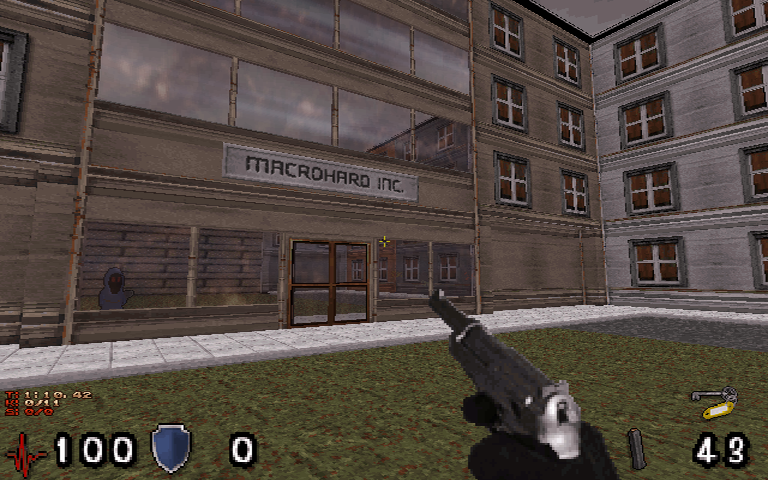
I was cleaning up one of my backup thumb drives and found some pics of the second map for last year's Quest Town TC. I plan on finishing and adding in this map sometime this year. These are pics of just a few outdoor locations. There are plenty of indoor areas too.

Wow, those look amazing!
0

User is offline   Mark 

#8347

Thanks for the compliment.
0

User is offline   Mark 

#8348

Yesterday I took another walk down "memory lane" by reading all the posts in this thread from 2012. Its was cool to see how many different people and projects were in the works. Some made it to completion and others sadly not. But it sure was an active year. Kind of sad though when I read about great mods that never were finished.

When I go back and read posts from years ago it sometimes brings a smile when I read that a certain mod is nearly finished but I know now that it wasn't finished until 3 or 4 years later.

I found pics and post from myself that I had forgotten about. Some of them were screenshots taken from my current projects with humorous captions.
1

#8349

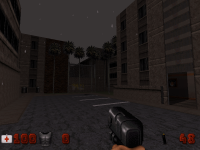
I rarely post anything on this forum, so for a change, here's a little preview picture taken of my new map. It's basically a rainy urban environment. Not sure how the gameplay unfolds; hopefully it will balance my bulky architecture.

Attached thumbnail(s)

  • Attached Image: rainy.png

8

Share this topic:


  • 365 Pages +
  • « First
  • 277
  • 278
  • 279
  • 280
  • 281
  • Last »
  • You cannot start a new topic
  • You cannot reply to this topic


All copyrights and trademarks not owned by Voidpoint, LLC are the sole property of their respective owners. Play Ion Fury! ;) © Voidpoint, LLC

Enter your sign in name and password


Sign in options