EDuke32 2.0 and Polymer! "talk about the wonders of EDuke32 and the new renderer"
#5331 Posted 20 September 2015 - 08:52 AM
Helixhorned, on 20 September 2015 - 04:30 AM, said:
Is there anything that prevents non-Lunatic build from having new structures in the map format? Or is it a matter of the classic Build engine code being too messy?
This post has been edited by Fox: 20 September 2015 - 08:53 AM

#5332 Posted 20 September 2015 - 03:53 PM
I'd guess there must be something stopping the current map system from adding new stuff in otherwise Helix wouldn't have used the offsets for TROR in the first place.
This post has been edited by Micky C: 20 September 2015 - 03:58 PM

#5333 Posted 21 September 2015 - 11:04 AM
Micky C, on 20 September 2015 - 03:53 PM, said:

OK, you know how every time we change something internally, savegames break? Imagine that but with map files. We'd end up with thousands of lines of compatibility code to support loading every map version we ever went through, and everyone would end up with maps that only worked in EDuke32/Mapster32 and could never be altered by any other existing utility again. That would be bad.
#5334 Posted 24 September 2015 - 11:49 AM
build/src/winlayer.c: In function 'void UninitDirectInput()':
build/src/winlayer.c:1161:59: error: invalid conversion from 'const void*' to 'void*' [-fpermissive]
for (i=joynumaxes-1; i>=0; i--) Bfree(axisdefs[i].name);
^
In file included from build/src/winlayer.c:31:0:
C:/Progs/mingw64/x86_64-w64-mingw32/include/malloc.h:77:16: note: initializing argument 1 of 'void free(void*)'
void __cdecl free(void *_Memory);
^
build/src/winlayer.c:1166:64: error: invalid conversion from 'const void*' to 'void*' [-fpermissive]
for (i=joynumbuttons-1; i>=0; i--) Bfree(buttondefs[i].name);
^
In file included from build/src/winlayer.c:31:0:
C:/Progs/mingw64/x86_64-w64-mingw32/include/malloc.h:77:16: note: initializing argument 1 of 'void free(void*)'
void __cdecl free(void *_Memory);
^
build/src/winlayer.c:1171:58: error: invalid conversion from 'const void*' to 'void*' [-fpermissive]
for (i=joynumhats-1; i>=0; i--) Bfree(hatdefs[i].name);
^
In file included from build/src/winlayer.c:31:0:
C:/Progs/mingw64/x86_64-w64-mingw32/include/malloc.h:77:16: note: initializing argument 1 of 'void free(void*)'
void __cdecl free(void *_Memory);
^
Failed building build/obj/winlayer.o from build/src/winlayer.c!
makefile:626: recipe for target 'build/obj/winlayer.o' failed
mingw32-make: *** [build/obj/winlayer.o] Error 1
This post has been edited by LeoD: 24 September 2015 - 11:50 AM
#5335 Posted 24 September 2015 - 03:02 PM
TerminX, on 21 September 2015 - 11:04 AM, said:
But wouldn't it make sense if you could only open ROR maps with Eduke/Mapster? As a last resort, Mapster could have the option to export ROR maps without the ROR data. The lack of y-xpannign is what prevents me from releasing a ROR map. You may think it's nitpicking, but I want my E1L3 with transparent water to have the correct texture alignment.
Also I don't understand why it has to use x-ypanning instead of the sector extra, since it's a structures unused by the map editor and has the same amount of bits. The only reason I can think of is that it was thought at the time that some existing mod could be using it. But that wouldn't have been a good decision, since the alternative is to prevent textures from being properly aligned, and the sector extra is not accessible via CON (the value is overwritten before any game event can read it) so no mod has ever used it.
#5336 Posted 25 September 2015 - 09:42 AM
Quote
sector[].extra is used in Duke3D game logic: it's the lotag of the GPSPEED sprite found in it, or 256 by default.
Fox, on 24 September 2015 - 03:02 PM, said:
If you have the sectors of the water area in one bunch, the floor textures will be aligned to each other, although they will have "arbitrary" global alignment, assuming no wall-relative alignment. I agree that it's a bug that the renderer still regards the panning value when it's actually a bunch index -- it could be made to have a fixed panning such as 0 then. Even if you have to split one sector into multiple bunches (for example because you want every one of them to be convex for the classic renderer's sake), if you end up small panning differences (say 1 to 5), it shouldn't be noticeable at a casual glance.
#5337 Posted 25 September 2015 - 10:05 AM
Helixhorned, on 25 September 2015 - 09:42 AM, said:
AFAIK, after the map is loaded the sector bunchs are stored in the floorbunch and ceilingbunch structures, so it should't conflict with GPSPEEDs.
This post has been edited by Fox: 25 September 2015 - 10:06 AM
#5338 Posted 25 September 2015 - 10:41 AM
Fox, on 25 September 2015 - 10:05 AM, said:
Well, these structures are present in the Lunatic build. The GPSPEED sprites are deleted after premap, sector[].extra stays.
#5339 Posted 25 September 2015 - 10:57 AM
This post has been edited by Fox: 25 September 2015 - 10:59 AM
#5340 Posted 27 September 2015 - 12:59 AM
------------------------------------------------------------------------ r5352 | hendricks266 | 2015-09-23 10:55:31 -0700 (Wed, 23 Sep 2015) | 1 line Remove NULL checks before calling free(): they are unnecessary as per the C standard. Other cleanup includes factoring code into DO_FREE_AND_NULL() macros. ------------------------------------------------------------------------ r5351 | hendricks266 | 2015-09-23 10:55:19 -0700 (Wed, 23 Sep 2015) | 1 line Defs: Add basepalette, palookup, and blendtable tokens. ------------------------------------------------------------------------ r5350 | hendricks266 | 2015-09-23 10:55:15 -0700 (Wed, 23 Sep 2015) | 1 line Defs: Prevent tilefromtexture from ever assigning index #255 (the transparent color) to the processed image. ------------------------------------------------------------------------ r5349 | hendricks266 | 2015-09-23 10:55:11 -0700 (Wed, 23 Sep 2015) | 1 line Internally, work with 24-bit palettes instead of 18-bit. ------------------------------------------------------------------------ r5348 | hendricks266 | 2015-09-23 10:55:02 -0700 (Wed, 23 Sep 2015) | 1 line Restructure the basepaltable subsystem to support up to 256 palettes and use dynamic allocation like palookup and blendtable.
Just curious, what stuff can this be used for?
#5341 Posted 27 September 2015 - 01:23 AM
#5342 Posted 27 September 2015 - 05:55 AM
#5343 Posted 27 September 2015 - 06:06 AM
#5344 Posted 27 September 2015 - 06:43 AM
Jblade, on 27 September 2015 - 05:55 AM, said:
Basepalettes are included, and I have raised the cap from 7 to 256. I am going to write a wiki tutorial explaining how everything works once I write a new Buildtool to apply our tilefromtexture color match algorithm to an input file (because I've found IrfanView, GIMP, and Photoshop to all suck at this particular task).
If you want a taste, this is the code to load everything from PALETTE.DAT and LOOKUP.DAT:
basepalette 0 { raw { file "PALETTE.DAT" shiftleft 2 } }
palookup 0 { raw { file "PALETTE.DAT" offset 770 } }
blendtable 0 { raw { file "PALETTE.DAT" offset 8962 } }
palookup 1 { raw { file "LOOKUP.DAT" offset 2 noshades } }
palookup 2 { raw { file "LOOKUP.DAT" offset 259 noshades } }
palookup 6 { raw { file "LOOKUP.DAT" offset 516 noshades } }
palookup 7 { raw { file "LOOKUP.DAT" offset 773 noshades } }
palookup 8 { raw { file "LOOKUP.DAT" offset 1030 noshades } }
palookup 3 { raw { file "LOOKUP.DAT" offset 1287 noshades } }
palookup 4 { raw { file "LOOKUP.DAT" offset 1544 noshades } }
palookup 5 { raw { file "LOOKUP.DAT" offset 1801 noshades } }
palookup 9 { raw { file "LOOKUP.DAT" offset 2058 noshades } }
palookup 10 { raw { file "LOOKUP.DAT" offset 2315 noshades } }
palookup 12 { raw { file "LOOKUP.DAT" offset 2572 noshades } }
palookup 13 { raw { file "LOOKUP.DAT" offset 2829 noshades } }
palookup 15 { raw { file "LOOKUP.DAT" offset 3086 noshades } }
palookup 16 { raw { file "LOOKUP.DAT" offset 3343 noshades } }
palookup 18 { raw { file "LOOKUP.DAT" offset 3600 noshades } }
palookup 19 { raw { file "LOOKUP.DAT" offset 3857 noshades } }
palookup 11 { raw { file "LOOKUP.DAT" offset 4114 noshades } }
palookup 14 { raw { file "LOOKUP.DAT" offset 4371 noshades } }
palookup 17 { raw { file "LOOKUP.DAT" offset 4628 noshades } }
palookup 20 { raw { file "LOOKUP.DAT" offset 4885 noshades } }
palookup 21 { raw { file "LOOKUP.DAT" offset 5142 noshades } }
palookup 22 { raw { file "LOOKUP.DAT" offset 5399 noshades } }
palookup 23 { raw { file "LOOKUP.DAT" offset 5656 noshades } }
palookup 24 { raw { file "LOOKUP.DAT" offset 5913 noshades } }
palookup 25 { raw { file "LOOKUP.DAT" offset 6170 noshades } }
basepalette 1 { raw { file "LOOKUP.DAT" offset 6426 shiftleft 2 } }
basepalette 2 { raw { file "LOOKUP.DAT" offset 7194 shiftleft 2 } }
basepalette 4 { raw { file "LOOKUP.DAT" offset 7962 shiftleft 2 } }
basepalette 3 { raw { file "LOOKUP.DAT" offset 8730 shiftleft 2 } }
basepalette 5 { raw { file "LOOKUP.DAT" offset 9498 shiftleft 2 } }Note that I don't recommend concatenating multiple datasets in a single file for anything new.
#5345 Posted 11 October 2015 - 11:54 PM
#5346 Posted 12 October 2015 - 12:19 AM
Jblade, on 11 October 2015 - 11:54 PM, said:
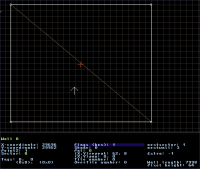
There is a bit of purple - it is flashing between red and purple instead of being pulsating purple as it should be. If it's not an accident then I have to ask the question why change something that was fully functional previously.
I suspect it is a bug though, as I just drew a square, divided it diagonally and got a white wall. Clearing blocking bit made the line red, setting it again made it pulsate red/<->purple.
TTFN,
Jon
#5347 Posted 22 October 2015 - 12:43 AM
Quote
I saw this in the changelog, and testing it ingame it works great and will help fix a lot of ugly flickering we had with glow sprites and stuff. Thanks a lot for adding it in!
#5348 Posted 22 October 2015 - 01:03 AM
#5349 Posted 22 October 2015 - 12:26 PM
#5350 Posted 26 October 2015 - 06:44 AM
This post has been edited by NightFright: 26 October 2015 - 06:45 AM
#5351 Posted 29 October 2015 - 09:05 AM
#5352 Posted 29 October 2015 - 11:16 AM
This post has been edited by Mark.: 29 October 2015 - 11:19 AM
#5353 Posted 29 October 2015 - 11:45 AM
Mark., on 29 October 2015 - 11:16 AM, said:
Am I mistaken or was the translucent look the default before? I wonder why it's no longer the default for me, if so?
To be honest I did try making a con file last week messing with various stuff, and it didn't work, it would always say there was a bunch of mistakes when trying to load. And I'm sure there were.
Is there a default template somewhere? I read the wiki page on con editing didn't quite get me there.
This post has been edited by PsychoGoatee: 29 October 2015 - 11:49 AM
#5354 Posted 29 October 2015 - 01:00 PM
This post has been edited by Mark.: 29 October 2015 - 01:00 PM
#5355 Posted 29 October 2015 - 01:37 PM
PsychoGoatee, on 29 October 2015 - 09:05 AM, said:
There are 3 CON files that come with Duke 3D. They are GAME.CON, USER.CON, and DEFS.CON
You should definitely have copies of these in the same folder that contains DUKE3D.GRP. Note that the copies that are loose in your folder will override the copies that are zipped inside of DUKE3D.GRP
I believe that the Atomic edition comes with those files outside of the GRP and ready to edit.
The tripbomb settings, and many other settings can be found in USER.CON
Here is the relevant part:
define TRIPBOMBLASERMODE 1 // 0 = always visable
// 1 = transluscense
// 2 = invisible w/o IR goggles
// 3 = totally invisable
Again, even if you don't intend to do much with the CON files, it is good to have them handy.
#5356 Posted 29 October 2015 - 02:15 PM
Mark., on 29 October 2015 - 01:00 PM, said:
Mark that is a great idea and would help immensely.
#5357 Posted 29 October 2015 - 02:30 PM
Trooper Dan, on 29 October 2015 - 01:37 PM, said:
You should definitely have copies of these in the same folder that contains DUKE3D.GRP. Note that the copies that are loose in your folder will override the copies that are zipped inside of DUKE3D.GRP
I believe that the Atomic edition comes with those files outside of the GRP and ready to edit.
The tripbomb settings, and many other settings can be found in USER.CON
Here is the relevant part:
define TRIPBOMBLASERMODE 1 // 0 = always visable
// 1 = transluscense
// 2 = invisible w/o IR goggles
// 3 = totally invisable
Again, even if you don't intend to do much with the CON files, it is good to have them handy.
Much thanks. I've only been copying Duke.grp and Duke.rts into my eduke folders since I read those were all you need. I haven't played Vanilla DOS Duke in a long time. But I do have those .cons there in the classic folder in Megaton, so I don't have to dig out the ol' CD, right on.
#5358 Posted 29 October 2015 - 02:52 PM
PsychoGoatee, on 29 October 2015 - 11:45 AM, said:
Well the error messages should point you in the right direction, but if it was the sheer quantity of error mesages that put you off just bear in mind that, just like the 'C' language, CON files are such that just one mistake can generate an absolute shed load of error messages all over the place including other files.
My top two errors these days are 1) using "var" instead of "varvar" e.g. setvar instead of setvarvar, doesn't always give an error message that is obvious but once you've seen it a few times you know _exactly_ what you feck'd up
I agree with Mark, plenty of trial and error needed, you learn lots that way.
I am toying with a tutorial on getting started with CON files. Not put much time in as, well, didn't think there'd be anyone to read it so currently it is in the form of Mechanic-with-a-head-like-a sieve notes.
The Wiki has all the info but, agian, as Mark said it kinda assumes you are already up to speed and indeed some information just isn't easy to find - I've asked a few questions only to get a (helpful) direct link to a relevent page that I swear never turned up via Google or starting with the scripting page of the Wiki.
TTFN,
Jon
#5359 Posted 29 October 2015 - 06:29 PM
Mark., on 29 October 2015 - 01:00 PM, said:
It was! There are a few older 1.3D/1.5 CON tutorials that have been on the wiki for years that everyone is expected to read before getting started with the more complicated stuff. It's mentioned pretty early on in the basic page about scripting you reach via the wiki's front page.

Help
Duke4.net
DNF #1
Duke 3D #1