Duke4.net Forums: EDuke32 2.0 and Polymer! - Duke4.net Forums

Jump to content

  • 213 Pages +
  • « First
  • 100
  • 101
  • 102
  • 103
  • 104
  • Last »
  • You cannot start a new topic
  • You cannot reply to this topic

EDuke32 2.0 and Polymer!  "talk about the wonders of EDuke32 and the new renderer"

User is offline   TerminX 

  • el fundador

  #3020

View PostHigh Treason, on 27 June 2012 - 02:46 PM, said:

So... Can Autoexec.cfg be loaded from a .zip or does it have to be in the root directory of EDuke32?

If it can't be loaded from a zip I might have some ideas on a temporary workaround.

It can likely be loaded from a zip, if that zip is initialized into the game's virtual filesystem before the point where autoexec.cfg is loaded. So, as a grp file.
0

User is offline   Fox 

  • Fraka kaka kaka kaka-kow!

#3021

For the sake of the recent progress in Duke 64 mod I think I should be asking this now... I had like to work a bit more in the favor of Polymer renderer, but there is one big issue preventing me from doing so: how the game chooses what paralaxed sky will be displayed.

Not sure if I can put it in words, but normally I just "temporarily" change the ceiling texture to a blank texture in order to ommit the paralaxed sky. And by temporarily I mean changing it in EVENT_DISPLAYROOMS and reverting back in EVENT_DISPLAYREST, so it only displays a different texture, but doesn't affect the gameplay. In some sense it is the equivalent of EVENT_DISPLAYSPRITES for sectors and walls.

The reason why I only change the texture temporarily is because I still want side-effects of the paralaxed skies, like being killed while in a sector using BIGORBIT texture. That works just fine in Classic or Polymost modes, but not so much for Polymer. The problem is, the Polymer rendered doesn't decides what paralaxed sky texture it will display in the background based on the temporary display.

For example, let's say I "temporarily" change BIGORBIT to another texture with palette 1. In Classic or Polymost modes everything will works as it should: I will be seeing another texture in the sky with pal 1, but I will still be killed if I go outside. But the very problem is that in Polymer mode BIGORBIT will still be displayed despite I changing the sky texture.

So if you can understand my problem, Polymer doesn't display the paralaxed sky based on the "temporarily" display as I would expect it to, but instead it uses the "real" texture being used (in my example it is BIGORBIT) as a reference.

This post has been edited by Fox: 29 June 2012 - 07:51 PM

0

#3022

@TerminX; That was the plan. I would usually just have tested but I've been too busy recently. Oddly I still haven't tested, preffering instead to opt for a batch file that renames any pre-existing autoexec.cfg and then rename the one included with the project this is for, before a small delay and starting EDuke32. Upon exiting it restores the original file names. As far as I am aware this was only required for a temporary workaround so it doesn't need to be very elegant anyway.

@Fox; Poylmer is a bit strange with it's skyboxes, I think it has somethng to do with how the renderer works and I know for a fact that you can only display one skybox per map and if you change it in the map you have to reset the video system (or something within it to which the console has no access as far as I know) for that change to take effect.

As the Duke 64 mod requires CON code already, could you not just replicate the effects in CON and have the map use whatever texture you wanted to from the start? I don't think it would be that hard to code, I would even be willing to attempt it if you wanted.

This post has been edited by High Treason: 29 June 2012 - 09:33 PM

0

User is offline   Fox 

  • Fraka kaka kaka kaka-kow!

#3023

I could do that, but I don't want to. I want to stay faithful to the original.

I am not sure about Polymer. But I suppose the "right" way would be to display one skybox per scene, not per map. But I remember already seeing it working that way in some version, while I am not sure about the current one.
0

User is offline   Fox 

  • Fraka kaka kaka kaka-kow!

#3024

I wish you could change the start position in Mapster easier than Build. Is it possible to make it so that the start position is displayed as an APLAYER sprite in 2D and 3D mode, and that you could change the position, height or attributes the same way you do with any other sprite? I guess it would have an ID of -1, since the sprite doesn't really exist but is just a representation.
1

User is offline   Hendricks266 

  • Weaponized Autism

  #3025

View PostFox, on 03 July 2012 - 02:59 PM, said:

I wish you could change the start position in Mapster easier than Build. Is it possible to make it so that the start position is displayed as an APLAYER sprite in 2D and 3D mode, and that you could change the position, height or attributes the same way you do with any other sprite?

I think being able to manipulate it in 2D mode is possible and a great idea, including its own little menu to set the exact value of x, y, z, and ang. I don't think 3D mode is a possibility, because...

View PostFox, on 03 July 2012 - 02:59 PM, said:

I guess it would have an ID of -1, since the sprite doesn't really exist but is just a representation.

It is just about never possible for something to have an ID of -1, whether it is a sprite or a level number. ID numbers are not just a convenience for referencing specific instances of an entity. They are actually indices for arrays, static memory structures which start at 0 and end at MAXTHINGS-1. Using negative numbers not only won't work, it will produce "out-of-bounds" errors which lead directly to crashes. Just ask Helix about those.

EDIT: My thinking is that you treat the start point as its own class of data (which it actually is) alongside sprites, walls, sectors, etc, so you don't bump into the sprite array. This would be very conducive to 2D mode but I don't know what it would entail to display something in 3D mode that is not a sprite yet still have sprite-like qualities of motion.

This post has been edited by Hendricks266: 03 July 2012 - 09:30 PM

2

User is offline   Helixhorned 

  • EDuke32 Developer

#3026

View PostFox, on 03 July 2012 - 02:59 PM, said:

I wish you could change the start position in Mapster easier than Build. Is it possible to make it so that the start position is displayed as an APLAYER sprite in 2D and 3D mode, and that you could change the position, height or attributes the same way you do with any other sprite? I guess it would have an ID of -1, since the sprite doesn't really exist but is just a representation.

startpox{x,y,z} and startsectnum are available from m32script. Just insert a dummy sprite, tweak its position to your liking, and set the starting position from the console:
seti <YOUR_DUMMY_SPRITE_INDEX>, set startposx .x, set startposy .y, set startposz .z, set startsector .sectnum, set startang .ang

script_expertmode needs to be enabled.

edit: fixed typo in code.
1

User is offline   Fox 

  • Fraka kaka kaka kaka-kow!

#3027

View PostHendricks266, on 03 July 2012 - 09:20 PM, said:

I think being able to manipulate it in 2D mode is possible and a great idea, including its own little menu to set the exact value of x, y, z, and ang. I don't think 3D mode is a possibility, because...


It is just about never possible for something to have an ID of -1, whether it is a sprite or a level number. ID numbers are not just a convenience for referencing specific instances of an entity. They are actually indices for arrays, static memory structures which start at 0 and end at MAXTHINGS-1. Using negative numbers not only won't work, it will produce "out-of-bounds" errors which lead directly to crashes. Just ask Helix about those.

EDIT: My thinking is that you treat the start point as its own class of data (which it actually is) alongside sprites, walls, sectors, etc, so you don't bump into the sprite array. This would be very conducive to 2D mode but I don't know what it would entail to display something in 3D mode that is not a sprite yet still have sprite-like qualities of motion.

My point is that it is not a sprite, but is just displayed as one.
0

User is offline   LeoD 

  • Duke4.net topic/3513

#3028

There are newer Ogg/Vorbis versions available, libogg 1.3.0 and libvorbis 1.3.3, which should be put into sources/jaudiolib/third-party/mingw32.

Spoiler

Spoiler

Attached File(s)


1

User is offline   TerminX 

  • el fundador

  #3029

Cool, thanks. They were never updated because we were too lazy to build new copies I guess. Did you build these yourself or download them somewhere?
0

User is offline   LeoD 

  • Duke4.net topic/3513

#3030

View PostTerminX, on 06 July 2012 - 10:00 AM, said:

Cool, thanks. They were never updated because we were too lazy to build new copies I guess. Did you build these yourself or download them somewhere?

Built myself. MinGW gcc 4.7
0

User is offline   TerminX 

  • el fundador

  #3031

Alright, committed the newer versions. Thanks!
0

User is offline   Helixhorned 

  • EDuke32 Developer

#3032

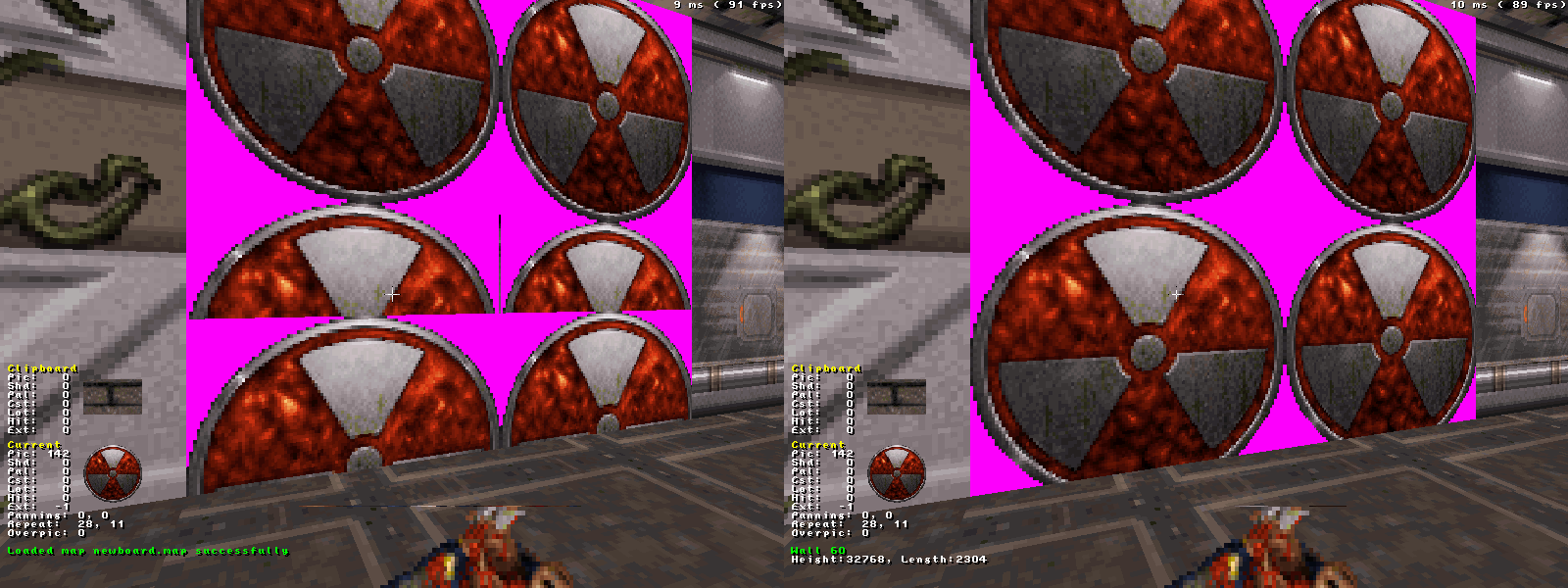
I recently completed the classic renderer's capability of drawing walls with non-power-of-two y sizes:

Posted Image

However, the original maps and imaginably custom ones too already relied on the particular panning with the incorrect drawing. Because the GL modes which came later always draw textures correctly, they had to implement various hacks to make theses cases display like in classic. The result is that now, all three renderers behave differently when faced with such problematic walls.

Here's what I consider correct behavior: the texture wraps once over the ypanning range of 0..255:
Animated PNG 1

This is the legacy classic behavior for reference. The texture is repeated ~2.5 times.
Animated PNG 2

Now things bet hairy. Polymost implemented some "corrections" to be able to display e.g. the "biker bimbos" panel in front of the steroids secret in E1L1, or the picture near the vault in E3L2. However, these are of course really hacks, since it's not easily possible (nor desirable) to reproduce exactly the classic renderer's way of drawing such walls.
Animated PNG 3

Polymer does the panning correction too, but in a different fashion than Polymost.
Animated PNG 4

The reason I'm saying this all is that it is currently a horrible mess. What I intend to do is
1) in the short term, make Polymer's offset "correction" behave like Polymost's. This seems like a sensible thing to do and would fix the picture in E3L2.
2) sometime in the future, new maps will be saved and loaded with the panning values doing what they're supposed to do.
4

User is offline   Fox 

  • Fraka kaka kaka kaka-kow!

#3033

Thank you for that. That's something I was really looking for. :(

View PostHelixhorned, on 08 July 2012 - 02:48 PM, said:

However, the original maps and imaginably custom ones too already relied on the particular panning with the incorrect drawing. Because the GL modes which came later always draw textures correctly, they had to implement various hacks to make theses cases display like in classic. The result is that now, all three renderers behave differently when faced with such problematic walls.

I don't mind, bug is bug.

This post has been edited by Fox: 08 July 2012 - 03:06 PM

0

User is offline   Hendricks266 

  • Weaponized Autism

  #3034

View PostHelixhorned, on 08 July 2012 - 02:48 PM, said:

Polymost implemented some "corrections" to be able to display e.g. the "biker bimbos" panel in front of the steroids secret in E1L1, or the picture near the vault in E3L2. However, these are of course really hacks, since it's not easily possible (nor desirable) to reproduce exactly the classic renderer's way of drawing such walls.

I think two more examples are the San Andreas fault sign in E1L5 and the cinema movie on the projector itself (not the screen) in E1L1.
0

User is offline   LeoD 

  • Duke4.net topic/3513

#3035

View PostTerminX, on 06 July 2012 - 10:41 AM, said:

Alright, committed the newer versions. Thanks!

This has brought up some new warnings (yet one left on MinGW):
source/music.c: In function 'MUSIC_ErrorString':
source/music.c:84:21: warning: assignment discards 'const' qualifier from pointer target type [enabled by default]

0

User is offline   Hendricks266 

  • Weaponized Autism

  #3036

No, that was caused by r2796, which broke building entirely, then Plagman fixed the build in r2798 but only as a stopgap.
0

User is offline   Fox 

  • Fraka kaka kaka kaka-kow!

#3037

View PostTerminX, on 17 June 2012 - 08:39 AM, said:

I've been spending my limited free time on Max Payne 3 lately (I haven't had time to actually play a game in ages). Making the tile sizes available is a really simple change though... it's literally 2 lines copied from Mapster32 into EDuke32.

Huh, has this been implemented? I failed in finding anything about it in the Changelog and etc.
0

User is offline   fgsfds 

#3038

Is this somehow related to this? http://i.imgur.com/WgBz1.jpg
I think this only happens in polymer with top-oriented textures.
0

User is offline   LeoD 

  • Duke4.net topic/3513

#3039

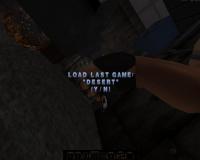
The space(use) key has ceased to work when trying to reload a map after dying.

Attached thumbnail(s)

  • Attached Image: no_space.jpg

0

User is offline   Hendricks266 

  • Weaponized Autism

  #3040

View PostLeoD, on 09 July 2012 - 07:22 AM, said:

The space(use) key has ceased to work when trying to reload a map after dying.

This is on purpose. r2802:

Quote

Remove BUTTON(gamefunc_Jump) and KB_KeyPressed(sc_Space) from AdvanceTrigger so you can type spaces in savegame names.

You can press Enter, KPEnter, LMB, your "Open" key, and your "Fire" key to advance prompts.
0

User is offline   LeoD 

  • Duke4.net topic/3513

#3041

View PostHendricks266, on 09 July 2012 - 10:07 AM, said:

This is on purpose. r2802:
You can press Enter, KPEnter, LMB, your "Open" key, and your "Fire" key to advance prompts.
I'm pretty sure that not so long ago I could have spaces in savegames and could reload the map using space...well, maybe some restructuring has happened which now prevents having both.
0

User is offline   Helixhorned 

  • EDuke32 Developer

#3042

View PostFox, on 08 July 2012 - 03:05 PM, said:

Thank you for that. That's something I was really looking for. :(

That's great, but I have reverted the correct drawing for now because it's the logical thing to do currently: the original levels rely on how those walls are drawn, and we have the correction hacks in place for the GL renderers. So I hope you don't mind waiting until the new map format arrives (this is something that is discussed on IRC from time to time). Levels saved with that one will then always have the correct panning, across all renderers.

View PostLeoD, on 08 July 2012 - 03:29 PM, said:

This has brought up some new warnings (yet one left on MinGW):
source/music.c: In function 'MUSIC_ErrorString':
source/music.c:84:21: warning: assignment discards 'const' qualifier from pointer target type [enabled by default]


Oh hey, I wasn't even aware we had Windows-exclusive code other that winlayer.c and the like up till now. D'oh to that.

View PostFox, on 08 July 2012 - 07:51 PM, said:

Huh, has this been implemented? I failed in finding anything about it in the Changelog and etc.

No, and I'm not sure it's only "2 lines copied from Mapster32", since as far as I can see CON has no support for system (i.e. non-user) arrays.

View Postempy, on 08 July 2012 - 09:26 PM, said:

Is this somehow related to this? http://i.imgur.com/WgBz1.jpg
I think this only happens in polymer with top-oriented textures.

Absolutely related, though not as easy, and with r2824 they should be identical for Polymost and Polymer.

View PostLeoD, on 09 July 2012 - 07:22 AM, said:

The space(use) key has ceased to work when trying to reload a map after dying.

What troubles me more is that the use key (which for me isn't space) has stopped working as a means to fast-forward the level ending screen. IMO one shouldn't assume a particular binding of keys to functions.

0

User is offline   TerminX 

  • el fundador

  #3043

Yeah, I was in fact wrong when I said it was 2 lines. It actually requires a fair bit more of the array system changes from Mapster32 to be propagated back into EDuke32 itself, which is why it hasn't been done yet.
0

User is offline   Fox 

  • Fraka kaka kaka kaka-kow!

#3044

So I am having a little trouble with Duke Nukem 64 maps. Apparently the geniuses tought it would be a good idea to completely shift the sound numbers. So the maps have a completely different sounds, including many hard-coded sounds.

I have already made a comparison list beetween the sounds in the ROM and the PC. For example, the speech at the beggining of Hollywood Holocaust now uses what originally was the Protozoid Slimer death sound. Sound 396 which is the last sound avaiable is now 255.

How exactly I solve this issue? You can't really make it work in CON because of the hard-coded sounds, and frankly I don't expect to make a workaround with just EVENT_SOUND, since it would take forever and it would never be 100%.

A possibility I tought was of using a Mapster script in these maps. But I don't want to save a map file in Mapster since it will change the size of some sprites and attempt to repair my sectors among other things. And as far I know there isn't an option which if I saved a map in Mapster without actually doing anything every single byte will remain the same.

This post has been edited by Fox: 09 July 2012 - 12:09 PM

0

User is offline   Hendricks266 

  • Weaponized Autism

  #3045

View PostFox, on 09 July 2012 - 12:06 PM, said:

A possibility I tought was of using a Mapster script in these maps. But I don't want to save a map file in Mapster since it will change the size of some sprites and attempt to repair my sectors among other things. And as far I know there isn't an option which if I saved a map in Mapster without actually doing anything every single byte will remain the same.

If you can work out preserving the map data, I wrote M32scripts to do exactly what you need, for Vaca+ and NW+. The original code is in the SVN but it's a little bit specialized because I needed to make two passes, at least for picnum switching.
0

User is offline   Fox 

  • Fraka kaka kaka kaka-kow!

#3046

By the way, I have defined a level for E1L8 and there is virtually no way in telling the difference beetween it and an User Map.

Adding a variable that returns whenever you are in a User Map or not may help, but it would only work 100% if I could change the slot occupied by User Map.
0

User is offline   Helixhorned 

  • EDuke32 Developer

#3047

View PostHelixhorned, on 09 July 2012 - 11:14 AM, said:

What troubles me more is that the use key (which for me isn't space) has stopped working as a means to fast-forward the level ending screen. IMO one shouldn't assume a particular binding of keys to functions.

By the way, I can't reproduce this any more, and I'm not finding a difference between r2801 and r2802 for my particular case either. Go figure...
0

User is offline   Micky C 

  • Honored Donor

#3048

Running r2834, textures such as tile 889 running water no longer animates on walls. They still work on floors and masked walls though. Actually they seem to work on white walls (void space boundary) too. I haven't looked into it much, hopefully it's one of those bugs which is obvious to fix. It's kind of a biggie as it affects the original levels too.
0

User is offline   Helixhorned 

  • EDuke32 Developer

#3049

Oops, my bad. Should be fixed with r2835.
1

Share this topic:


  • 213 Pages +
  • « First
  • 100
  • 101
  • 102
  • 103
  • 104
  • Last »
  • You cannot start a new topic
  • You cannot reply to this topic


All copyrights and trademarks not owned by Voidpoint, LLC are the sole property of their respective owners. Play Ion Fury! ;) © Voidpoint, LLC

Enter your sign in name and password


Sign in options