Duke4.net Forums: EDuke32 2.0 and Polymer! - Duke4.net Forums

Jump to content

  • 213 Pages +
  • « First
  • 69
  • 70
  • 71
  • 72
  • 73
  • Last »
  • You cannot start a new topic
  • You cannot reply to this topic

EDuke32 2.0 and Polymer!  "talk about the wonders of EDuke32 and the new renderer"

User is offline   Scott_AW 

#2090

Is transparent sprite shadows exclusive to opengl modes or is there a trick to get them to work in 8bit?
0

User is offline   The Commander 

  • I used to be a Brown Fuzzy Fruit, but I've changed bro...

#2091

Is it me, or is the Expander (hud weapon) meant to go completely black in opengl mode, possible the same in software mode.
0

User is offline   Skulldog 

#2092

View PostScott_AW, on Jan 24 2011, 01:28 PM, said:

Is transparent sprite shadows exclusive to opengl modes or is there a trick to get them to work in 8bit?


Not sure, but don't Panic. They can fix it.
http://www.youtube.c...h?v=xZn0o30tS1c
http://www.bing.com/videos/watch/video/bat...with%20a%20bomb

This post has been edited by Skulldog: 29 January 2011 - 07:44 AM

0

User is offline   Hendricks266 

  • Weaponized Autism

  #2093

View PostThe Commander, on Jan 29 2011, 12:52 AM, said:

Is it me, or is the Expander (hud weapon) meant to go completely black in opengl mode, possible the same in software mode.

I've reported this in IRC twice, and it happens in all modes. Something strikes me as off about the shrinker too.
0

User is offline   Hendricks266 

  • Weaponized Autism

  #2094

http://hendricks266..../stuff/eduke32/

I've made some improvements to the logo images and icons.

I've applied the GIMP "Color to Alpha" tool on a 1-2 pixel ring around the edges of the circles so that there is now a smooth transition (translucent pixels) from the logo to any color background. No change is detectable, even when zooming in, if the background is the original white or black.

eduke32.ico is unchanged, although it still has the fix on the 8x8 icon which was patched into SVN a couple months ago.

eduke32_classic.ico is basically eduke32.ico with the hue adjusted to make it orange. I've tested it to be exact same change to make eduke32.png look exactly like eduke32_classic.png. I think it would be nice to apply it to one of the executables, to tell them apart quickly and easily.

This post has been edited by Hendricks266: 29 January 2011 - 04:52 PM

0

User is offline   Mikko 

  • Honored Donor

#2095

Do others get pitch black textures at shade values 25 and beyond?

I noticed this last fall when I was running through Imagination World 2. I thought they were missing textures but since then I've been getting black textures in other levels as well, in locations I used to be able to see.
0

User is offline   Mark 

#2096

Yes we do. Shade values have been adjusted a few times in the various versions of the engine and 24 to 25 is where the "black" occurs these days.

This post has been edited by Marked: 30 January 2011 - 05:22 AM

0

User is offline   Stabs 

#2097

sourceforge is still being a cunt

http://sourceforge.n...ojects/eduke32/

havnt been able to find out what the new revisions do
0

User is offline   The Commander 

  • I used to be a Brown Fuzzy Fruit, but I've changed bro...

#2098

The way I have been looking is going to the latest revisions here, http://dukeworld.duk...ke32/synthesis/
And reading the changelog.txt
0

User is offline   Omni 

#2099

http://sourceforge.n...ck-full-report/ So yeah SF is not yet back to 100%.
0

User is offline   Stabs 

#2100

what sort of douchebag would attack SF?
0

User is offline   Mikko 

  • Honored Donor

#2101

View PostMarked, on Jan 30 2011, 03:21 PM, said:

Yes we do. Shade values have been adjusted a few times in the various versions of the engine and 24 to 25 is where the "black" occurs these days.


Any idea why? It's really fucked up now.
0

User is offline   Danukem 

  • Duke Plus Developer

#2102

View PostMikko_Sandt, on Jan 31 2011, 08:23 AM, said:

Any idea why? It's really fucked up now.


They were attempts to make the shading more like the software renderer, and actually it sort of succeeded except that it goes to black too soon.

This is why, in my mods I include an autoexec.cfg file that contains the line: r_shadescale 0.99

Changing the shade scale fixes it.


I hope that people are not mapping differently to compensate for the problem, because if they do their maps will be too bright in software mode, or if the shade scale is adjusted (e.g. DukePlus), or if the problem is fixed in eduke32.

This post has been edited by DeeperThought: 31 January 2011 - 09:32 AM

0

User is offline   Plagman 

  • Former VP of Media Operations

#2103

So is 0.99 widely accepted to be closest to software mode in the current state of things? If so, it seems it should be the default.
0

User is offline   Danukem 

  • Duke Plus Developer

#2104

View PostPlagman, on Jan 31 2011, 11:39 AM, said:

So is 0.99 widely accepted to be closest to software mode in the current state of things? If so, it seems it should be the default.


I don't know if it's widely accepted, it is just what I use. But here is the strange thing: the difference between .99 and 1.00 should be trivial, and yet it makes a big difference in game. Or maybe 1.00 is not the default setting? IIRC, DanM uses 1.05 and that gets rid of the premature blackness as well.

This post has been edited by DeeperThought: 31 January 2011 - 11:59 AM

0

User is offline   Gambini 

#2105

View PostPlagman, on Jan 31 2011, 04:39 PM, said:

So is 0.99 widely accepted to be closest to software mode in the current state of things? If so, it seems it should be the default.


If you´re going to tweak the shading, do it also with the visibility. The difference between software and 32 bits doesn´t exactly stand out in the shading but more in how distant stuff looks. In software mode it´s darker but more lineal, in 32bits it tends to fade off at a pretty short distance, either with polymost or polymer, only that in the latter this seems to affect the sky too!

EDIT: Another thing that should be revised is that while in 8bits visibility doesn´t affect the z axis, it does in 32bits. Suppose you´re looking up a skycraper. in software mode you´ll be able to see the top of it as bright as the bottom, instead in 32 bits the top will look pitch black unless it´s shade 0. Maybe this difference can´t be sorted out, but surely can be disguised somehow.

This post has been edited by Gambini: 31 January 2011 - 12:44 PM

0

User is offline   Danukem 

  • Duke Plus Developer

#2106

View PostGambini, on Jan 31 2011, 12:39 PM, said:

If you´re going to tweak the shading, do it also with the visibility. The difference between software and 32 bits doesn´t exactly stand out in the shading but more in how distant stuff looks. In software mode it´s darker but more lineal, in 32bits it tends to fade off at a pretty short distance, either with polymost or polymer, only that in the latter this seems to affect the sky too!

EDIT: Another thing that should be revised is that while in 8bits visibility doesn´t affect the z axis, it does in 32bits. Suppose you´re looking up a skycraper. in software mode you´ll be able to see the top of it as bright as the bottom, instead in 32 bits the top will look pitch black unless it´s shade 0. Maybe this difference can´t be sorted out, but surely can be disguised somehow.


This raises the question of whether we really want the new renderers to imitate the software renderer in all respects. The z-axis feature of software could be regarded as a bug, since arguably visibility should be a function of true distance, not just xy distance. The renderers have been different since the first version of polymost. The top priority should be fixing the recent fuckery.
0

User is offline   Scott_AW 

#2107

It does bring up an interesting question as if you want to make it more like classic yet with enhancments or just generally enhanced. Maybe focus should be put on just making it look good or better, but not necessarily just the same.

With 16-32bit, there is more potential in color blending, shadows, alpha and other nice stuff.

However there are some things you can't replicate easily in a fixed palette system. There's a lot of control when you only have to deal with 256 colors, but there's very little control over thousands and millions of colors.

I imagine once polymer is more refined it can make an awesome engine for a TC, since the build scripting and mapping is easy to work with, throw in the special effects and you have something comparable to a modern engine, although with limits. I'd like to work on a hi-res project with this engine sometime in the future.
0

User is offline   Gambini 

#2108

Visibility in newer renderers is just an inheritance from the classic mode. What´s the whole point of a fade to black effect in a 3d world with lightsources such as polymer? Nobody in their right mind would think of that unless it serves a purpose, like keeping things look similar when playing maps or mods designed for the old engine.

How many times you drive by the highway and see how the road turns pitch black ten meters away? That´s not realistic. That doesn´t happen in modern games. Thus, there´s no doubt this effect is there just to make things look remotely like in 8bits.

Do we agree? If so: why not making it work just like it works in 8bits?
0

User is offline   Danukem 

  • Duke Plus Developer

#2109

Visibility (or lack thereof) is the same thing as fog in Duke 3D. It can be used to simulate the darkness of night, and actual fog (if used with colors). The default visibility is unrealistic for normal daytime lighting, though, but this can be easily adjusted in maps or on con code.
0

User is offline   Tetsuo 

#2110

That reminds me of one thing I don't like about certain old maps and it's the fact that at times you can clearly see the boundaries of the world. Especially in maps that take place outside near or on large bodies of water like a ship map. Those kind of levels could use some fog and or depth of field to cover up the obvious boundaries to help with the suspension of disbelief.

This post has been edited by Tetsuo: 01 February 2011 - 12:51 AM

0

User is offline   SwissCm 

#2111

Eventually I would like to see the maps that have Polymer lights have no diminishing light, however before that happens we need a way to have lights scriptable in such a way that sector effectors, light switches and such can be used to change light values, positions etc.
0

User is offline   Danukem 

  • Duke Plus Developer

#2112

View PostSwissCm, on Feb 1 2011, 03:51 AM, said:

Eventually I would like to see the maps that have Polymer lights have no diminishing light, however before that happens we need a way to have lights scriptable in such a way that sector effectors, light switches and such can be used to change light values, positions etc.


SE lights can already be scripted to turn on/off and do other things upon activation, such as when switches are used:

They are already scriptable like that: http://fissile.duke4...ymer_switch.wmv
0

User is offline   SwissCm 

#2113

View PostDeeperThought, on Feb 2 2011, 03:20 AM, said:
SE lights can already be scripted to turn on/off and do other things upon activation, such as when switches are used:

They are already scriptable like that: http://fissile.duke4...ymer_switch.wmv

I meant with maphacks.
0

User is offline   Danukem 

  • Duke Plus Developer

#2114

But a maphack just changes some values on sprites at map load time; they don't do anything that couldn't be done already in mapster itself. So what you really want is for the SE lights to have some new hardcoded features enabling them to turn on/off and do other stuff in response to activations and other conditions. That's probably a good idea -- even though it's already possible to do stuff like that using CON scripting -- but currently there aren't enough unused tags on the SE sprites to store the extra information needed. Either the map format would have to change or there would need to be new hardcoded sprites introduced.
0

User is offline   Helixhorned 

  • EDuke32 Developer

#2115

Why not rather make lights first-class citizens in CON from the ground up, like actors, walls or userdefs? You'd have something like "lightspawn x", "setlight[x].something" and maybe e.g. "lightfollowactor actor" for often-needed operations. Surely we don't want to put more hardcoded stuff into them, do we? A convenient related feature to have would be the ability to pre- or post-load CONs from DEFs, which would be used for mutator-type mods rather than fully-fledged TCs. For example, one could code the current light behaviour for switches etc. in CON then and add it to the HRP so that people would have a choice of enabling those effects.
0

User is offline   Plagman 

  • Former VP of Media Operations

#2116

Having direct light control from CON was the plan at first, but since I didn't want anything to do with the game code TerminX came up with the SE interface.

The plan with maphacks was indeed to be able to override part or all sector lighting of a map in order to let Polymer lights do their thing. There's also an existing interface to map a lighthack intensity to the shade of the sector it's in, allowing it to react to stuff like lightswitches and broken lights. It was working fine in the first iteration, but at some point I reworked the light system and seemed to have broken it (it's the minshade and maxshade members of lighthacks). I'll need to take a look at some point.
0

User is offline   Mikko 

  • Honored Donor

#2117

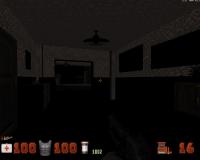
Instead of going through who knows how many past EDuke32 versions, could someone tell me which one doesn't have the black walls?

It's getting really annoying. This is an indoor location from MRCK's latest map:

Attached thumbnail(s)

  • Attached Image: mrc.jpg

0

User is offline   Danukem 

  • Duke Plus Developer

#2118

Mikko, just open the console and type "r_shadescale .99" and it's fixed. No one remembers when it started.
0

User is offline   Mikko 

  • Honored Donor

#2119

Ok, great, I keep forgetting there's a console...
0

Share this topic:


  • 213 Pages +
  • « First
  • 69
  • 70
  • 71
  • 72
  • 73
  • Last »
  • You cannot start a new topic
  • You cannot reply to this topic


All copyrights and trademarks not owned by Voidpoint, LLC are the sole property of their respective owners. Play Ion Fury! ;) © Voidpoint, LLC

Enter your sign in name and password


Sign in options

