Plagman, on Jan 25 2010, 01:27 AM, said:
You're right that the model is going to get flat shaded depending on its BUILD shade. This is essentially the ambient component when rendering with Polymer. If you want to start from complete darkness, do a test room and shade it very dark.
Also, note that you don't need a specular map to specify the specular material of your model. Just setting "specpower" and "specfactor" in the diffuse map definition will allow you to make your model less shiny. The specular map is just for tweaking that per-pixel.
Quote
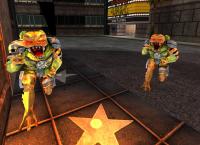
Oh, and I forgot to mention that this is not going to work correctly if you're using mirrored UV. Not sure if the new liztroop is using it, but since I know the old one is I thought I'd mention that. Any vertex that's shared by two triangles that don't have the same UV handedness will cause artifacts. I'm not sure whether it should be the artist responsibility to duplicate these vertices to create a seam in the mesh along the UV mirror or if the model postprocessor should automagically patch it up when loading it in EDuke32.
Would it be somehow possible to control that amount of ambient lighting on the model?
Ofcourse I could make the model a bit more dark, but still I would not achieve as much contrast as I want..
I did remake the UV maps (and most of the model) for this one, so this does not have shared UV:s. I tested it in Blenders "game engine" viewport rendering and they worked.
I think I'm having those seams because the X-axis is mirrored in Blenders normal map system. I'll try to get that Gimp Normalmap-plugin working to fix it.

 Help
Help
 Duke4.net
 DNF #1
 Duke 3D #1