Duke4.net Forums: EDuke32 Scripting - Duke4.net Forums

Jump to content

  • 124 Pages +
  • « First
  • 89
  • 90
  • 91
  • 92
  • 93
  • Last »
  • You cannot start a new topic
  • You cannot reply to this topic

EDuke32 Scripting  "CON coding help"

User is offline   jimbob 

#2688

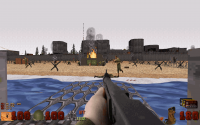
well, got the zoom to work, now to get the overlay working, holstering the weapon, and give it infinite inventory amount somehow :D and remove that nasty green NV effect from sprites.

as for the airstrike, the sprite can run a check to see if the player is currently using the goggles, and if so set the cstat from hidden to not hidden, but that would make using them rather awkward i guess, somehow an indicator needs to be there so the player know he can actually use the binoculars to signal an airs/artillery strike. something im going to think about next.
[edit]
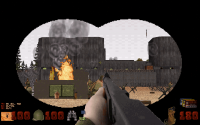
have the binocular overlay working using EVEN_DRAWROOMSEND, maybe not the best way but it works so im happy for now. now to tell the game to lower the weapon when using the binocular, and end using the binoculars when hitting the fire key.

[edit]
fixed the player being able to fire during the use of binoculars, firing wil set the NV goggles to 0

now to holster the weapon, tried setting setplayer[THISACTOR].holster_weapon to 0 but that breaks the weapons
but its a start, art needs to be updated, this is just something i threw together for the time being

Attached thumbnail(s)

  • Attached Image: duke0000.png
  • Attached Image: duke0001.png


This post has been edited by jimbob: 27 February 2021 - 01:01 PM

1

User is offline   jimbob 

#2689

fixed the holster gun issue, setting setplayer[THISACTOR].weapon_pos 20 when the NV is on lowers it, and whats nice is that it still lets you switch the gun while on the binoculars.
0

User is online   Danukem 

  • Duke Plus Developer

#2690

If you want you could also cancel weapon drawing when the goggles are on by setting RETURN to -1 in EVENT_DISPLAYWEAPON and EVENT_DRAWWEAPON if player[THISACTOR].heat_on YES
0

User is offline   jimbob 

#2691

View PostDanukem, on 28 February 2021 - 10:44 AM, said:

If you want you could also cancel weapon drawing when the goggles are on by setting RETURN to -1 in EVENT_DISPLAYWEAPON and EVENT_DRAWWEAPON if player[THISACTOR].heat_on YES

if that also prevents the weapon firing that might also work, i choose for holster because its a more realistic way of handeling things, you cant hold a 2 handed weapon, ánd a binocular at the same time so holstering seemed like a logical way to handle it. maybe that would be usefull for a sniper rifle, if i decide to add one.

how do i remove the enemy spritepal wen using the NV goggles, tried several things but it seems pretty persistent.

as for the airstrike, i recon making the marker a switch that triggers an activator, but can only be switched on when looking through the binoculars, and perhaps you would also have to be near a radioman, i could use a FPS view of a handy talky but programming that is a bit too advanced for me.

i have found a way to keep the binoculars at 100%
so i figure using it to call an airstrike would immediatly deplete it to 0 to prevent multiple uses, and then recharge it over time and being able to call a new one once it reaches 100%.


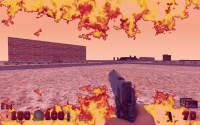
been thinking about the other inventory items, and the steroids might just stay as they are, but also add a temporary health boost. thinking about changin it to panzerchocolade, chocolat bars the germans used laced with pervitin ( meth ) so a temporary stat boost combined with a witty comment and a screenpal like purple to simulate a rush.

but im thinking out loud again :D

[edit] changed the pal to purple for the pervitin, and added some fire for optimal effect, it would be fun if you are on steroids, you can kick someone and send them flying back, or explode like in doom.

[edit]

whats the correct command to initiate the loogie animation? i want to use it to say, draw blood on the screen if the player is under a certain amount of health
found that setting numloogs and loogcnt does display loogies, but does not animate the way they normally do in the game :/

Attached thumbnail(s)

  • Attached Image: duke0003.png


This post has been edited by jimbob: 28 February 2021 - 02:41 PM

0

User is offline   jimbob 

#2692

ugh, have the artystrike working for like 80% the way i want it, but im going codeblind, for whatever reason the timing does not do what i want it to do, i have set up a action for loading, just a 1 frame action with a delay so i can use ifactioncount x to switch to a new action, wich is the fire mode, this spawns a line that moves in a random direction and spawns a morter on a semi random interval, but no matter how i set it up the timing is off and the actions seem to work in reverse, and the ifcount 300 killit also does not seem to work, ugh.
ideally i would like to set it up that i can controll exactly how many mortars it shoots, and the timing inbetween actuall shots. this is dirty, but for now it does function, albeit indefinatly.\
looking at it, i suspect resetactioncount also resets count so it never reaches 300, but i need it to reset the angle to random evertime it is about to spawn a mortarline.

action USMORTARFIRE 0 1 1 1 8
action USMORTARLOADING 0 1 1 1 16

useractor notenemy USMORTARSPAWN 0 USMORTARLOADING
cstat 32768
ifaction USMORTARFIRE
ifcount 300 killit
{ 
ifactioncount 2
	{
 	move 0 0 randomangle
	spawn USMORTARLINE
	resetactioncount
	} 

}

ifaction USMORTARLOADING 
ifactioncount 120 // when done loading, fire away
			{
				action USMORTARFIRE // the firing state
			}
enda


[edit] resetactioncount seemed to be the culprit, now it starts and stops, though the starting does not respond to the delay i want to set

action USMORTARFIRE 0 1 1 1 16
action USMORTARLOADING 0 1 1 1 16
 

useractor notenemy USMORTARSPAWN 0 USMORTARLOADING
cstat 32768
ifaction USMORTARFIRE
ifcount 150 killit
{ 
ifactioncount 2
	{
 	move 0 0 randomangle
	ifrnd 64 spawn USMORTARLINE
	ifactioncount 40 killit
	} 

}

ifaction USMORTARLOADING
ifactioncount 120 // when done loading, fire away
			{
				action USMORTARFIRE // the firing state
			}
enda


This post has been edited by jimbob: 01 March 2021 - 01:29 PM

0

User is online   Danukem 

  • Duke Plus Developer

#2693

Resetactioncount does NOT reset count.

However, any move command applied DOES reset count. So each time you apply "move 0 0 randomangle" that resets the count.

Count is how many tics have passed since the actor got its current move.
0

User is offline   jimbob 

#2694

wel that explains a thing or two, well for the time being this is functional, it starts, it stops, it destroys stuff. it has a few drawbacks but in game it looks pretty neat. now to figure out what uses i can find for the other inventory items.
0

User is offline   jimbob 

#2695

sorted out the issue with my arty strike, bracketing matters.

anyway, unrelated question, is it possible to have an actor play a music file ( .ogg or midi ) i need this for purposes :P i could use wav, but long music files soak up tons of space.

0

User is online   Danukem 

  • Duke Plus Developer

#2696

View Postjimbob, on 03 March 2021 - 01:47 PM, said:

anyway, unrelated question, is it possible to have an actor play a music file ( .ogg or midi ) i need this for purposes :P i could use wav, but long music files soak up tons of space.


If you want it to be specifically defined as music and not a sound, then use one of these commands:


https://wiki.eduke32...wiki/Starttrack
0

User is offline   jimbob 

#2697

i could try to define a temporary episode music ( say episode 8 ) and use starttrack to play the music from there, but im afraid that replaces/overrides the level specific music.
i would prefer if it could be used as a sound, what im trying to do is make a functional record player that plays back X amount of musical tracks depending on how often you use it, i could use short samples liek say 30 seconds but even that in half decent audio in WAV requires a lot of space, so if i could play a midi file of .ogg file from that actor as a sound comming from a 'recordplayer' that would be pretty neat.
0

#2698

View Postjimbob, on 04 March 2021 - 08:06 AM, said:

i could try to define a temporary episode music ( say episode 8 ) and use starttrack to play the music from there, but im afraid that replaces/overrides the level specific music.
i would prefer if it could be used as a sound, what im trying to do is make a functional record player that plays back X amount of musical tracks depending on how often you use it, i could use short samples liek say 30 seconds but even that in half decent audio in WAV requires a lot of space, so if i could play a midi file of .ogg file from that actor as a sound comming from a 'recordplayer' that would be pretty neat.


Alien Armageddon has a bunch of ogg samples loaded via `definesound` in attcons/ATTDEFS.CON
0

User is offline   jimbob 

#2699

I have that mod on my computer, i'll take a look at what they did and hopefully can make a fully functional record
0

User is online   Danukem 

  • Duke Plus Developer

#2700

View Postjimbob, on 05 March 2021 - 04:15 AM, said:

I have that mod on my computer, i'll take a look at what they did and hopefully can make a fully functional record


There's not much to look at in AA that would help you make a record player, he was just pointing out that you can use .ogg as a sound format.

A really simple way to do what you want would be to make a separate actor for each individual record and have them spread across a table with the record player in the middle. The player would walk up to the record they want to play, then the record would be an actor with code something like:

useractor notenemy RECORD1 0

 ife RECORD1UNLOCK YES
{
 cstat 32
 ifp palive ifp pfacing ifpdistl 1280 ifhitspace ifcansee 
 { 
  stopsound REC2SOUND stopsound REC3SOUND
  soundonce REC1SOUND
 }
enda


You would make the record sprites start as invisible in mapster, and define the sounds with a large radius so that they seemed to emanate from the entire room. You would declare a global var for each variable (RECORD1UNLOCK, RECORD1UNLOCK, etc) and set them to NO (NO = 0, YES = 0). Then all you have to do code some things in the game to make them turn to YES.
0

User is offline   jimbob 

#2701

View PostDanukem, on 05 March 2021 - 11:35 AM, said:

There's not much to look at in AA that would help you make a record player, he was just pointing out that you can use .ogg as a sound format.

A really simple way to do what you want would be to make a separate actor for each individual record and have them spread across a table with the record player in the middle. The player would walk up to the record they want to play, then the record would be an actor with code something like:

useractor notenemy RECORD1 0

 ife RECORD1UNLOCK YES
{
 cstat 32
 ifp palive ifp pfacing ifpdistl 1280 ifhitspace ifcansee 
 { 
  stopsound REC2SOUND stopsound REC3SOUND
  soundonce REC1SOUND
 }
enda


You would make the record sprites start as invisible in mapster, and define the sounds with a large radius so that they seemed to emanate from the entire room. You would declare a global var for each variable (RECORD1UNLOCK, RECORD1UNLOCK, etc) and set them to NO (NO = 0, YES = 0). Then all you have to do code some things in the game to make them turn to YES.

right now i have one record on the gramophone player, the actor has a few tracks you can go to by pressing space, i have it set up like this.

action RECORDTRACK1 0 1 1 1 8
action RECORDTRACK2 0 1 1 1 8
action RECORDTRACK3 0 1 1 1 8
action RECORDTRACK4 0 1 1 1 8

action RECORDSTOPPED 0 1 1 1 8
move RECORDSPINNING 0 0
move RECORDSTOPSPINNING 0 0


useractor notenemy RECORDS 0 RECORDTRACK1
ifaction RECORDTRACK1
	{
	soundonce BONUSMUSIC
	move RECORDSPINNING spin
// ifactioncount 8 action RECORDTRACK1
			ifpdistl 2048
				ifp palive
					ifcansee
					ifhitspace
						{
							ifactioncount 4
							action RECORDSTOPPED
						}
	}
else
ifaction RECORDSTOPPED
		{
		move RECORDSTOPPED stopsound BONUSMUSIC
			ifpdistl 2048
				ifp palive
					ifcansee
					ifhitspace
						{
							ifactioncount 4
							action RECORDTRACK1
						}
		}

enda

this way i can just make new actions for each track it has to play, and eventually either stop, like i have now, or loop back to track 1
note, the actor is set relative to the floor, so it is flat and spins right round like a record baby.

This post has been edited by jimbob: 05 March 2021 - 12:52 PM

0

User is offline   jimbob 

#2702

aparently it really is as simple as definesound *.ogg works like a charm :)
0

User is offline   jimbob 

#2703

i have this weird bug, i added some new enemy art files, and since these are a higher resolution i used EVENT_EGS to scale enemies to thier new respective sizes ( about 10 X and Y ) but now the enemies that are only seen on higher difficulties show up in game, but dont do anything. they are "there" but not quite. is there a fix to this? what i nean is, that if an enemy is flagged for say damn im good, he will show up at any difficulty but the AI does nothing. its really confusing for the player.

This post has been edited by jimbob: 16 March 2021 - 05:19 PM

0

User is online   Danukem 

  • Duke Plus Developer

#2704

Are you sure you are using EVENT_EGS to resize them and not EVENT_SPAWN? The issue you are describing happens when the game has deleted a higher difficulty enemy by setting its size to 0 by 0, and then your code goes ahead and makes it bigger anyway. Since the game already tried to delete it, it becomes a dead sprite and just stands there.
0

User is offline   jimbob 

#2705

View PostDanukem, on 16 March 2021 - 05:47 PM, said:

Are you sure you are using EVENT_EGS to resize them and not EVENT_SPAWN? The issue you are describing happens when the game has deleted a higher difficulty enemy by setting its size to 0 by 0, and then your code goes ahead and makes it bigger anyway. Since the game already tried to delete it, it becomes a dead sprite and just stands there.

you are right, i used event_spawn and not EGS :doh:
using event EGS doesnt actually resize the items and enemies :(

[edit]
placed the whole shebang under event_game and that works flawelessly.

This post has been edited by jimbob: 17 March 2021 - 12:12 AM

0

User is online   Danukem 

  • Duke Plus Developer

#2706

EVENT_SPAWN is the correct place for the code

You just have to make sure that the actor isn't size 0 0 before you apply your own size to it. For example, instead of using "sizeat 24 24" you would use"ifg sprite[].xrepeat 4 sizeat 24 24"

EVENT_GAME works but the sprite is running that code every single tic, which is not efficient. It may never matter in your project, but enough inefficient code will eventually bog the game down. Also, if you want the actor to be resizable, your EVENT_GAME code has to be written to allow that, because if you are just constantly setting the size in that event it will override whatever size you set in the actor code.
0

User is offline   jimbob 

#2707

View PostDanukem, on 17 March 2021 - 01:18 AM, said:

EVENT_SPAWN is the correct place for the code

You just have to make sure that the actor isn't size 0 0 before you apply your own size to it. For example, instead of using "sizeat 24 24" you would use"ifg sprite[].xrepeat 4 sizeat 24 24"

EVENT_GAME works but the sprite is running that code every single tic, which is not efficient. It may never matter in your project, but enough inefficient code will eventually bog the game down. Also, if you want the actor to be resizable, your EVENT_GAME code has to be written to allow that, because if you are just constantly setting the size in that event it will override whatever size you set in the actor code.

ill put it back in event_spawn with the added fix, i plan on using a ton of enemies, and have them resizing too.
0

User is offline   jimbob 

#2708

probably a stupid question, but i cant seem to resize the healt and ammobox sprite ( the ones that are drawn on the HUD if you use a larger screensize. there is a displaysbar event, messing with that seems to mess up the screen somewhat so i decided to use EVENT_DISPLAYREST

onevent EVENT_DISPLAYREST
// rezise ammo health and inventory box.
switch sprite[spriteid].picnum
case HEALTHBOX
		gettspr[].tsprxrepeat x div x 2
		gettspr[].tsprxrepeat y div y 2
		settspr[].tsprxrepeat x
		settspr[].tspryrepeat y
break
endswitch
// resize hud icons
endevent


but no matter where i place it, it doesnt scale the art down half to compensate the larger res art.
0

User is online   Danukem 

  • Duke Plus Developer

#2709

I think tsprite commands only work in EVENT_ANIMATESPRITES, so not in the hud at all.

For the hud you need to draw your own using rotatesprite and similar command, then you can size and place things however you want. Its a huge pain in the ass to get all the numbers right, though.
0

User is offline   jimbob 

#2710

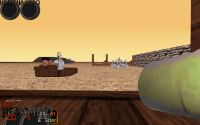
what im trying to do is replace the original background boxes with my own ( the ones that say HEALTH and AMMO ) and then scale them down half size, they are tile 30 31 and 33 and 20, in what event would rotatesprite for hud tiles have to be used? i did manage to place some "huud"sprites onscreen with EVENT_DISPLAYROOMSEND, i used it to draw 'blood' on the screen when low on health. the numbers themselves are good enough for the time being, might replace the font with a more apropriate one later

[edit] i suppose an easy but dirty fix would be to delete the original art tiles and use rotatesprite to draw a new one scaled to size on the originals position using EVENT_DISPLAYROOMSEND.

heres an image of what i try to do, the bottom ones are the originals, the top what i want, but on the bottom :P

Attached thumbnail(s)

  • Attached Image: duke0000.png


This post has been edited by jimbob: 21 March 2021 - 12:49 PM

0

User is online   Danukem 

  • Duke Plus Developer

#2711

I had never even heard of that event until you mentioned it. The normal procedure would be to use EVENT_DISPLAYREST, set RETURN to -1 to cancel the hardcoded Duke display, then draw your own hud however you want using screen drawing commands and logic.
0

User is offline   jimbob 

#2712

View PostDanukem, on 21 March 2021 - 02:52 PM, said:

I had never even heard of that event until you mentioned it. The normal procedure would be to use EVENT_DISPLAYREST, set RETURN to -1 to cancel the hardcoded Duke display, then draw your own hud however you want using screen drawing commands and logic.

i'll look into it today, thanks :)
0

User is offline   jimbob 

#2713

Quick and probably stupid question, but i was messing with event_damagewall today and made certain walls spawn debris when hit, u want to do the same with floors but using floor[RETURN].picnum xxx doesnt seem to work in event_damagefloors
0

User is offline   oasiz 

  • Dr. Effector

#2714

Tried using sets[RETURN].floorpicnum ?
Getting seems to work without sets/setw but changing values not so.

Also with sectors you have sector[].floor/ceilingpicnum -- Floors/ceilings do not have their own structs.
0

User is offline   jimbob 

#2715

I'll try that tomorow
0

User is offline   jimbob 

#2716

View Postoasiz, on 29 March 2021 - 12:45 PM, said:

Tried using sets[RETURN].floorpicnum ?
Getting seems to work without sets/setw but changing values not so.

Also with sectors you have sector[].floor/ceilingpicnum -- Floors/ceilings do not have their own structs.

that seems to work, though i did just a quick test, im going to use this to spawn dirt kicking up when hitting sandy floors etc, much like when shooting water surfaces.
0

User is offline   jimbob 

#2717

Well it didnt quite work, must have been a fluke. It did change a seemingly random texture,probably due to the set command
0

Share this topic:


  • 124 Pages +
  • « First
  • 89
  • 90
  • 91
  • 92
  • 93
  • Last »
  • You cannot start a new topic
  • You cannot reply to this topic


All copyrights and trademarks not owned by Voidpoint, LLC are the sole property of their respective owners. Play Ion Fury! ;) © Voidpoint, LLC

Enter your sign in name and password


Sign in options