Duke4.net Forums: Duke Plus - Duke4.net Forums

Jump to content

  • 57 Pages +
  • « First
  • 41
  • 42
  • 43
  • 44
  • 45
  • Last »
  • You cannot start a new topic
  • You cannot reply to this topic

Duke Plus  "feedback and general discussion of Duke Plus"

User is offline   LkMax 

#1247

I want to play some new custom map and stuff for Duke 3D with Duke Plus so I'm "reconfiguring" it (actually only changing a few variables on the con files), but there's something I don't know how to change: the level of transparency of smoke effects (like on explosions). There must be a very simple way to ajust that (like changing a single value?) to my preferences but I can't find how to. Anyone could tell me how to do that (what command in what file should I change)? :) IMO the extremely transparent smoke is not something good looking nor realistic.

Thanks.
0

User is offline   Danukem 

  • Duke Plus Developer

#1248

View PostLkMax, on 10 March 2012 - 12:50 PM, said:

I want to play some new custom map and stuff for Duke 3D with Duke Plus so I'm "reconfiguring" it (actually only changing a few variables on the con files), but there's something I don't know how to change: the level of transparency of smoke effects (like on explosions). There must be a very simple way to ajust that (like changing a single value?) to my preferences but I can't find how to. Anyone could tell me how to do that (what command in what file should I change)? :) IMO the extremely transparent smoke is not something good looking nor realistic.
Thanks.


It's not really a code issue. Most of the transparency comes from the sprites themselves. There are a few uses of the smoke in the game where transparency is added, but in most cases (e.g. when spawning from rockets or explosions) no transparency is being added by code.

So what you need to do is modify the PNG files in the DUKEPLUS/RESOURCES/GRAPHICS/smoke/ folder. There is also DUKEPLUS/RESOURCES/GRAPHICS/smoke4.png, which is the skin used for plane.md3. Make those files less transparent or replace them with others of similar dimensions. If the results are good, maybe I will incorporate them into the next release.
0

User is offline   LkMax 

#1249

View PostTrooper Dan, on 10 March 2012 - 01:03 PM, said:

It's not really a code issue. Most of the transparency comes from the sprites themselves. There are a few uses of the smoke in the game where transparency is added, but in most cases (e.g. when spawning from rockets or explosions) no transparency is being added by code.

So what you need to do is modify the PNG files in the DUKEPLUS/RESOURCES/GRAPHICS/smoke/ folder. There is also DUKEPLUS/RESOURCES/GRAPHICS/smoke4.png, which is the skin used for plane.md3. Make those files less transparent or replace them with others of similar dimensions. If the results are good, maybe I will incorporate them into the next release.

I'll try that later, thanks for the tip.
I noticed that, for some reason, the smokes looks better when I play on classic mode so I thought it could have something to do with the HD sprites but I was not sure.

This post has been edited by LkMax: 10 March 2012 - 01:10 PM

0

User is offline   LeoD 

  • Duke4.net topic/3513

#1250

EDuke's improved DEF parsing as of r2436 has revealed three minor bugs in DukePlus:
Error: file 'DUKEPLUS_RESOURCES/GRAPHICS/MAP_EFFECTS/models/br_billboards/br_bill4.jpg'
 does not exist
Error: file 'DUKEPLUS_RESOURCES/GRAPHICS/MAP_EFFECTS/models/br_schoolbus/br_schoolbus.jpg'
 does not exist
Error: file 'DUKEPLUS_RESOURCES/GRAPHICS/MAP_EFFECTS/models/br_lumber/br_lumber2.jpg'
 does not exist
br_lumber2 .jpg simply needs to get rid of the space in the file name. The other two are really missing.


The new Polymer pistol (r296/r297) seems to break DukePlus/Polymer HRP compatibility:
Invalid frame name on line dukeplus.def:84
Invalid starting frame name on line dukeplus.def:87
Invalid frame name on line dukeplus.def:88
Removing model 462 due to errors.
Invalid starting frame name on line dukeplus.def:103
Invalid frame name on line dukeplus.def:104
Removing model 462 due to errors.

I haven't seen obvious glitches yet, though, and I don't understand why the pistol is defined twice in dukeplus.def, either. (I assume the latter is used actually.) I think this issue should be addressed HRP-wise before the next release.
EDIT: Oh, well, just a few minutes late...


Just a reminder: :)
DukePlus/dpcons/USERPLUS.CON:401: warning: number greater than INT32_MAX converted to a negative one.
clip map 0: warning: sprite 80 pointing neither northward nor southward. X-flipping will be wrong.
clip map 0: warning: sprite 81 pointing neither northward nor southward. X-flipping will be wrong.


This post has been edited by LeoD: 10 March 2012 - 05:06 PM

0

User is offline   Danukem 

  • Duke Plus Developer

#1251

Ok, I just fixed the extra space in the file name on my end. The other missing files have always been missing, so I need to decide whether to try and find them at black rayne studios and add them, or whether to just get rid of the def entries.

For the pistol I will download the polymer update pack and go from there. Hopefully I will be able to sort it out.
1

User is offline   LkMax 

#1252

Hahaha, it did not end the way I expected :) at least I tried.
There's some minor tweaks I still can do without needing to start photoshopping from scratch again, but I think this may be an improvement already.
The effects looks better in game, by the way.

BEFORE
Spoiler

AFTER
Spoiler


If anyone want to try it out I'm uploading a zip and later I'll post the link here.

Edited:

Done, download here:
http://www.4shared.c...Plus_smoke.html

This post has been edited by LkMax: 11 March 2012 - 07:11 AM

0

User is offline   Danukem 

  • Duke Plus Developer

#1253

You are right that the current smoke could look better. Currently it looks more like faint clouds. On the other hand, I'm not sure I want to switch to your version. They don't look bad, but there is a cartoonish quality to them, and they have a very strong presence (maybe too strong).
1

User is offline   LkMax 

#1254

 Trooper Dan, on 11 March 2012 - 08:34 AM, said:

You are right that the current smoke could look better. Currently it looks more like faint clouds. On the other hand, I'm not sure I want to switch to your version. They don't look bad, but there is a cartoonish quality to them, and they have a very strong presence (maybe too strong).


Yeah I know, when I finished and looked at the sprites it resembled the Rayman 2 art style - this game art is excellent but have nothing to do with shooters like Duke 3D lol.
After some work I reached a closer result to what I wanted (effects inspired by DNMP), it's not perfect but it's kinda good to me (I'll be playing with it). =P

Some comparsions (again):
Screens 1 - Before / After

Spoiler


Spoiler


I tried to make the borders smoother but the end result was ugly, so I'll leave it that way.
If anyone want to play with it, here's the download link: http://www.4shared.c...us_smokev2.html
I didn't feel like creating another topic just because I made a few textures for a mod so I'm leaving it here.
0

User is offline   Danukem 

  • Duke Plus Developer

#1255

It's hard for me to judge from those screens, but those do look better. If I use them, I will probably change the code as well so that only one smoke puffed is spawned by an explosion and it doesn't drift much.
0

User is offline   Zaero 

#1256

Dan do you plan to include those camera modes Duke 3D camera test in Duke Plus? They look really cool.
0

User is offline   blackhatred 

  • Dumbfuck Wannabe

#1257

It's already there I think! Check the Dukeplus menu.
0

#1258

I hate that camera mode. And it usualy make maps look worse.
0

User is offline   Danukem 

  • Duke Plus Developer

#1259

 Centaurious, on 17 April 2012 - 12:07 PM, said:

It's already there I think! Check the Dukeplus menu.


The one in the DukePlus menu is something completely different. The test video linked above was in War of Attrition.
0

User is offline   Mia Max 

#1260

 Zaero, on 17 April 2012 - 11:39 AM, said:

Dan do you plan to include those camera modes Duke 3D camera test in Duke Plus? They look really cool.


Personally I don't like 3rd person view, but this video is fun to watch.
I like how Duke runs through the level and kills those pigs <_<
0

User is offline   Má_hmc 

#1261

Why all monsters cant drop ammo in game?. Would make sense if they can drop ammo. When I killed police pigs sometimes drops ammo usually falls 1-3 bullets. I find it very little for me. should be at least 4 bullets. (my opinion). The focus of my point is to pick ammo from all monsters in game. It would be better and would make more sense.

Regarding the blood in the game. I really enjoyed the gib system but the blood soon disappears would be more fun if the blood remained on the ground.
0

User is offline   Danukem 

  • Duke Plus Developer

#1262

View PostMá_hmc, on 20 April 2012 - 07:38 AM, said:

Why all monsters cant drop ammo in game?. Would make sense if they can drop ammo. When I killed police pigs sometimes drops ammo usually falls 1-3 bullets. I find it very little for me. should be at least 4 bullets. (my opinion). The focus of my point is to pick ammo from all monsters in game. It would be better and would make more sense.

Regarding the blood in the game. I really enjoyed the gib system but the blood soon disappears would be more fun if the blood remained on the ground.


In Duke Nukem 3D, the amount of ammo available depends on how much was put there by the level designer. In most levels, there is an abundance of ammo. It's very rare that I run out of shotgun ammo.

As for blood and gore: If it isn't deleted after a while, there can be too many objects in the game which can can contribute to poor performance or even cause a crash (too many sprites spawned). While that is not an issue in most maps, I have to consider the worst case scenario. Also, sometimes blood and gore will end up on small ledges or in places where it looks glitchy. I have coded checks for this, but it still happens in some cases. Making it temporary helps mitigate the problem.

The next thing I do for DukePlus will probably be an overhaul of the menu to give it a nice GUI and possibly some different options.
0

User is offline   Mateos 

#1263

Thanks for the news <_<
0

User is offline   Má_hmc 

#1264

View PostTrooper Dan, on 20 April 2012 - 07:57 AM, said:

In Duke Nukem 3D, the amount of ammo available depends on how much was put there by the level designer. In most levels, there is an abundance of ammo. It's very rare that I run out of shotgun ammo.

As for blood and gore: If it isn't deleted after a while, there can be too many objects in the game which can can contribute to poor performance or even cause a crash (too many sprites spawned). While that is not an issue in most maps, I have to consider the worst case scenario. Also, sometimes blood and gore will end up on small ledges or in places where it looks glitchy. I have coded checks for this, but it still happens in some cases. Making it temporary helps mitigate the problem.

The next thing I do for DukePlus will probably be an overhaul of the menu to give it a nice GUI and possibly some different options.


I understand. I play a mod for doom that has enough blood and gore. Ever gib, bullets, blood, dont desapear in game. ("Brutal Doom"). There are parts in the game that loses performace significantly. But it is still a great game. I do not know what the real important item in question. The computer system or the program itself that will crash the game. I believe it can be both, but the main thing in my opinion is the computer system.
That's why I do not use polymer and hrp duke nukem to play. With this i can have a great performace in the game =). (I still prefer just using the dukeplus, is more to my liking.)

It was the best mod for doom already done. If you have time for a look at the mod, and see the features in the game. It's nice to get some ideas.
http://www.moddb.com...n-015a-released

obs: im using notebook with system :
intel celeron 440 1.86ghz 1,93gb ram ^^

This post has been edited by Má_hmc: 20 April 2012 - 11:34 AM

0

User is offline   Mia Max 

#1265

Hallo Dan!

I just wanted to ask you if it is okay when the texture pack has ~50 MB?

I will finish the pack next week and will give it to you.

BTW, I can't send you PMs...
0

User is offline   Danukem 

  • Duke Plus Developer

#1266

View PostMia Max, on 06 May 2012 - 09:14 AM, said:

I just wanted to ask you if it is okay when the texture pack has ~50 MB?


That is very large! It depends on whether the textures would be of general usefulness, or whether they would only be used for your map.

EDIT: You can send me PMs once again.

This post has been edited by Trooper Dan: 06 May 2012 - 07:28 PM

0

User is offline   Mia Max 

#1267

View PostTrooper Dan, on 06 May 2012 - 07:20 PM, said:

That is very large! It depends on whether the textures would be of general usefulness, or whether they would only be used for your map.

EDIT: You can send me PMs once again.


What would be a good file size?

I just converted the textures and now it's 30MB.
The quality still is good and I think I can make the file size even smaller.
There are also some textures I don't need, so the file size would be 20 MB I think.

And yes, I think other want to use the textures too.
There are some nice rock, wall, metal textures and new grass...

This post has been edited by Mia Max: 06 May 2012 - 07:49 PM

0

User is offline   Danukem 

  • Duke Plus Developer

#1268

It sounds reasonable. Who knows, maybe the new textures will encourage more people to make maps for DP again? I need to release an update soon anyway, because of a change to the way lights are handled in eduke.
0

User is offline   Mia Max 

#1269

Fine <_<
I just converted the textures again and now it's ~12 MB.
Most textures still look good, but I will check them ingame too.
I will send you the texture pack this week.
0

User is offline   Danukem 

  • Duke Plus Developer

#1270

View PostMia Max, on 06 May 2012 - 07:56 PM, said:
Fine <_<
I just converted the textures again and now it's ~12 MB.
Most textures still look good, but I will check them ingame too.
I will send you the texture pack this week.


OK, but make sure that they all still look good. If you change size/compression to the point where the difference is noticeable in game, then you have done it too much.
0

User is offline   Mia Max 

#1271

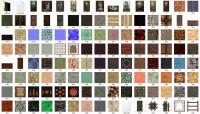
So, right now the pack has 18 MB, 120 textures, some of them have 2048x2048.
I think people will like the large rock textures.
There's also a new skybox.

The qualtiy is good.

Attached thumbnail(s)

  • Attached Image: Zwischenablage01.jpg


This post has been edited by Mia Max: 06 May 2012 - 10:02 PM

4

User is offline   Micky C 

  • Honored Donor

#1272

There are some useful looking textures in that <_<
0

User is offline   Micky C 

  • Honored Donor

#1273

Can there be an ability to stop the fog from being removed when weapons are being fired in polymer? And can there also be an option to stop enemies going fullbright when they're shooting at you? This last point in particular can really break the mood in dark places.
1

User is offline   Jblade 

#1274

View PostMicky C, on 09 May 2012 - 01:54 AM, said:

Can there be an ability to stop the fog from being removed when weapons are being fired in polymer? And can there also be an option to stop enemies going fullbright when they're shooting at you? This last point in particular can really break the mood in dark places.

Stopping fog from being removed when shooting in any renderer would be best, but I don't know if it's even possible. As for the second one, I think an option in a projectile's workslike flag that stop whatever's firing it from lighting up would be useful as well <_<

This post has been edited by James: 09 May 2012 - 08:04 AM

0

User is offline   Diaz 

#1275

You can stop actors who are firing from lighting up by setting their shade value manually in EVENT_GAME. By doing this depending on what AI / action the actor is executing, you can make him light up when shooting shotspark1 but not when shooting rpg, for example.

You can also prevent fog from being removed when shooting by adding 256 to WEAPONx_FLAGS .
0

User is offline   Danukem 

  • Duke Plus Developer

#1276

View PostDiaz, on 09 May 2012 - 08:27 AM, said:

You can also prevent fog from being removed when shooting by adding 256 to WEAPONx_FLAGS .


Yes, but that ought to be automatic in Polymer, as James was saying. Shooting already makes Polymer lights (as do the shotsparks upon impact) so the additional flashing of the entire level is just a legacy thing with drawbacks.
0

Share this topic:


  • 57 Pages +
  • « First
  • 41
  • 42
  • 43
  • 44
  • 45
  • Last »
  • You cannot start a new topic
  • You cannot reply to this topic


All copyrights and trademarks not owned by Voidpoint, LLC are the sole property of their respective owners. Play Ion Fury! ;) © Voidpoint, LLC

Enter your sign in name and password


Sign in options