Duke4.net Forums: EDuke32 2.0 and Polymer! - Duke4.net Forums

Jump to content

  • 213 Pages +
  • « First
  • 195
  • 196
  • 197
  • 198
  • 199
  • Last »
  • You cannot start a new topic
  • You cannot reply to this topic

EDuke32 2.0 and Polymer!  "talk about the wonders of EDuke32 and the new renderer"

User is offline   Micky C 

  • Honored Donor

#5870

Heads up; I have no idea what I’m talking about here.

I have the feeling that there’s simply no mechanism in place that can be adapted to drawing equivalent models of the clipmaps. The 2D engine can’t spawn sector geometry for a spite that’s floating in the air or crossing multiple sectors. It can’t really be made of individual spites since those sprites would have to be sloped and of arbitrary, dynamically-generated shape, other than some kind of particle-based system not unlike what Trooper Dan suggested but spawned directly by the model on a per-frame basis.

Model support itself is also pretty limited. TX or someone has said that the engine doesn’t really know what a model is, simply that the renderer is told to show a certain asset. After all, the whole reason that Helixhorned implemented clipshape was because that the engine doesn’t intrinsically know model geometry in the first place. As such, it’s unlikely that the reverse process is going to be a thing. Yes, the engine does know the clipping going on in this case, but again there’s no good mechanism to draw it.

It doesn’t help that Helixhorned, who did the original implementation, is no longer around.

This post has been edited by Micky C: 01 June 2018 - 03:05 AM

0

User is offline   Mark 

#5871

In Mapster under the wireframe mode it shows the model and its clipshape in polygons. It should be possible to get that in game too I would think.

This post has been edited by Mark.: 01 June 2018 - 06:06 AM

0

User is offline   Danukem 

  • Duke Plus Developer

#5872

So I'm trying to figure out how to make cameras show the player as Bombshell when the player is Bombshell. There seems to be a dummy player sprite just for the purpose of showing the player next to the viewscreen, and it always shows APLAYER (tile 1405), regardless of what animation the player is actually in or what direction the player is facing. I don't know how to get access to that sprite.

Anyways, I thought to try EVENT_DISPLAYCAMERAOSD, which of course isn't documented. RETURN is 0 and setting it to -1 does nothing. Next I noticed that THISACTOR in that event has a value, so I thought maybe it was the value of the dummy player sprite. So I thought what the fuck let's just set the picnum of that sprite to Bombshell's picnum and see what happens. Fucking hilarious! Turns out it is the ID of the camera being viewed from, so doing that turned the camera into a Bombshell actor which started running around and shooting monsters. But, since it was still the ID of the active camera, you could see from her eyes through the viewscreen if you took a step back from it.
1

User is offline   Forge 

  • Speaker of the Outhouse

#5873

Funny side-effect.

If you want to get the result you were originally after, ask James. He has like 38 characters in his AMC TC and is able to get cameras to show the proper actor.
0

User is offline   Danukem 

  • Duke Plus Developer

#5874

View PostForge, on 03 June 2018 - 02:44 PM, said:

Funny side-effect.

If you want to get the result you were originally after, ask James. He has like 38 characters in his AMC TC and is able to get cameras to show the proper actor.


I have a solution now; I'll check with James later to see if we're doing it the same way.
1

User is offline   Jblade 

#5875

IIRC I basically spawn in a dummy sprite when the player is looking through a camera; I came up with the code back when the mod was first being worked on so my solution probably isn't as elegant as it could be.
1

#5876

I posted in the wrong thread, so I'll say well, Duke on!

This post has been edited by PsychoGoatee: 06 June 2018 - 05:39 PM

0

User is offline   Fox 

  • Fraka kaka kaka kaka-kow!

#5877

View PostTrooper Dan, on 03 June 2018 - 02:25 PM, said:

Anyways, I thought to try EVENT_DISPLAYCAMERAOSD, which of course isn't documented.

It's used to display CAMCORNER and CAMLIGHT when viewing through a security camera.
0

User is offline   Mark 

#5878

I have brought this issue up a few times over the years and I don't remember what the replies were or why it has never been resolved.

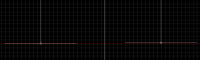
Flickering of wall sprites under polymer. When a sprite is placed on a wall, Mapster offsets it a tiny little bit away from the wall when looking at it in 2D mode. That makes it a 50/50 chance that it will flicker in game using Polymer. My solution has been to turn off grid locking and manually drag the sprite a tiny bit further from the wall. Flickering problem solved. But seeing as how I have had to do this many 100's, maybe more than a 1,000 times over the years in all my projects it sure would be nice to have Mapster automatically place new sprites further away.

My suggestion is double the number that is used in that calculation right now. My pic shows the default placement on the left and where I manually drag it to on the right. Just that tiny bit of placement makes the problem go away. For reference in the pic, mapster is set for the smallest grid square.

Attached thumbnail(s)

  • Attached Image: FLICKERSPRITE.png


This post has been edited by Mark.: 11 June 2018 - 09:16 AM

0

User is offline   Mark 

#5879

No response? I'm guessing the problem may be an issue with the Polymer renderer. But since messing with that isn't very feasible I thought getting the fix through Mapster would be the hot ticket. Any foreseen problems with the Mapster fix?
0

User is offline   Danukem 

  • Duke Plus Developer

#5880

View PostMark., on 13 June 2018 - 10:47 AM, said:

No response? I'm guessing the problem may be an issue with the Polymer renderer. But since messing with that isn't very feasible I thought getting the fix through Mapster would be the hot ticket. Any foreseen problems with the Mapster fix?


I'm pretty sure they don't want to make mapster changes based on Polymer glitches. But you could strengthen your case if you could show that the old default distance used in the original maps was larger and did not cause the issue.

Also, I don't have time to do this right now, but one could make a mapster script that would adjust the distances for the entire map all at once so you wouldn't have to do it manually.
0

User is offline   Mark 

#5881

IIRC It does cause the flicker in vanilla maps. This has been happening for years. I thought I would bring it up again in case someone wanted to try what I thought would be a good compromise fix. I'll just continue my workaround for another few hundred times. Its not a mod breaker.
0

User is offline   TerminX 

  • el fundador

  #5882

Polymer still has issues with z buffer fighting regarding wall oriented sprites, yeah. Changing the editor to place sprites further away from the walls is just a band-aid "fix" and isn't really acceptable--the issue will have to be addressed in Polymer itself if/when it enters active development in the future.
0

User is offline   Mark 

#5883

sigh :(
0

User is offline   Tea Monster 

  • Polymancer

#5884

If your name were Jim, I could tell you something.
0

User is offline   Mark 

#5885

Huh?

Attached thumbnail(s)

  • Attached Image: huh.gif

0

User is offline   Mark 

#5886

View PostTerminX, on 13 June 2018 - 05:08 PM, said:

Polymer still has issues with z buffer fighting regarding wall oriented sprites, yeah. Changing the editor to place sprites further away from the walls is just a band-aid "fix" and isn't really acceptable--the issue will have to be addressed in Polymer itself if/when it enters active development in the future.


I determined the band-aid fix to be acceptable and asked someone to apply it to Mapster32 for me. It works great. I know, if I want to continue using this feature I have to stay with this revision. I don't want to keep bugging this guy every couple of months to apply the band-aid to the latest revision. But right now its a decent tradeoff.

This post has been edited by Mark.: 24 June 2018 - 06:07 AM

0

User is offline   Micky C 

  • Honored Donor

#5887

Couldn’t you just add a mapster script solution?
0

User is offline   Mark 

#5888

I'm sure its possible. But wouldn't the script be run from the console after the sprites are placed? In the mean time they would flicker and sometimes be hard to select and pan/resize.

Or would the script automatically run at Mapster startup and place the sprites away from the wall by default like my version does?

This post has been edited by Mark.: 24 June 2018 - 06:17 AM

0

User is offline   Kyanos 

#5889

View PostMicky C, on 24 June 2018 - 06:10 AM, said:

Couldn’t you just add a mapster script solution?

Hmmm, how would you determine which sprites to move and when to move them. Just sorting for wall aligned sprites isn't enough, you would need to check if they are close to a wall. It's not so complex for trig, but a fair bit complex for m32 script.

Attached Image: capt0000.png

Eg) Rooftop E1L1, the fence;
These sprites are all pretty close to a wall, so the script should move them, but then the corners will open up (more than they already are.)
Also these sprites are above the wall and don't actually z-fight with anything because there is nothing behind them... so maybe they shouldn't move after all but now that's a hell of a lot of extra scripting, and what is that checking for, the height of the floor on the other side of a red wall if the sprite is even against a red wall, it may be a white wall and be empty back there...

This post has been edited by Drek: 24 June 2018 - 08:31 AM

0

User is offline   Danukem 

  • Duke Plus Developer

#5890

But if the script is written to apply to alt-selected sectors, then he could just decide which ones to include, whether its the whole map or a specific part. His maps may not even contain any situations similar to the fence area in E1L1.
0

User is offline   Mark 

#5891

That sounds like I would move the sprites with the script long after they are placed in the map. I much prefer to have them away from the wall at the time they are placed. I can't tell you how many times I was changing sprite size or height by holding down a key, the sprite flickers out and the wall behind it now changes. Or if the sprite has flickered completely out I have to move to get it back in view to mess with it. I don't find changing them with script after the fact as the prefered band-aid fix.

Also, the extra time and effort to zoom in all over the map to find and alt-select the proper sprites to run the script on would be a hassle. In my opinion, hacked Mapster32 is the best solution for me at this time.

If a Mapster script can be autoran at startup and perform the same sprite placement away from the wall at the time it is placed there I would say go for it. But right now it doesn't look to be that way. Until then it will be hard to talk me out of hacked mapster which does exactly what I wanted.

This post has been edited by Mark.: 24 June 2018 - 10:59 AM

0

User is offline   Danukem 

  • Duke Plus Developer

#5892

View PostMark., on 24 June 2018 - 10:50 AM, said:

That sounds like I would move the sprites with the script long after they are placed in the map. I much prefer to have them away from the wall at the time they are placed.


Well I don't know how I would make a mapster script intercept and adjust the sprite placement as it happens. The only way I know how to do it is when the user deliberately runs the script.
0

User is offline   Mark 

#5893

Sorry. I hit refresh and your post did not display so I added on to mine. So that just confirms in my mind I made the right choice for a band-aid until a Polymer fix happens, if ever.

This post has been edited by Mark.: 24 June 2018 - 11:03 AM

0

User is offline   Kyanos 

#5894

View PostTrooper Dan, on 24 June 2018 - 10:53 AM, said:

Well I don't know how I would make a mapster script intercept and adjust the sprite placement as it happens. The only way I know how to do it is when the user deliberately runs the script.

m32 script is many things, undocumented and surprising being just two of them.

onevent EVENT_INSERTSPRITE3D
    set k I
    for i spritesofsector .sectnum
    {
        ife i k
        {
            set .lotag 10
        }
    }
endevent


I read about EVENT_INSERTSPRITE2D in a.m32 so I just tried to do something random using event insert sprite 3d and it works. Maybe a script solution is feasible.
2

User is offline   Mark 

#5895

Once again Drek has...

Attached thumbnail(s)

  • Attached Image: upsidedown.jpg

1

User is offline   Kyanos 

#5896

This has gone far beyond my level of caring lol, but I do have a m32 that sort of accomplishes this, most of the time, doesn't seem to like 45 degree angle walls for some reason I'm far to tired to look into at this point.

////////// MOVE SPRITE ORNAMENTED (TESTING-6/24/2018) //////////

gamevar mso_i 0 0
gamevar mso_j 0 0
gamevar mso_k 0 0


onevent EVENT_INSERTSPRITE3D
    set mso_i -1
    set mso_j -1
    set mso_k 0
    
    ifaimingsprite nullop else
    ifaimingwall
    ife searchstat 0
    {                
            // j = wall[hitw].point2;
            // sprite[i].x -= ksgn(wall[j].y-wall[hitw].y);
            // sprite[i].y += ksgn(wall[j].x-wall[hitw].x);
        set mso_i -1
        set mso_j -1
        set mso_k 0
        setvarvar mso_j wall[searchwall].point2;
        
        setvarvar mso_i wall[mso_j].y 
        subvarvar mso_i wall[searchwall].y
        cos mso_k mso_i   
        divvar mso_k 512
        subvarvar .x mso_k;
        
        set mso_i -1
        set mso_k 0
        
        setvarvar mso_i wall[mso_j].x 
        subvarvar mso_i wall[searchwall].x
        sin mso_k mso_i   
        divvar mso_k 512
        subvarvar .y mso_k;
    }
endevent

1

#5897

Just a question if I may, that Duke UI spinning model, is it broken due to that new v5.1 hrp model that was added?

Because prior to that, it used a 3D spinning Duke model in the menu, now it's just the regular sprite.

Probably old, but just wanted to know.
0

User is offline   Hendricks266 

  • Weaponized Autism

  #5898

Do you mean the Duke in the Player Setup menu? I am confused because there is no "spinning Duke" in the menu anywhere.
0

#5899

Hey guys.

I've returned to Duke after a year, downloaded the newest version of eDuke32 and noticed some of my Cosmetic Duke code does not seem to work anymore i.e. specifically the casings on the Pistol and Shotgun. Funnily enough, the Chaingun casings and Pistol magazines (all of which are projectiles) work fine.

Mod:

https://www.mediafir...c8/CosmDuke.zip

I've tracked the specific version wherein the code stops working to 20170727-6388. It still works fine on 20170720-6372. I don't know whether this is a bug or some change I need to adjust my code to.
1

Share this topic:


  • 213 Pages +
  • « First
  • 195
  • 196
  • 197
  • 198
  • 199
  • Last »
  • You cannot start a new topic
  • You cannot reply to this topic


All copyrights and trademarks not owned by Voidpoint, LLC are the sole property of their respective owners. Play Ion Fury! ;) © Voidpoint, LLC

Enter your sign in name and password


Sign in options