Duke4.net Forums: EDuke32 2.0 and Polymer! - Duke4.net Forums

Jump to content

  • 213 Pages +
  • « First
  • 84
  • 85
  • 86
  • 87
  • 88
  • Last »
  • You cannot start a new topic
  • You cannot reply to this topic

EDuke32 2.0 and Polymer!  "talk about the wonders of EDuke32 and the new renderer"

User is offline   Plagman 

  • Former VP of Media Operations

#2540

View PostMarked, on 02 October 2011 - 07:58 AM, said:

A number of my custom models also get goofed up with the new face culling feature. But if the feature leads to an FPS increase I guess I'll go with the flow and re-work my models. Along with the previously mentioned HUD problems, the knuckle cracking "c'mon" model is also in need of repair.


Argh. The only thing I did was to unify behavior between Polymost and Polymer, but it's definitely my fault that Polymer had been inconsistent for so long. I guess your models were made specifically for Polymer and gliched under Polymost? Please let me know if it would be too much work to just flip the winding order of the faces, maybe I can help by writing a tool that does it for you.

0

User is offline   Mark 

#2541

The problems could have cropped up in earlier versions. I don't know for sure. I have been keeping up to date with the svn and other synthesis updates in one copy of Eduke. But my project's version is still from way back at 1743. I just updated the project's version to the most recent to take advantage of new features and some of my models do not display properly in Polymost and Polymer. I re-installed 1743 to confirm proper display and it does.
0

User is offline   Plagman 

  • Former VP of Media Operations

#2542

I haven't changed anything in Polymost; can you send me one of the models that's problematic in the new version?
0

User is offline   E.C.S 

#2543

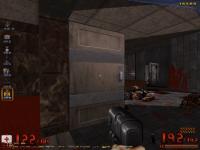
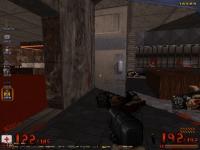
So, I lost the track of the updates a bit sometime ago, the most things which I noticed is the Widescreen option no longer works (or maybe changed the way of how it works) and this (see Attachments)

Also looks like there's a new .dll (ebacktrace1.dll), what does this file?

Sorry if I sound to stupid for asking this.

Attached thumbnail(s)

  • Attached Image: duke0000.jpg
  • Attached Image: duke0001.jpg

0

User is offline   Danukem 

  • Duke Plus Developer

#2544

View PostE.C.S, on 02 October 2011 - 02:33 PM, said:

and this (see Attachments)


That's probably just the door swinging the wrong way due to an imperfect implementation of map mirroring in that mod.
0

User is offline   E.C.S 

#2545

View PostDeeperThought, on 02 October 2011 - 02:47 PM, said:

That's probably just the door swinging the wrong way due to an imperfect implementation of map mirroring in that mod.


Hmmm... I see. but I have disabled that effect by default, or you're telling me the mirroring effect code is active even if the map isn't mirrored?
0

User is offline   Danukem 

  • Duke Plus Developer

#2546

View PostE.C.S, on 02 October 2011 - 03:04 PM, said:

Hmmm... I see. but I have disabled that effect by default, or you're telling me the mirroring effect code is active even if the map isn't mirrored?


That glitch in the screenshot is caused by a swing door swinging in the wrong direction; at least that's the only time I have seen that glitch. You are playing a mod which can mirror maps, and mirroring maps can cause some swing doors to swing in the wrong direction, because the code that changes the angle of the SEs gets it wrong in corner cases or something.

If mirroring is disabled in the menu, then it should not be happening. You can check by typing "addlogvar mirrored" in the console. If it answers with "1", then you know the map you are playing is mirrored.
0

User is offline   E.C.S 

#2547

View PostDeeperThought, on 02 October 2011 - 03:15 PM, said:

That glitch in the screenshot is caused by a swing door swinging in the wrong direction; at least that's the only time I have seen that glitch. You are playing a mod which can mirror maps, and mirroring maps can cause some swing doors to swing in the wrong direction, because the code that changes the angle of the SEs gets it wrong in corner cases or something.

If mirroring is disabled in the menu, then it should not be happening. You can check by typing "addlogvar mirrored" in the console. If it answers with "1", then you know the map you are playing is mirrored.


As a said, I deactivated the mirror effect (I change the gamevar mirroroption to NO to do it more easy), I typed in the console addlogvar mirrored and the answer was "0". I'm aware what mirroring does that's why I never play mirrored maps. I will check that map with no mods, to see if that glitch happens too.

This post has been edited by E.C.S: 02 October 2011 - 03:22 PM

0

User is offline   E.C.S 

#2548

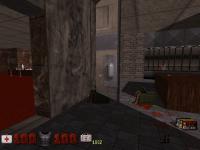
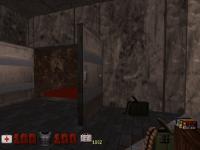
Same result, can anyone try this to make sure I'm not the only one with this problem?.

As you can see it only happens from one side and only when you're in that room.

Attached thumbnail(s)

  • Attached Image: duke0000.jpg
  • Attached Image: duke0001.jpg

0

User is offline   Mark 

#2549

View PostPlagman, on 02 October 2011 - 02:26 PM, said:

I haven't changed anything in Polymost; can you send me one of the models that's problematic in the new version?


Would it be possible to PM your email address to me and I can send a couple of the models and skins along with the problems I encountered?
0

User is offline   Danukem 

  • Duke Plus Developer

#2550

View PostE.C.S, on 02 October 2011 - 03:26 PM, said:

Same result, can anyone try this to make sure I'm not the only one with this problem?.

As you can see it only happens from one side and only when you're in that room.


Some maps have glitchy doors. If you've ever tried making swinging doors, you know how easy it is to mess it up with this kind of result. Unless you can show that the problem is being caused by a recent change in EDuke32, the most reasonable assumption is that it is a problem with the map.
0

User is offline   Mike Norvak 

  • Music Producer

#2551

 DeeperThought, on 02 October 2011 - 05:05 PM, said:

Some maps have glitchy doors. If you've ever tried making swinging doors, you know how easy it is to mess it up with this kind of result. Unless you can show that the problem is being caused by a recent change in EDuke32, the most reasonable assumption is that it is a problem with the map.


It should be caused by a recent change in EDuke, since that door has always been working. Maybe something about what is rendered first thing?

Attached thumbnail(s)

  • Attached Image: 1111.jpg


This post has been edited by Norvak: 02 October 2011 - 07:49 PM

0

User is offline   Plagman 

  • Former VP of Media Operations

#2552

Could be related to the changes Helix made to the Polymost drawing algorithm for TROR.
0

User is offline   Mike Norvak 

  • Music Producer

#2553

 Plagman, on 02 October 2011 - 07:50 PM, said:

Could be related to the changes Helix made to the Polymost drawing algorithm for TROR.


Well it looks correct with r1871 o.O Gonna check the last revision that works fine

EDIT: Glitch was introduced with r1887 :( Yep TROR was also introduced with that revision...

This post has been edited by Norvak: 02 October 2011 - 08:07 PM

0

User is offline   Helixhorned 

  • EDuke32 Developer

#2554

It was a bug with dragpoint() since the first TROR revision! Good thing it's out of the way now.
---

I'll be away till the 16th, but maybe I'll find a way to keep in touch.
0

User is offline   Tetsuo 

#2555

Since my builds tend to have fullscreen broken I like to get builds from you Helixhorned so are you going to do another one soon? Oh wait, he's gone until the 16th... :(

Don't mind me in this post anyone else.

This post has been edited by Tetsuo: 03 October 2011 - 11:20 AM

0

User is offline   Mark 

#2556

 Plagman, on 02 October 2011 - 02:26 PM, said:

I haven't changed anything in Polymost; can you send me one of the models that's problematic in the new version?


Email with 2 models and skins has been sent. Thanks.
0

User is offline   Danukem 

  • Duke Plus Developer

#2557

I think someone else asked this recently, but I don't remember where, or if they got an answer.

Is there an easy way to prevent the "CACHE SPACE ALL LOCKED UP!" crash? Apparently it happens when too many hi-res sprites are being drawn. I could reduce the number of sprites, but I'm wondering if there is a way to increase the cache size.

EDIT: Nevermind, I found the cachesize command.

But is it really necessary for the game to crash? Couldn't it dynamically increase the cachesize or do something smart like that?
0

User is offline   Stabs 

#2558

plagman iam not sure if you aware of this as i dont think many people use it but splitting sectors so a se49 cannot see a sector and therefore not cast light into that sector does not seem to work within TROR stacks
0

User is offline   TerminX 

  • el fundador

  #2559

View PostDeeperThought, on 03 October 2011 - 09:19 PM, said:

But is it really necessary for the game to crash? Couldn't it dynamically increase the cachesize or do something smart like that?

It could, but it would introduce a slew of new actual crashes to hammer out before it ever worked right. Changing the cache size after the engine is initialized like that would involve changing the location in memory for every 8-bit tile, non-ogg sound effect, etc, I guess the game could be saved and the engine could be transparently reinitialized with higher cache values but there would certainly be a long pause during this process, probably to the extent of having to throw up a loading screen during it.

It's a lot better of an idea to just specify a larger cache in your def files. :(
0

User is offline   Hendricks266 

  • Weaponized Autism

  #2560

View PostTX, on 12 October 2011 - 07:12 AM, said:

Changing the cache size after the engine is initialized like that would involve changing the location in memory for every 8-bit tile, non-ogg sound effect, etc

/me shuffles to the to-do list of things too ambitious to do

(as in not requiring massive repositioning)

This post has been edited by Hendricks266: 12 October 2011 - 06:10 PM

0

User is offline   Ronin 

#2561

The way you guys are working, Duke 3D will probably keep getting better until eventually it becomes god.
0

User is offline   Micky C 

  • Honored Donor

#2562

When I first read that, I thought you said they'd keep working on it until it becomes 'good'.

Anyway I second DanM on the slicer tool for mapster, it would be a huge time saver. It doesn't even have to be a slicer tool per say, it could be if you draw a red line over one or more red lines, and connect it to a wall at the other end of the room, a point is inserted at each intercection, with the red line going through all points. Maybe it could ask if we want points to be inserted like with the copy and paste.
0

User is offline   Ronin 

#2563

View PostMicky C, on 13 October 2011 - 04:58 PM, said:

When I first read that, I thought you said they'd keep working on it until it becomes 'good'.

Anyway I second DanM on the slicer tool for mapster, it would be a huge time saver. It doesn't even have to be a slicer tool per say, it could be if you draw a red line over one or more red lines, and connect it to a wall at the other end of the room, a point is inserted at each intercection, with the red line going through all points. Maybe it could ask if we want points to be inserted like with the copy and paste.

HAHA no I love it and only recently have I got a pc powerful enough to run stuff like polymer properly, I show it off to some of my mates who are old Duke fans and it makes them want a better PC, I have enjoyed watching the evolution of Duke 3D and cant wait for the next leap which I hope will be be enemy animations though I understand there are limitations at the moment with what can be done with them. But it keep growing like nothing else out there, which is cool because I often wondered why one of the best games ever made doesnt get more attention and sequals, and it hurts less when I see the progress being made on this, it will eventually reach perfection...how could it not?
0

User is offline   Master Fibbles 

  • I have the power!

#2564

The problem with what you propose is that what if you don't want your red lines to intersect? While doing TROR and not having the layers fully greyed out or something similar, that could cause all sorts of map bugs.
0

User is offline   Micky C 

  • Honored Donor

#2565

That's why mapster would ask if you want points to be inserted. When you paste sectors inside other sectors, it asks you whether or not you want to create an inner loop, and that's what'll happen with the slicer. The TROR does make it more complicated though, as you would have to have areas greyed out sometimes. Or it might be able to check which group of sectors the start and end point are directly connected to, and only insert points in those sectors.
0

User is offline   Stabs 

#2566

its such a quirky little engine you just learn to work around things, hell i worked around that shit SOS sector detection for years ( way better now but still not as accurate as lebuild ) , and if you understand TROR enough you should be able to understand and compensate for the complications of an operation like this.

no one will be forced to use it but the fact its there is nice

This post has been edited by DanM: 13 October 2011 - 10:26 PM

0

User is offline   Jblade 

#2567

Any chances you guys could raise the max level limit in an episode to 64 or something? Or let us define music tracks up to that much? I know we could use other episodes for extra levels but some stuff I've coded depends on levels being in a set episode so It'd help me alot if we had more room for maps and music tracks :(
0

User is offline   Fox 

  • Fraka kaka kaka kaka-kow!

#2568

Since you are asking, can it be made so it's possible to start the music defined by title and briefing screen? I would also like to be able to stop the track without the need to define a blank sound file.

This post has been edited by Fox: 18 October 2011 - 05:22 AM

0

User is offline   Hendricks266 

  • Weaponized Autism

  #2569

I've had for some time in my list of stuff to add some way of splitting music out from the episode/level system and adding controls which are not available now.

Same thing with increasing map amounts.
1

Share this topic:


  • 213 Pages +
  • « First
  • 84
  • 85
  • 86
  • 87
  • 88
  • Last »
  • You cannot start a new topic
  • You cannot reply to this topic


All copyrights and trademarks not owned by Voidpoint, LLC are the sole property of their respective owners. Play Ion Fury! ;) © Voidpoint, LLC

Enter your sign in name and password


Sign in options