EDuke32 2.0 and Polymer! "talk about the wonders of EDuke32 and the new renderer"
#2427 Posted 31 August 2011 - 01:06 PM
Here's my log:
OK this seems to only happen when setting the game full screen it fails when I try to do that. On the other hand the long standing bug I had been talking about where sectors outside the one you are in cease to draw showing the skybox after a while seems to have been fixed so that's something.
This post has been edited by Tetsuo: 31 August 2011 - 04:37 PM

#2428 Posted 31 August 2011 - 06:31 PM
See WGR2 Models thread for download.
#2429 Posted 31 August 2011 - 08:33 PM
#2430 Posted 31 August 2011 - 08:37 PM
#2431 Posted 01 September 2011 - 12:07 PM
Plagman, on 31 August 2011 - 08:33 PM, said:
I figured it was something I did. I just wanted to show you in case it was a polymer issue. And the height map came from that crazybump program, so it's probably flawed somehow, they base it from a picture. I will make my own and hope for better results. Thanks Plagman.
#2432 Posted 01 September 2011 - 01:31 PM
TX, on 28 August 2011 - 11:31 AM, said:
Hooray! Congrats, Plagman! Not that it matters to me anymore. I've since upgraded to a NVidia card with no issues at all. But this will be a godsend for people still living under ATI's regime. Thank you for all your hard work!
#2433 Posted 01 September 2011 - 02:49 PM
DeeperThought, on 01 September 2011 - 12:50 PM, said:

I am attempting to replace a set of fence tiles with this one md3. The model has 2 planes in the center, each facing opposite directions. These two planes are what change for each different sprite via separate skins. This is the area DT is talking about in this quote. Both planes coexist at the exact same location, just a mirrored duplicate. I will try some adjustments on the model. I just wanted to let you know about this because it does work in polymost.
#2434 Posted 01 September 2011 - 03:01 PM
This post has been edited by Marked: 01 September 2011 - 03:11 PM

#2435 Posted 01 September 2011 - 05:06 PM
#2436 Posted 01 September 2011 - 06:12 PM
#2437 Posted 01 September 2011 - 06:14 PM
#2438 Posted 02 September 2011 - 12:01 PM
Quote
I guess nobody posted about this here yet, but Plagman fixed the huge problems ATI users were experiencing with Polymer last night. Go Plagman.
Thanks Plagman, this fix finally makes polymer playable for me on my laptop
This post has been edited by Drek: 02 September 2011 - 12:05 PM
#2439 Posted 02 September 2011 - 01:29 PM
#2440 Posted 03 September 2011 - 11:33 AM
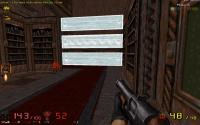
There is a problem with floor aligned and wall aligned sprites not being displayed with the correct game palette when the game palette changes (e.g. when nightvision goggles are used). I have only seen this happen in WGR2, which has a modified nightvision palette.
-Many wall aligned sprites continue to look normal when the goggles are on, instead of having the altered palette.
-Some floor aligned sprites do have the altered palette when the goggles are on, but then they continue to have it even after the goggles are off.
-In one instance which I haven't been able to replicate, all of the wall aligned wood planks in the map (even those miles away from where the goggles were used) continued to be displayed with the altered palette after the goggles were turned off. Turning goggles on/off again did not fix it. I have a screenshot of this attached.
EDIT: The easiest way to see an example of the bug is to kill some enemies with the rocket launcher while using nightvision ("spirit vision" in WGR2). When you turn them off, some or all of the blood pools will still have the goggle palette.
#2441 Posted 05 September 2011 - 01:49 PM
#2442 Posted 05 September 2011 - 05:40 PM
James, on 05 September 2011 - 01:49 PM, said:
Yeah is kinda annoying, anyways you can enter this on the console: corruptcheck tryfix
#2443 Posted 05 September 2011 - 06:14 PM
Norvak, on 05 September 2011 - 05:40 PM, said:
Is there any possibility of that raping the map? It scares me. I just did it on a map, and it changed literally hundreds of sectors. Here's a sample:
-> auto-correction: reset sector 11's ceiling slope -> auto-correction: reset sector 12's ceiling slope -> auto-correction: reset sector 13's floor slope -> auto-correction: reset sector 14's floor slope -> auto-correction: reset sector 15's ceiling slope
The map looks fine, but it's huge and I may have missed something.
#2444 Posted 05 September 2011 - 06:25 PM
#2445 Posted 05 September 2011 - 07:09 PM
#2446 Posted 06 September 2011 - 05:57 AM
#2447 Posted 06 September 2011 - 11:01 AM
Fox, on 05 September 2011 - 06:25 PM, said:
That sounds plausible. But that's so minor it shouldn't be considered "corruption". The game could easily fix that at map load time, anyway.
#2448 Posted 06 September 2011 - 01:05 PM
#2449 Posted 06 September 2011 - 02:16 PM
Helixhorned, on 06 September 2011 - 01:05 PM, said:
Is having inconsistencies between stats and heinum safe, or is it not safe? If it's not safe, then I don't see why the inconsistency needs to be allowed for the sake of a possible tag, especially when there are other ways to achieve the same result (moreover, I doubt that anyone has actually used it that way or plans to). If it is safe, then it's not what should be considered "corruption". When mapster reports "corruption", that sounds very serious; it's too bad there's no easy way to tell how serious the corruption actually is without having a lot of technical knowledge.
#2450 Posted 07 September 2011 - 08:13 AM
5 -- run for your life (clearly invalid values that can lead to a crash)
4 and 3 -- very serious and serious
2 and 1 -- warnings
Right now, only the maximum is reported though.
#2453 Posted 11 September 2011 - 03:27 PM
#2454 Posted 11 September 2011 - 08:25 PM
ReaperMan, on 11 September 2011 - 01:29 PM, said:
TX, on 11 September 2011 - 02:46 PM, said:

Help
Duke4.net
DNF #1
Duke 3D #1