EDuke32 Scripting "CON coding help"
#2538 Posted 13 July 2019 - 04:42 AM
#2539 Posted 28 August 2019 - 11:51 AM
I want to know if there is a code for Eduke32, for manual pistol reload?
If so what are the Eduke32 equivalents of these:
actor APLAYER onevent EVENT_DOFIRE onevent EVENT_TURNAROUND onevent EVENT_RESETPLAYER onevent EVENT_PRESSEDFIRE onevent EVENT_DISPLAYREST

I got confused trying to make the code from "How to manually reload" tutorial work with Eduke32. It works in Duke 3D CON's
#2540 Posted 28 August 2019 - 12:05 PM
Gordon Freeman, on 28 August 2019 - 11:51 AM, said:
The tutorial you refer to: https://wiki.eduke32...manually_reload
IS for EDuke32 already. You've got it backwards -- you can use it in EDuke32 CONs but not in regular Duke 3D CONs.
#2542 Posted 30 August 2019 - 03:15 PM
Can someone post a script example of how to add manual reload to the shotgun, as an example.
Its easier for me to learn by example.
I'm learning, but it is a very slow process...
#2543 Posted 30 August 2019 - 03:52 PM
EDIT: Anyway, I coded a manual reload shotgun for DukePlus, and I think AMC TC has several like that. It will be hard for you to find the relevant code by searching through the CONs, but I don't have time to write new code.
This post has been edited by Trooper Dan: 30 August 2019 - 04:01 PM
#2544 Posted 31 August 2019 - 07:39 AM
Trooper Dan, on 30 August 2019 - 03:52 PM, said:
EDIT: Anyway, I coded a manual reload shotgun for DukePlus, and I think AMC TC has several like that. It will be hard for you to find the relevant code by searching through the CONs, but I don't have time to write new code.
I want the shotgun to reload after firing 8 rounds. I want the shotgun to stop working after it empties all 8 rounds, until i press the reload key. You don't have to write a new code, I will find it in the AMC TC or DukePlus, and make it work, somehow. Thank you for telling me, and also for help and patience with me.
#2546 Posted 23 November 2019 - 03:16 PM
#2547 Posted 08 January 2020 - 02:26 AM
#2548 Posted 19 January 2020 - 11:51 PM
Is there a way to determine which frame of the animation is currently playing? This is necessary, for example, to synchronize the sound of steps with character animation. Or to make sure that the animation has finished playing.
#2549 Posted 20 January 2020 - 03:28 AM
Mr. Alias Nameless, on 19 January 2020 - 11:51 PM, said:
Is there a way to determine which frame of the animation is currently playing? This is necessary, for example, to synchronize the sound of steps with character animation. Or to make sure that the animation has finished playing.
https://wiki.eduke32...iki/Actioncount
ifactioncount and resetactioncount can be used to do what you want.
#2550 Posted 20 January 2020 - 10:04 AM
For example a golden armor of 200hp, will keep the health always at 100%, until the armor runs out.
Last thing, I would also like to make sure that Duke cannot pick up another armor, until the special armor is used up below 100%.
This post has been edited by Firefly Trooper: 20 January 2020 - 10:13 AM
#2551 Posted 28 January 2020 - 01:16 AM
This could be very useful for creating an inventory interface, for example.
#2552 Posted 10 February 2020 - 06:44 AM
Still, we have some functions like ifcansee that work against actors. I probably need that but for textures.
edit:
Apparently this is exposed via the gotpic array in CON.
ife gotpic[tilenum] 1 => means that tilenum is currently visible
The array doesn't reset on its own (there is an EVENT_RESETGOTPICS but from what I can tell from the source code, this only gets called when handling mirrors), but you can do so manually inside your code bock:
setarray gotpic[tilenum] 0
So far performance seems ok
Credit to Mblackwell for letting me know
This post has been edited by Sangman: 10 February 2020 - 09:29 AM
#2553 Posted 10 February 2020 - 09:44 AM
Sangman, on 10 February 2020 - 06:44 AM, said:
ife gotpic[tilenum] 1 => means that tilenum is currently visible
The array doesn't reset on its own (there is an EVENT_RESETGOTPICS but from what I can tell from the source code, this only gets called when handling mirrors), but you can do so manually inside your code bock:
setarray gotpic[tilenum] 0
Interesting. So what exactly causes the elements to get set? For example, if a certain enemy dies in a place where no players are around, is its dead body tile "in view"? Or does it require that the tile is actually rendered on a screen?
#2555 Posted 19 February 2020 - 12:45 PM
This post has been edited by Firefly Trooper: 19 February 2020 - 12:48 PM
#2556 Posted 19 February 2020 - 03:56 PM
Trooper Dan, on 10 February 2020 - 09:44 AM, said:
It requires the tile to be rendered.
This was added so the skybox in Ion Fury would only be drawn if the skybox texture (which is a blank tile) was visible.
Note that it's only set after it's rendered (meaning that in the Ion Fury example there's a 1 frame delay).
#2557 Posted 19 February 2020 - 04:15 PM
Fox, on 19 February 2020 - 03:56 PM, said:
This was added so the skybox in Ion Fury would only be drawn if the skybox texture (which is a blank tile) was visible.
Note that it's only set after it's rendered (meaning that in the Ion Fury example there's a 1 frame delay).
I miss-clicked and downvoted you by accident (that was supposed to be an upvote).
Anyway, that's a good feature for saving resources with an expensive command like showview
#2558 Posted 21 March 2020 - 08:49 AM
#2559 Posted 22 March 2020 - 03:24 PM
getplayer[THISACTOR].posx temp1 getplayer[THISACTOR].posy temp2 setplayer[THISACTOR].posx XPOS setplayer[THISACTOR].posy YPOS ldist DISTDIFF THISACTOR player[THISACTOR].i setplayer[THISACTOR].posx temp1 setplayer[THISACTOR].posy temp2
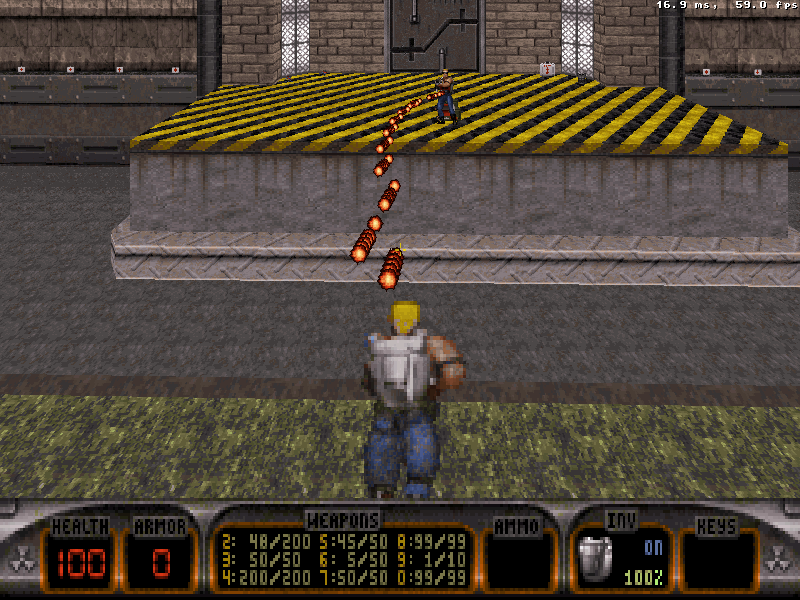
I'm trying to make monsters shoot at the direction of the player's movements (if you played Unreal games, you know what I mean).
#2560 Posted 22 March 2020 - 03:49 PM
EDIT: Here, if the vars "hitx" and "hity" are the distant coordinates, and assuming the other vars have been declared, then this will do the job
set xydist sprite[].x sub xydist hitx mul xydist xydist set y2 sprite[].y sub y2 hity mul y2 y2 add xydist y2 sqrt xydist xydist
This post has been edited by Trooper Dan: 22 March 2020 - 03:56 PM
#2561 Posted 23 March 2020 - 09:45 AM
Example, dodging left:

Also made a variant that take account of height. This time dodging left and jetpack on, going up:
#2562 Posted 23 March 2020 - 10:42 AM
#2563 Posted 23 March 2020 - 01:08 PM
#2564 Posted 24 May 2020 - 11:31 PM
#2565 Posted 25 May 2020 - 11:20 AM
#2566 Posted 25 May 2020 - 11:37 AM
spacekebab, on 25 May 2020 - 11:20 AM, said:
Not sure what you mean. At first I thought you meant prevent them from hanging off of ledges, but now I doubt that.
#2567 Posted 25 May 2020 - 07:15 PM
Trooper Dan, on 25 May 2020 - 11:37 AM, said:
That's exactly what I meant, sorry - didn't know how to word it.
This post has been edited by spacekebab: 25 May 2020 - 07:16 PM

Help
Duke4.net
DNF #1
Duke 3D #1