Duke4.net Forums: PolymerNG - Xbox One and Windows 10 - Duke4.net Forums

Jump to content

  • 41 Pages +
  • « First
  • 22
  • 23
  • 24
  • 25
  • 26
  • Last »
  • You cannot start a new topic
  • You cannot reply to this topic

PolymerNG - Xbox One and Windows 10

User is offline   Mark 

#691

We wanted our project to be a total surprise but it seems we have to make the following announcement to help decide what to showcase with the NG renderer. In January a small team was created to produce NG props for Hollywood Holocaust to showcase the upcoming new renderer from IceColdDuke. The plan was to replace all or most of the models and even replace some sprite and sector based items with models. Also included would be revamping the Polymer lighting in the map.

There were 6 people on the team at the beginning but very shortly after starting, 3 of them dropped out for various "real life" reasons. Unfortunately the first to leave was 1 of our 2 main model makers and is known as a real speed demon for how fast he could produce them. The other 2 were to be for textures and mapping help. At that same time there was an issue with ICD disappearing for almost a month with his own real life issues. That, along with not actually having a version of the renderer for testing caused the 3 remaining team members ( TeaMonster, Spiker and I ) to re-evaluate the scope of the project.

After much discussion we had decided to go forward as a project for Polymer with the intent of keeping our new assets in NG formats to be added in at a later time when the NG renderer is more mature. That in itself was still quite a large undertaking for 3 people with families and/or fulltime jobs. And if that wasn't enough already, I had to come along and urge the guys to let me expand on and retexture the map itself. Even more work.

While changing the map I made sure to keep it easily recognizable as HH. The overall layout hasn't changed. As of right now the enemies, weapons and ammo hasn't been changed. Rooms have been filled with lots of extra props and more Polymer lights have been added. I have been keeping track in the back of my mind that some people still don't have powerful enough computers to run Polymer so with only a change to global shading and visibility I should be able to include a Polymost version of the map. Of course it won't have the lighting to bring out the whiz-bang highlights of the models and textures but it will be playable.

So, I just wanted to bring this up in case it has some bearing on the discussion. We are striving to have something to release within 4-6 weeks. It most likely won't be 100 percent of our original goals because of lack of manpower. But we are churning out a lot of stuff. :)

This post has been edited by Mark.: 05 June 2016 - 06:28 AM

8

User is offline   Fox 

  • Fraka kaka kaka kaka-kow!

#692

Related?
0

User is offline   Tea Monster 

  • Polymancer

#693

Nope.
0

#694

View PostMark., on 05 June 2016 - 06:21 AM, said:

We wanted our project to be a total surprise but it seems we have to make the following announcement to help decide what to showcase with the NG renderer. In January a small team was created to produce NG props for Hollywood Holocaust to showcase the upcoming new renderer from IceColdDuke. The plan was to replace all or most of the models and even replace some sprite and sector based items with models. Also included would be revamping the Polymer lighting in the map.

There were 6 people on the team at the beginning but very shortly after starting, 3 of them dropped out for various "real life" reasons. Unfortunately the first to leave was 1 of our 2 main model makers and is known as a real speed demon for how fast he could produce them. The other 2 were to be for textures and mapping help. At that same time there was an issue with ICD disappearing for almost a month with his own real life issues. That, along with not actually having a version of the renderer for testing caused the 3 remaining team members ( TeaMonster, Spiker and I ) to re-evaluate the scope of the project.

After much discussion we had decided to go forward as a project for Polymer with the intent of keeping our new assets in NG formats to be added in at a later time when the NG renderer is more mature. That in itself was still quite a large undertaking for 3 people with families and/or fulltime jobs. And if that wasn't enough already, I had to come along and urge the guys to let me expand on and retexture the map itself. Even more work.

While changing the map I made sure to keep it easily recognizable as HH. The overall layout hasn't changed. As of right now the enemies, weapons and ammo hasn't been changed. Rooms have been filled with lots of extra props and more Polymer lights have been added. I have been keeping track in the back of my mind that some people still don't have powerful enough computers to run Polymer so with only a change to global shading and visibility I should be able to include a Polymost version of the map. Of course it won't have the lighting to bring out the whiz-bang highlights of the models and textures but it will be playable.

So, I just wanted to bring this up in case it has some bearing on the discussion. We are striving to have something to release within 4-6 weeks. It most likely won't be 100 percent of our original goals because of lack of manpower. But we are churning out a lot of stuff. :)

I personally vote for this, any objections?

This post has been edited by icecoldduke: 05 June 2016 - 07:36 AM

0

User is offline   Spiker 

#695

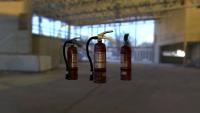
Small teaser of one of the props I made for it Posted Image

Attached thumbnail(s)

  • Attached Image: screenshot002.jpg

6

User is offline   Kyanos 

#696

View Posticecoldduke, on 05 June 2016 - 07:36 AM, said:

I personally vote for this, any objections?


You crack me up. I think that project has the best chances of finishing in a decent time frame.

How's the win7 build coming? I look forward to having something to see.
0

#697

View PostDrek, on 05 June 2016 - 08:49 AM, said:

You crack me up. I think that project has the best chances of finishing in a decent time frame.

How's the win7 build coming? I look forward to having something to see.

You can't say I make boring conversations :). I'm working on it, I'll post here with binaries when its complete.
1

User is offline   Steveeeie 

#698

View PostSpiker, on 05 June 2016 - 08:08 AM, said:

Small teaser of one of the props I made for it Posted Image


You're material definition looks great.

Was this baked from a high poly? I ask because the edges are all very sharp.

Also on the body you have excess geometry that could have been achieved better if it was baked into the normal map.

That said in other places you are lacking geometry, like the handle its very square and sharp.
0

User is offline   Mblackwell 

  • Evil Overlord

#699

At a certain point realistically though it has to be "good enough", especially for the frequency and proximity of that prop.

Spoiler

0

User is offline   Spiker 

#700

View PostSteveeeie, on 05 June 2016 - 09:03 AM, said:

You're material definition looks great.

Was this baked from a high poly? I ask because the edges are all very sharp.

Also on the body you have excess geometry that could have been achieved better if it was baked into the normal map.

That said in other places you are lacking geometry, like the handle its very square and sharp.

I can add bevel to the handle if thats what you mean and if it makes it better.

Excess geometry? You mean the "black stripe"?

I did not bake it. I heard it's the best approach but would that help in that case? Is it always worth replacing geometry with normal maps?

I did not consider it final because I did not have a chance to tweak it for the new renderer.

This post has been edited by Spiker: 05 June 2016 - 09:17 AM

0

User is offline   Steveeeie 

#701

View PostSpiker, on 05 June 2016 - 09:16 AM, said:

I can add bevel to the handle if thats what you mean and if it makes it better.

Excess geometry? You mean the "black stripe"?

I did not bake it. I heard it's the best approach but would that help in that case? Is it always worth replacing geometry with normal maps?

I did not consider it final because I did not have a chance to tweak it for the new renderer.


No need to re-work at this point, you're better off moving on and working on the next thing.

I'll try and do a paint over after and show you where it could be improved so you know a bit more going into the next prop.
0

User is offline   Spiker 

#702

View PostSteveeeie, on 05 June 2016 - 09:20 AM, said:

No need to re-work at this point, you're better off moving on and working on the next thing.

I'll try and do a paint over after and show you where it could be improved so you know a bit more going into the next prop.
Any advice is welcome.
0

User is offline   Kyanos 

#703

View PostSpiker, on 06 June 2016 - 01:56 AM, said:

Any advice is welcome.
ok

View PostSpiker, on 05 June 2016 - 09:16 AM, said:

Is it always worth replacing geometry with normal maps?

View PostMark., on 05 June 2016 - 06:21 AM, said:

I have been keeping track in the back of my mind that some people still don't have powerful enough computers to run Polymer so with only a change to global shading and visibility I should be able to include a Polymost version of the map.
If you guys are serious about backwards compatibility then it is definitely good to keep some geometry vs normal maps.

This post has been edited by Drek: 06 June 2016 - 03:28 PM

0

User is offline   Mark 

#704

Polymost compatibility is not a priority. Some rooms and textures are going to look flat because of the lack of lighting and use of normal and spec maps. At least it will be playable
0

#705

So a quick update regarding the UWP -> Win64 effort(32bit will not be supported initially, only because I have not tested 32bit at all). I moved all the game code over to its own project. Initially it was inside the UWP project. The UWP project project has now been renamed to EDuke32_UWP_Launcher, the Win32/64 launcher will be EDuke32_Windows_Launcher. The game project is the first project that is a non UWP project that compiles, links and runs inside of UWP. I need to convert Build/enet/jaudiolib and jmact over to generic projects from UWP, that should not be too long. These projects should work fine under UWP and regular windows.

Then I have to create the win32 launcher, that might take a bit. Then I have to compile and link regular windows versions of all the third-party libraries. Then I have to fix keyboard and mouse support(simply because I broke those), controller support I'll move over to SDL.

So at the end of the day PolymerNG the initial effort will support Windows 7 SP1-10 generic, Windows 10 UWP and Xbox One. Also keep in mind in the first non uwp release, the only renderer that will work is PolymerNG. Classio, Polymost, and Polymer will not work in the initial release(this will get fixed at a later date).

Posted Image

The initial release will have binaries for Win64 and UWP(Windows 10 and Xbox One). The idea going forward for those that want to develop on the Xbox One, you will make your mod in Win64. UWP will be for testing and deployment only(since you have to rebuild the package everytime, not good for iteration times). Win64 will also have support for shader reloading. UWP shaders have to be already built.

This post has been edited by icecoldduke: 08 June 2016 - 12:20 PM

4

#706

I updated the above post. You will need Windows 7 SP1 or higher. SP1 will be required(since I need D3D 11.1). Windows Vista is NOT supported.

EDIT:
The OS has to support Direct3d 11.1, but your graphics has to have the Direct3D 10 feature set or higher.

This post has been edited by icecoldduke: 08 June 2016 - 12:05 PM

0

User is offline   Hendricks266 

  • Weaponized Autism

  #707

Are you using winlayer or sdlayer?
0

#708

View PostHendricks266, on 08 June 2016 - 12:56 PM, said:

Are you using winlayer or sdlayer?

Actually I'm using my own layer(its been awhile since I dealt with that code). I think what I did was I took winlayer and split it off into:

Syslayer.cpp
And
Syslayer_deprecated.cpp

The timer stuff obviously isn't deprecated. The other code is I believe. The idea behind having the syslayer was a generic system layer, and the rest of the OS specific stuff you had in that code would go in the launcher. I think that was the design pattern I choose.

Another reason I remember having to redue a lot of that logic, was because in PolymerNG the game thread is in it's own thread, so I don't need to pump window messages all the time. I remember that was kind of a pain to remove.

EDIT:
Also if you look I have two different rendering functions, one for the UI and the other for everything else. I've talked about this before, but the UI always gets rendered at the native window resolution and the user can downscale the world rendering to gain performance if needed.

This post has been edited by icecoldduke: 08 June 2016 - 01:58 PM

0

#709

I guess it didn't take as long as I thought it would :).

This is the Win64 build.
Posted Image

If above image link doesn't work try this one:
Full size image

This post has been edited by icecoldduke: 08 June 2016 - 03:58 PM

2

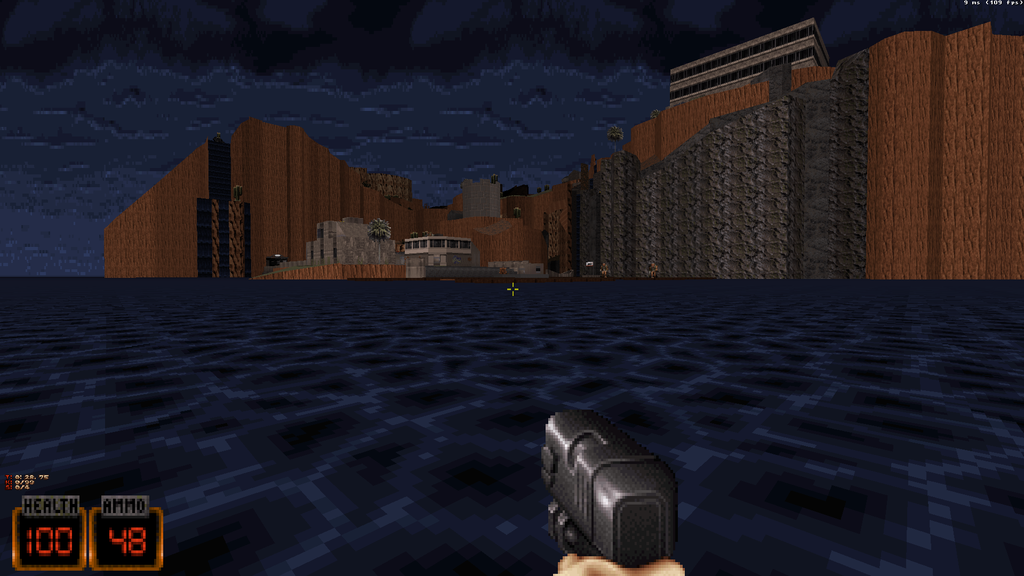
#710

Also for those that think PolymerNG is "fast enough", take a look at the image below. Inside the area outlined in red, any gaps you see is the GPU doing nothing. Blue is the GPU doing work. Those gaps are because we have so many individual pieces of geo. So there are plenty of performance gains to be had with virtual texturing and dynamic index buffers should remove the gaps, and frametime should go down by a lot.

This is Clear the Coast profiled in the bad area I always profile.
Posted Image

So were at 103 fps aka 9milliseconds, I think I can cut that down in half if not more. Look how idle the GPU is; after I get this build out to you guys, next thing I'm doing is virtual texturing.
Posted Image

Full size image to see FPS better
Clcoast 103 FPS full image.

EDIT:
I might just group all surfaces by material and render that instead. Similar to Plagmans bucket system, but it will only differentiate by what textures that material has. The material attributes/surface attributes will get pulled from a texture instead.

This post has been edited by icecoldduke: 08 June 2016 - 06:24 PM

4

User is offline   TerminX 

  • el fundador

  #711

View Posticecoldduke, on 08 June 2016 - 05:09 PM, said:

Also for those that think PolymerNG is "fast enough", take a look at the image below. Inside the area outlined in red, any gaps you see is the GPU doing nothing. Blue is the GPU doing work. Those gaps are because we have so many individual pieces of geo. So there are plenty of performance gains to be had with virtual texturing and dynamic index buffers should remove the gaps, and frametime should go down by a lot.

This is Clear the Coast profiled in the bad area I always profile.
Posted Image

So were at 103 fps aka 9milliseconds, I think I can cut that down in half if not more. Look how idle the GPU is; after I get this build out to you guys, next thing I'm doing is virtual texturing.
Posted Image

Full size image to see FPS better
Clcoast 103 FPS full image.

EDIT:
I might just group all surfaces by material and render that instead. Similar to Plagmans bucket system, but it will only differentiate by what textures that material has. The material attributes/surface attributes will get pulled from a texture instead.

Try profiling from (-16580, -39771, -95377) at angle 257. Perf is even worse there.
0

#712

View PostTerminX, on 08 June 2016 - 08:01 PM, said:

Try profiling from (-16580, -39771, -95377) at angle 257. Perf is even worse there.

Off hand do you know were the code that pulls the player start position from the map is? Since input is broken at the moment, that's the only way I can profile that location :). Or is there a way to do that in mapster?

So I updated github with the latest perforce. This brings the public github up to P4 rev 281. This includes the current work I have done on the Win64 launcher. Everything except for input seems to work, but I need to do more testing before I release binaries. The link for the public github is always in my signature. Also I have not tested Shadow Warrior yet, but I will be releasing Shadow Warrior binaries as well.

For those interested, I have moved the UWP launcher code into its own "UniversalWindows_Launcher" folder. The Win64 launcher is now in the Windows_Launcher folder. This is code for the Windows launcher, didn't take that much code to get it working. It was mostly dividing up the projects and such that took some amount of effort.

DukeNukem/Windows_Launcher/WinMain.cpp

This post has been edited by icecoldduke: 08 June 2016 - 09:30 PM

0

User is offline   TerminX 

  • el fundador

  #713

It's in prepare_loadboard() in engine.c.
0

#714

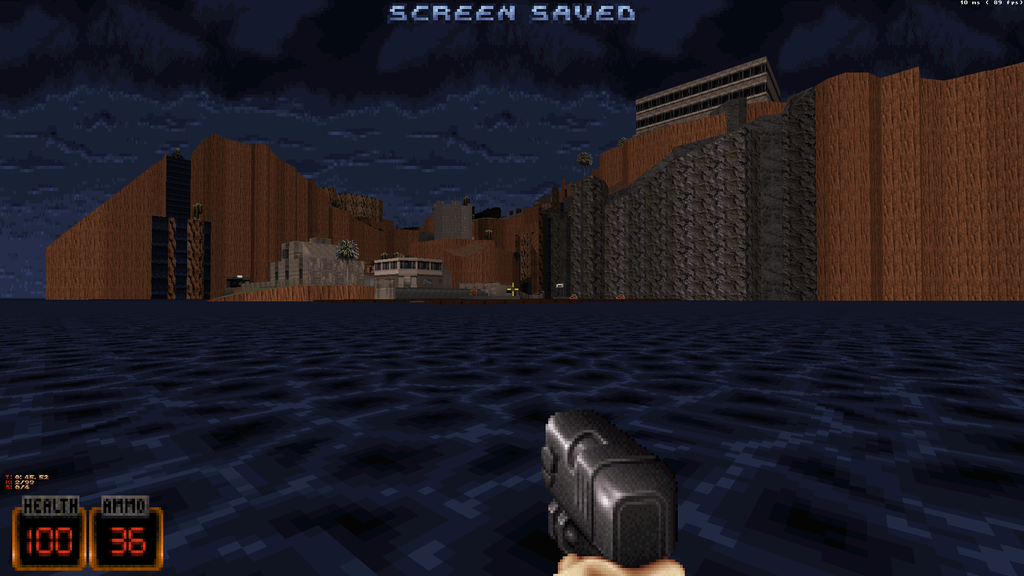
This is without the geo grouping idea I talked about in the above post, that idea was actually slower. Were getting about 107 fps(9ms).

Try to ignore the red water :).
Posted Image

Any gaps you see is the GPU not doing any work.

Posted Image

To put this in perspective; if you guys went out and bought a $400 video card for Polymer or PolymerNG all those gaps are your fancy expensive graphics card doing nothing :P.

This post has been edited by icecoldduke: 09 June 2016 - 07:12 AM

1

#715

So I made some more changes and cut off 2 milliseconds from the above images(I was always updating the texture unit even if that texture was already bound). So now that area is at 131 fps(7.62ms). If you look at the GPU idle time, we still have work to do.

Posted Image

This post has been edited by icecoldduke: 09 June 2016 - 07:25 AM

1

#716

Got it down almost another millisecond by cleaning up some of my renderstate detection code that wasn't working right. Now its at 6.82ms(146.6fps).
Posted Image

When I was running in UWP mode, the GPU timer was under 1ms, and the CPU was at 6.8ms. So I think I'm CPU bound. Some of that is Polymost trying to figure out whats visible. I'm going to investigate more.

This post has been edited by icecoldduke: 09 June 2016 - 08:49 AM

3

#717

TerminX/Hendricks have either of you done a lot of profiling with Polymost? So if I "pause" visibility testing, and just use stale data(which effectively disables the Polymost vis pass), I drop from 6.8ms down to 2.2ms or 443..3fps.

Posted Image

Have you guys done any profiling with Polymost? To everyone else, can you please go to were I am in the post above this one in Polymost and post your framerate?

This post has been edited by icecoldduke: 09 June 2016 - 12:34 PM

0

User is offline   Hendricks266 

  • Weaponized Autism

  #718

TX has, which resulted in the changeover from doubles to floats, the introduction of libdivide, and more.
0

#719

View PostHendricks266, on 09 June 2016 - 01:09 PM, said:

TX has, which resulted in the changeover from doubles to floats, the introduction of libdivide, and more.

I'd like to speed this up if possible, but I've accepted I might not be able to speed this up. I've tried various optimizations that either failed or turned out to be slower then the current implementation. Since the GPU will have more then 6ms worth of work then this shouldn't be an issue(remember the CPU and GPU run in parallel).

I would like people to try clcoast in Polymost and tell me what your performance is, and include your specs. I'd like to know how Polymost scales on lower end hardware.

EDIT:
So some updates on the binary release. I just got SDL keyboard input working, I hate who ever added this to the sdl key translation file. :).

MAP(SDL_SCANCODE_PRINTSCREEN,		-2);	// 0xaa + 0xb7


That -2 was causing me loads of issues. Because it was indexing -2 into a array :/.
void XBuildInputSystemPrivate::Update()
{
	const uint8_t* keystate = SDL_GetKeyboardState(NULL);

	for (int i = 0; i < SDL_NUM_SCANCODES; i++)
	{
		if (keystate[keytranslation[i].sdlkey])
		{
			// The game can reset keydown, handle this here.
			if(keyboardInputLocalState[keytranslation[i].buildkey] == false && keystatus[keytranslation[i].buildkey] == false)
				keystatus[keytranslation[i].buildkey] = 1;

			keyboardInputLocalState[keytranslation[i].buildkey] = 1;
		}
		else
		{
			keystatus[keytranslation[i].buildkey] = 0;
			keyboardInputLocalState[keytranslation[i].buildkey] = 0;
		}
	}
}


As soon as I get the mouse code in there and couple other things I'll get a binary release up.

This post has been edited by icecoldduke: 09 June 2016 - 08:42 PM

1

User is offline   MetHy 

#720

View Posticecoldduke, on 09 June 2016 - 07:39 PM, said:

I would like people to try clcoast in Polymost and tell me what your performance is, and include your specs. I'd like to know how Polymost scales on lower end hardware.


I don't know if this helps.

EDuke32 r5771 played in Polymost 1920*1080
I set visibility very high so it reflects your screenshot (if that even matters)

Went from 110 to 79 FPS (from 50 to 80FPS in classic mode). In comparison In Polymost EDuke32's FPS counter claimed between 2000 and 2800 FPS at the start of the map int he helicopter.

i5-4570 quadcore 3,2GHZ
8GB DDR3 and GTX660 (if that even matters)

Spoiler


This post has been edited by MetHy: 10 June 2016 - 01:17 AM

0

Share this topic:


  • 41 Pages +
  • « First
  • 22
  • 23
  • 24
  • 25
  • 26
  • Last »
  • You cannot start a new topic
  • You cannot reply to this topic


All copyrights and trademarks not owned by Voidpoint, LLC are the sole property of their respective owners. Play Ion Fury! ;) © Voidpoint, LLC

Enter your sign in name and password


Sign in options