Duke4.net Forums: PolymerNG - Xbox One and Windows 10 - Duke4.net Forums

Jump to content

  • 41 Pages +
  • « First
  • 5
  • 6
  • 7
  • 8
  • 9
  • Last »
  • You cannot start a new topic
  • You cannot reply to this topic

PolymerNG - Xbox One and Windows 10

#181

 MusicallyInspired, on 06 May 2016 - 05:53 PM, said:

I tried compression on textures once....turned it off and never looked back. Made everything look like trash. Noticeably.

Do you have specific examples? Texture compression will be absolutely prefered in PolymerNG.
0

User is offline   Rellik 

#182

 icecoldduke, on 06 May 2016 - 06:41 PM, said:

Do you have specific examples? Texture compression will be absolutely prefered in PolymerNG.

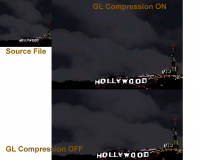
I brought this up in the HRP thread a while back, it may or may not be related, as it pertains to OpenGL specific compression.

Attached Image: compression.png

If NG does compression with far less shitty results, then there shouldn't be a problem, I imagine.

This post has been edited by Rellik: 06 May 2016 - 08:12 PM

0

#183

 Rellik, on 06 May 2016 - 08:11 PM, said:

I brought this up in the HRP thread a while back, it may or may not be related, as it pertains to OpenGL specific compression.

compression.png

If NG does compression with far less shitty results, then there shouldn't be a problem, I imagine.

Yeah NG will deliver way better compression results then that. I'll do a before and after comparison after I finish re-writing the occlusion system, since I realized the classic renderer won't do what I need it to do.

I need to fully integrate the intel occlusion library, so its going to be a bit before I have results to show.

This post has been edited by icecoldduke: 06 May 2016 - 09:44 PM

0

User is offline   MusicallyInspired 

  • The Sarien Encounter

#184

 icecoldduke, on 06 May 2016 - 06:41 PM, said:

Do you have specific examples? Texture compression will be absolutely prefered in PolymerNG.


If it is then I won't be using it. I like my pixels flawless. I play with no filters at all on my emulators, DOSBox, and ScummVM.

 Rellik, on 06 May 2016 - 08:11 PM, said:

I brought this up in the HRP thread a while back, it may or may not be related, as it pertains to OpenGL specific compression.

compression.png

If NG does compression with far less shitty results, then there shouldn't be a problem, I imagine.


Yeah, that compression was terrible. If it's not too bad and doesn't dirty them up too much I'd consider it.

 icecoldduke, on 06 May 2016 - 08:16 PM, said:

Yeah NG will deliver way better compression results then that.


That will be the determining factor.
0

#185

 MusicallyInspired, on 06 May 2016 - 10:33 PM, said:

If it is then I won't be using it. I like my pixels flawless. I play with no filters at all on my emulators, DOSBox, and ScummVM.
Yeah, that compression was terrible. If it's not too bad and doesn't dirty them up too much I'd consider it.
That will be the determining factor.

I have these kind of conversations with content developers all the time :angry:. I'm used to getting "my assets need to be uncompressed 8k textures", blah blah.

Trust me guys :lol:.
0

User is offline   Tea Monster 

  • Polymancer

#186

Where are you working that they insist on 8k textures?
0

#187

 Tea Monster, on 07 May 2016 - 06:54 AM, said:

Where are you working that they insist on 8k textures?

My apologies I wasn't thinking anyone on this forum was insisting that, it was meant to be a joke that didn't come off very well :angry:. I understand that people here have been bitten in the in the ass by bad compression. I really want your work to look as best as possible in PolymerNG. At the same time I need to ensure that your work is best optimized to run in PolymerNG.

Some of guys are working on showcase mods that will define PolymerNG as either something awesome, or a piece of shit. If it turns out you guys really need uncompressed assets I will get that in there. I would really like everyone to try out the optimized pipeline first. The optimized pipeline will ensure more people will you use your work. The optimized pipeline will ensure you guys always keep 60fps on minspec hardware. If there are bugs in the optimized pipeline I would like to fix and address those issues, rather then tell you to use things such as uncompressed assets.

This post has been edited by icecoldduke: 07 May 2016 - 07:51 AM

0

User is offline   Spiker 

#188

I got the joke. I think 2k is enough for the most important models (Duke, Monsters, Babes) probably you could even get away with 1k.
0

#189

 Spiker, on 07 May 2016 - 07:59 AM, said:

I got the joke. I think 2k is enough for the most important models (Duke, Monsters, Babes) probably you could even get away with 1k.

Don't compromise quality, 2k sounds just fine for Duke and the babes. I would agrue 1k for the monsters, but I wouldn't be opposed to 2k textures, as 4k monitors are becoming more mainstream. It's the world textures I want to emphasize should not be above 1k. When you guys are making content I really understand you want some show cases pieces in your levels for various reasons. When you guys play games that you haven't worked on, do you ever stop and stair at any individual asset in the game? If the game's framerate drops, do you get annoyed? If the game is fun would you rather trade, not so good graphics to allow you to continue to play? If you have ever turned down the graphics quality in any game, you have disabled some other artists showcase work.

The graphics fuckage that was posted by Rellik, that won't happen in PolymerNG. If you see something that noticeable in PolymerNG, that will be addressed. At the same time I would like to point out if there is some small error on a grate texture somewhere in the level, that is only noticable when you stop and look down and stair at it, do you think that situation would warrant uncompressed images to fix the issue? If the end user has to start turning graphical features off, that impact your entire level, so you can have uncompressed textures on the grate textures(and similar textures), would you guys really want that instead of texture compression?

This post has been edited by icecoldduke: 07 May 2016 - 08:19 AM

0

User is offline   Tea Monster 

  • Polymancer

#190

I thought you were joking. I was kind of counter-joking :angry:

I usually work in 2048 for production. That then gets knocked down to what looks best in game - usually 1024 or 512. I think that Duke was 1024 in the HRP - He was going to be retextured for PBR anyway. If we can do 2048, then that would be grand.

This post has been edited by Tea Monster: 07 May 2016 - 08:22 AM

0

#191

 Tea Monster, on 07 May 2016 - 08:19 AM, said:

I thought you were joking. I was kind of counter-joking :angry:

I usually work in 2048 for production. That then gets knocked down to what looks best in game - usually 1024 or 512. I think that Duke was 1024 in the HRP - He was going to be retextured for PBR anyway. If we can do 2048, then that would be grand.

Lets go with 2k for Duke, and for the Babes as well. I think there are plenty of people that will walk up to the strippers and take their clothes off. That is a solid reason to use 2k assets for the babes. Monsters I'm not sure about yet, since this is such as fast pace game, that players won't stop and stair at them for too long. I'm sort of inclined to think 1k will be enough for all but the bosses. Bosses should be 2k since they are huge.

Does that sound reasonable?

This post has been edited by icecoldduke: 07 May 2016 - 08:37 AM

0

User is offline   Tea Monster 

  • Polymancer

#192

The Cycloid and the Overlord are composed of 3 objects and thus have 3 texture sets each, so start with 1024 and see what happens from there.
0

#193

 Tea Monster, on 07 May 2016 - 08:37 AM, said:

The Cycloid and the Overlord are composed of 3 objects and thus have 3 texture sets each, so start with 1024 and see what happens from there.

Sounds good to me.
0

User is offline   Tea Monster 

  • Polymancer

#194

When you have details of render method and what maps you are using, let us know.

One thing - are you going to be using some form of cube mapping for lighting? When wandering between sector and dynamic lighting, you get weapons going 'flat' when you can't see specular and normal maps.

This post has been edited by Tea Monster: 07 May 2016 - 08:58 AM

0

#195

 Tea Monster, on 07 May 2016 - 08:55 AM, said:

When you have details of render method and what maps you are using, let us know.

One thing - are you going to be using some form of cube mapping for lighting? When wandering between sector and dynamic lighting, you get weapons going 'flat' when you can't see specular and normal maps.

Once the visibility code is actually working I'll move on to figuring out what we are going to be doing ng rendering wise. I haven't put much thought into lighting that is based on sector shading yet. I would imagine I could just use the center point of the sector in the standard lighting equation. What you imagine cubemaps being used for in relation to sector shading based lighting? I was maybe thinking about playing around with Image Based Lighting, but again I haven't thought that far ahead yet.

I might be moving at a slow pace for some of you, but I really want to get the albedo pass complete and locked down before moving on to the fun stuff :angry:.

This post has been edited by icecoldduke: 07 May 2016 - 09:15 AM

1

User is offline   Tea Monster 

  • Polymancer

#196

No, this is blinding fast :angry:

What I was saying, is that in current Polymer, sometimes there will be no polymer light if the sector is 'illuminated' by the sector lighting.
Once this happens, then, although the model is visible, without a physical lamp acting on it, the normal and specular textures suddenly don't register to the viewer. So if you have a polymer lamp on the object, it will render correctly, once you wander into an area without any polymer lamps, then suddenly all you are seeing is the diffuse texture and the object looks strange.

IBL would be great. I was trying to get some kind of realistic outdoor lighting for a test article a few months ago and we gave up on the idea as it just wasn't practicle to do anything that looked even sort of OK without using huge spotlights that would kill performance.

This post has been edited by Tea Monster: 07 May 2016 - 09:31 AM

0

#197

 Tea Monster, on 07 May 2016 - 09:29 AM, said:

No, this is blinding fast :angry:

What I was saying, is that in current Polymer, sometimes there will be no polymer light if the sector is 'illuminated' by the sector lighting.
Once this happens, then, although the model is visible, without a physical lamp acting on it, the normal and specular textures suddenly don't register to the viewer. So if you have a polymer lamp on the object, it will render correctly, once you wander into an area without any polymer lamps, then suddenly all you are seeing is the diffuse texture and the object looks strange.

IBL would be great. I was trying to get some kind of realistic outdoor lighting for a test article a few months ago and we gave up on the idea as it just wasn't practicle to do anything that looked even sort of OK without using huge spotlights that would kill performance.

I'm not sure the performance implications of IBL yet. I might try and come up with something that doesn't have all the bells and whistles, but still delivers a great result. I really don't know what solution I'm going to go with yet, but I will definitely address this issue in PolymerNG.

This post has been edited by icecoldduke: 07 May 2016 - 09:34 AM

0

User is offline   Danukem 

  • Duke Plus Developer

#198

 icecoldduke, on 07 May 2016 - 09:14 AM, said:

I would imagine I could just use the center point of the sector in the standard lighting equation. What you imagine cubemaps being used for in relation to sector shading based lighting? I was maybe thinking about playing around with Image Based Lighting, but again I haven't thought that far ahead yet.


You might want to just play around with it before discussing it publicly, because that there is a can of worms.
1

#199

 Trooper Dan, on 07 May 2016 - 09:39 AM, said:

You might want to just play around with it before discussing it publicly, because that there is a can of worms. The game (and therefore level designers) have always treated sector shading like it was an indelible structural features of the level.

I would agree you guys like to read to much into things :angry:.
0

User is offline   Danukem 

  • Duke Plus Developer

#200

View Posticecoldduke, on 07 May 2016 - 09:40 AM, said:

I would agree you guys like to read to much into things :angry:.


I'm sure it will turn out great in the end, but just to give you an idea of the kind of stuff people will worry about with sector shading: For various good reasons, the renderer should not ever modify sector shade values, regardless of what is going on with dynamic lights at a given time. And yet, sector shade values are (currently) used to determine renderer side things, such as how bright the hud weapon sprites are drawn.
0

User is offline   Tea Monster 

  • Polymancer

#201

You could have a standard level of lighting for any object in a level. Then, depending on how the sector lighting is done, you can lighten or darken the light acting on the model accordingly. This can all be worked out and adjusted, which is what this thread is all about.
0

User is offline   Hendricks266 

  • Weaponized Autism

  #202

I would support a maphack that can disable a sector's shading (or all sectors) if you have added enough Polymer lights to do the job instead. Thoughts?

I suppose the most you could consider sector lighting to do is project straight down from the ceiling plane (not center point). That would line up with the way Duke game sprite shadows work.
1

#203

View PostHendricks266, on 07 May 2016 - 01:14 PM, said:

I would support a maphack that can disable a sector's shading (or all sectors) if you have added enough Polymer lights to do the job instead. Thoughts?

I suppose the most you could consider sector lighting to do is project straight down from the ceiling plane (not center point). That would line up with the way Duke game sprite shadows work.

Possibly, I would like to do more research before considering this. The easiest solution is what you mentioned and thats ditching the sector shading all together if the maphack is present. I would be for this solution if there isn't any objections.
0

User is offline   Plagman 

  • Former VP of Media Operations

#204

View PostHendricks266, on 07 May 2016 - 01:14 PM, said:

I would support a maphack that can disable a sector's shading (or all sectors) if you have added enough Polymer lights to do the job instead. Thoughts?

I suppose the most you could consider sector lighting to do is project straight down from the ceiling plane (not center point). That would line up with the way Duke game sprite shadows work.


This is more or less the equivalent of having r_ambientlight to 0. Most of the lighthacks were placed and intended for being played at very low or zero ambient light values, IIRC.
0

User is offline   MusicallyInspired 

  • The Sarien Encounter

#205

View Posticecoldduke, on 06 May 2016 - 11:08 PM, said:

I have these kind of conversations with content developers all the time :angry:. I'm used to getting "my assets need to be uncompressed 8k textures", blah blah.

Trust me guys :lol:.


To be clear, I'm not a content developer.
0

#206

View PostMusicallyInspired, on 07 May 2016 - 09:48 PM, said:

To be clear, I'm not a content developer.

Even as a end user you won't notice, unless you make a habbit of staring at assets in the game and intetionally go and look at each asset for compression fuckage :angry:. This weekend I didn't get the occlusion stuff working, I think I'm just going to add in hardware occlusion querying and revisit the occlusion issue at a later time. Its irritating because I had this working two fucking years ago and I lost the code in a harddrive failure :lol: :/ :P

This post has been edited by icecoldduke: 09 May 2016 - 08:16 AM

0

User is offline   MusicallyInspired 

  • The Sarien Encounter

#207

That sucks. That's happened to me before. I was working on a full game soundtrack and lost more than half my work when I reinstalled Windows and like a douche didn't disconnect my second hard drive. The result was Windows decided to install itself identically on BOTH drives. Didn't get any of it back in data recovery. Had to start almost from scratch. Saved all my wife's years of photography, though.

This post has been edited by MusicallyInspired: 09 May 2016 - 10:01 AM

0

User is offline   Spiker 

#208

Unless you are very afraid of having your precious data stolen it's good to save your very important projects into cloud folder. But you already know that and probably use it now.
0

User is offline   Kathy 

#209

If you're very afraid of your stuff being stolen you can always encrypt it, but not backing up your work is downright stupid.

This post has been edited by Kathy: 09 May 2016 - 11:26 AM

1

User is offline   MusicallyInspired 

  • The Sarien Encounter

#210

I keep everything permanently backed up on an external hard drive with two partitions now and I disconnect it when I'm doing hardware or OS maintenance. I'm not letting anything get lost again. I'm not ever putting anything up on the cloud, though. That works for source code, sure, but not music source files.
0

Share this topic:


  • 41 Pages +
  • « First
  • 5
  • 6
  • 7
  • 8
  • 9
  • Last »
  • You cannot start a new topic
  • You cannot reply to this topic


All copyrights and trademarks not owned by Voidpoint, LLC are the sole property of their respective owners. Play Ion Fury! ;) © Voidpoint, LLC

Enter your sign in name and password


Sign in options