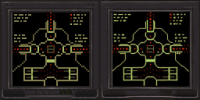
Duke4.net Forums: Duke3D HRP: new/updated art assets thread - Duke4.net Forums

Jump to content

  • 163 Pages +
  • « First
  • 154
  • 155
  • 156
  • 157
  • 158
  • Last »
  • You cannot start a new topic
  • You cannot reply to this topic

Duke3D HRP: new/updated art assets thread  "Post and discuss new or updated textures/models for the HRP here"

User is online   Phredreeke 

#4640

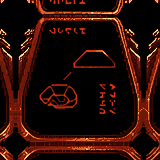
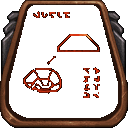
I had initially only intended to use this model for the glyphs, but Tea Monster liked the result so much he suggested I'd use it for the whole display

Attached Image: tile1146_rlt.png


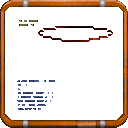
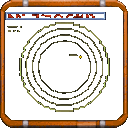
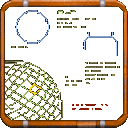
Attached Image: tile0529.png Attached Image: tile0532.png Attached Image: tile0533.png Attached Image: tile1146.png

(these have transparency, but it may be tough to tell given the forum's background)

0

User is offline   MrFlibble 

#4641

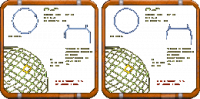
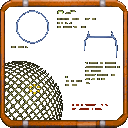
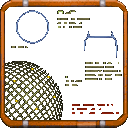
Why did the circles come out so jaggy in the second pic?

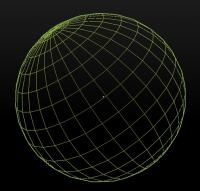
And the wireframe globe in the third image, I guess it was supposed to have regular shaped sectors/cells but the upscale messed them all up.

All these are very simple shapes though, I think it would make sense to just remake them in high-res manually if the time permits. No need for AI if the result does not really compare favourably even to xBRZ style algorithms.
0

User is online   Phredreeke 

#4642

Because the original tile wasn't antialiased (because I only intended to use them for the alien glyphs)

I upscaled the 3rd tile again with ssantialias9x pre-applied. I prefer this look tbh

Attached Image: tile0533-noaa-vs-aa.png
0

User is offline   Mark 

#4643

I'm assuming the planet grid looks like it was made from spaghetti noodles because the original sprite is poor quality.
0

User is online   Phredreeke 

#4644

Original tile

Posted Image

Perhaps the wireframe planet would be better recreated, as long as care is taken to align the grid size and position to match the original.

Here's another one I just made

Posted Image
1

User is offline   Mark 

#4645

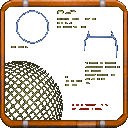
Teamonster could whip up a globe in Blender. Make the lines a little thicker and make the backround transparent in photoshop. It shouldn't take long at all. The 2nd pic is a quick attempt with transparent backround but not in the duke palette.

Attached thumbnail(s)

  • Attached Image: globe1.jpg
  • Attached Image: globe1.png


This post has been edited by Mark: 23 January 2021 - 02:44 PM
1

User is online   Phredreeke 

#4646

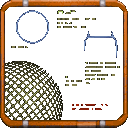
Potential options (Tea Monster helped render and place the sphere, as my attemps to failed pretty badly)

Attached Image: tile0533  newsphere.png Attached Image: tile0533  newsphere-sharper.png
2

User is offline   Tea Monster 

  • Polymancer

#4647

Nonsense, you've been a trooper on this project.
2

User is online   Phredreeke 

#4648

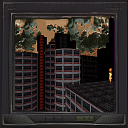
Added in the yellow dots and here's the result

Edit: Animations

Posted Image Posted Image

Attached thumbnail(s)

  • Attached Image: tile0533.png
  • Attached Image: tile0534.png
  • Attached Image: tile0535.png


This post has been edited by Phredreeke: 24 January 2021 - 08:29 AM
3

#4649

Was it always animated, or am I imagining things?
0

User is online   Phredreeke 

#4650

Upscales of a couple of displays

Attached Image: tile0271-compare.png Attached Image: tile0274-compare.png
0

User is offline   MrFlibble 

#4651

Nice job on the screens themselves but the lower part of the screen case got blurred and lost detail -- I believe you were considering to use the hi-res version from old HRP files?
0

User is online   Phredreeke 

#4652

Yeah, there are a ton of tiles using the same frame, that's why I asked who made those tiles for the HRP.

Here's a mockup I made using them.

Attached thumbnail(s)

  • Attached Image: tile0263.png

1

User is online   Phredreeke 

#4653

Thinking about it, I never explained how I made screens in the last few upscales.

1. Upscale the image with NMKD's Typescale model (optionally preprocess it with SSAA9x)
2. Using imagemagick, shift it 2 pixels in both axises then scale to 25%
3. Apply a palette with only the intended hues (I used a copy of palettes 1,2,7,8 with the fullbrights edited out)

For some of them I edited out everything but the intended color (the yellow dots in the tile with the wireframe planet for example) and upscaled separately. Then I edited the results together.
1

User is online   Phredreeke 

#4654

Posted Image

I decided to make an animation showing the different steps
Posted Image
0

User is online   Phredreeke 

#4655

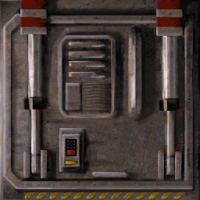
I decided to put the spacehatch through the same process as above. Here's the result

Posted Image

Is this better or worse (once the keypad is fixed) than the old frankentile using a rotated tile0447?

https://imgsli.com/MzkxMDE
0

User is offline   MrFlibble 

#4656

Frankentile is noticeably sharper so it's not easy to judge here I'd say.

I tried comparing the new version with a test upscale of the same tile I made a while ago by blending several layers (ThiefGold after HQ2x "softening" with something else -- it's some pages ago in this thread but I'm attaching another copy for reference), but the trick is that some parts seem to look better in one image and some in the other, and conversely, some areas have more undesirable artifacts or bad looking parts in one image and other areas on the other.
Attached Image: 4x-hatch2_hqx_4x_ThiefGoldMod_100000-blend2.png
How I understand it, the only way to get a definite improvement so far is to have an artist go over the upscale and fix problematic parts. I'm afraid that invoking more AI models ultimately servers only to multiply the ranges of "relatively good" and "relatively bad" results.
0

User is online   Phredreeke 

#4657

A pair of new upscales

Posted Image
Posted Image

Slide-over comparison for the former https://imgsli.com/Mzk0OTI

These use mostly the previously described Detoon-thiefgold interpolation, with sections cut in from NMKD-Typescale upscale.
0

User is offline   MrFlibble 

#4658

I'd say moderately nice job overall, although it feels that some downscaling artifacts are visible, e.g. the slight ringing around black outlines on the monitor and panel.

As for the computer screen content on the first image, the red shape at the bottom appears to be some kind of dynamic bar graph (like in Winamp -- no idea how to call it properly), which it totally lost in the upscale.
0

User is online   Phredreeke 

#4659

An attempt to restore the dithering lost in the upscale process
0

User is online   Phredreeke 

#4660

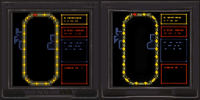
I've continued working on the various screen/control panel textures. All of these used NMKD-Typescale with pixelshifted downscaling to some extent for the displays

Spoiler


This post has been edited by Phredreeke: 08 February 2021 - 06:01 PM

2

User is offline   jkas789 

#4661

Those screens are looking really clean. Damn that must have taken some time (you said the second one needed some manual touch ups on the discord right?). Congrats on the results of your hard work mate, IMO they look good!
0

User is online   Phredreeke 

#4662

they ALL needed manual touchups (the second one was slightly more touched up compared to the version I posted on the art channel in discord, in the blue section on the middle panel)

This post has been edited by Phredreeke: 09 February 2021 - 06:11 PM

0

User is online   Phredreeke 

#4663

Last night I decided to tackle a pair of tiles already in the upscale pack

Posted Image
Posted Image

Spoiler


Slide-over comparison https://imgsli.com/NDA2OTQ


Also, first DC upscales

Posted ImagePosted Image

This post has been edited by Phredreeke: 13 February 2021 - 07:04 AM

4

#4664

Looks like progress is being made. Not to sound rude but maybe make the smaller text actually readable?
-1

User is online   Phredreeke 

#4665

I would have to come up with a text that makes sense for both tiles. Hence why I kept it illegible.

The "Missiles" label on the devastator ammo has been yeeted
Posted Image

As with the small text on the two tiles on my last post, the "text" here is still based on that of the original tile although the way I went about creating it was different (I isolated just the grey part of the label and upscaled with Fatal Text model, this gave a good shape but blew out any texture on it. So I took a copy of just the "text" part, duplicated and resized a bunch of times. Then I placed the upscaled text shape over that with blend mode set to multiply)

BTW I boomered and linked the wrong slide-over comparison above. This is the correct one https://imgsli.com/NDA3ODE

This post has been edited by Phredreeke: 14 February 2021 - 07:16 AM

0

#4666

View PostPhredreeke, on 14 February 2021 - 07:07 AM, said:

I would have to come up with a text that makes sense for both tiles. Hence why I kept it illegible.

The "Missiles" label on the devastator ammo has been yeeted
Posted Image

As with the small text on the two tiles on my last post, the "text" here is still based on that of the original tile although the way I went about creating it was different (I isolated just the grey part of the label and upscaled with Fatal Text model, this gave a good shape but blew out any texture on it. So I took a copy of just the "text" part, duplicated and resized a bunch of times. Then I placed the upscaled text shape over that with blend mode set to multiply)

BTW I boomered and linked the wrong slide-over comparison above. This is the correct one https://imgsli.com/NDA3ODE


What does the HRP texture on it say? Maybe use that as a basis?
0

User is offline   Mark 

#4667

the HRP has the correct text on each one
1

User is offline   MrFlibble 

#4668

The text kinda looks like Tengwar :)

Also apologies for my ignorance, but what is the round logo at the bottom of each plaque supposed to represent?
0

User is online   Phredreeke 

#4669

I believe it's a bear which is the state animal of California
1

Share this topic:


  • 163 Pages +
  • « First
  • 154
  • 155
  • 156
  • 157
  • 158
  • Last »
  • You cannot start a new topic
  • You cannot reply to this topic


All copyrights and trademarks not owned by Voidpoint, LLC are the sole property of their respective owners. Play Ion Fury! ;) © Voidpoint, LLC

Enter your sign in name and password


Sign in options