EDuke32 2.0 and Polymer! "talk about the wonders of EDuke32 and the new renderer"
#4671 Posted 24 May 2014 - 08:44 AM
It works if I do "remap=31-B8" for example though
#4673 Posted 24 May 2014 - 08:50 AM
#4674 Posted 24 May 2014 - 10:08 AM
Mark., on 24 May 2014 - 08:18 AM, said:
Actually, there's a workaround for Shift+KP5+KP2/4/6/8 since r1788: just use Alt insead. Back then, it was coded since the combination with KP5 is blocked at the keyboard level, but with the Windows SDL2 builds, I can in fact confirm that plain Shift+KP2/4/6/8 doesn't work either, but this time for a different reason.
MetHy, on 24 May 2014 - 08:37 AM, said:
Wait, do you mean that r4482 didn't fix the RAlt sector selection issue?
#4675 Posted 24 May 2014 - 10:49 AM
Helixhorned, on 24 May 2014 - 10:08 AM, said:
Sorry, it did, I thought you meant that even before r4482, switching to US keyboard was enough to make rAlt work.
btw thank you for fixing the helicopter thing
This post has been edited by MetHy: 24 May 2014 - 11:05 AM
#4676 Posted 24 May 2014 - 01:20 PM
I've already mentioned this glitch in another thread and I found a way to 'fix" the problem but the 'fix' I found doesn't work anymore.
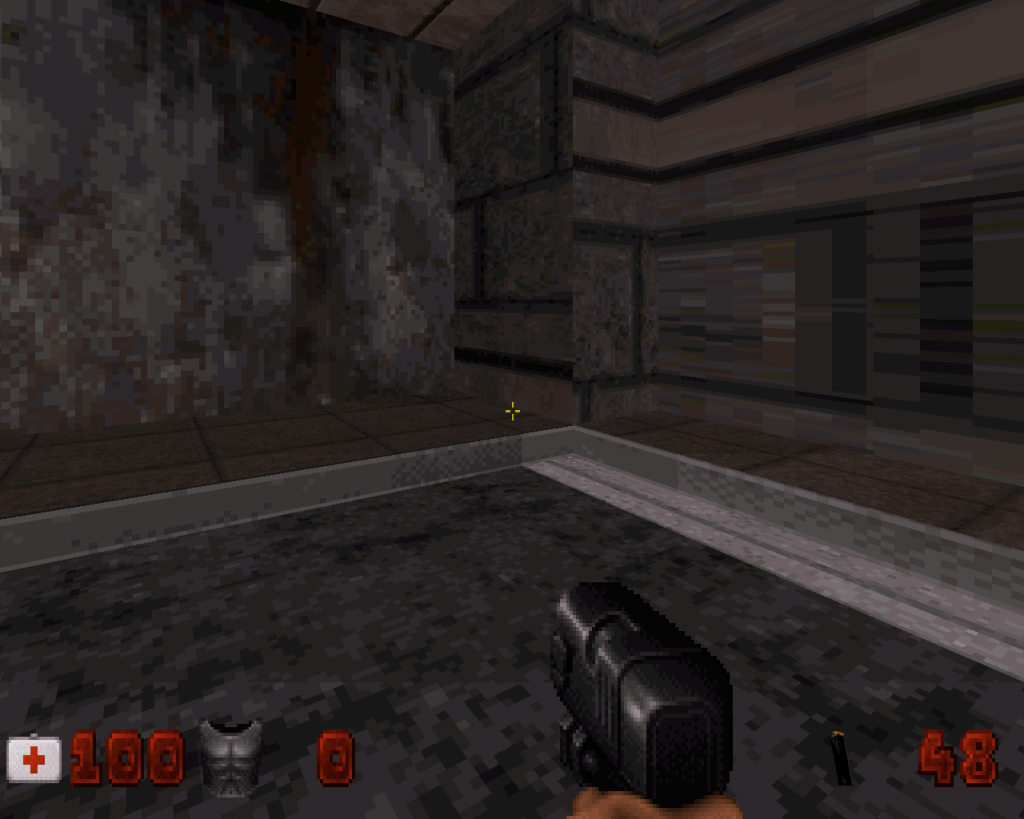
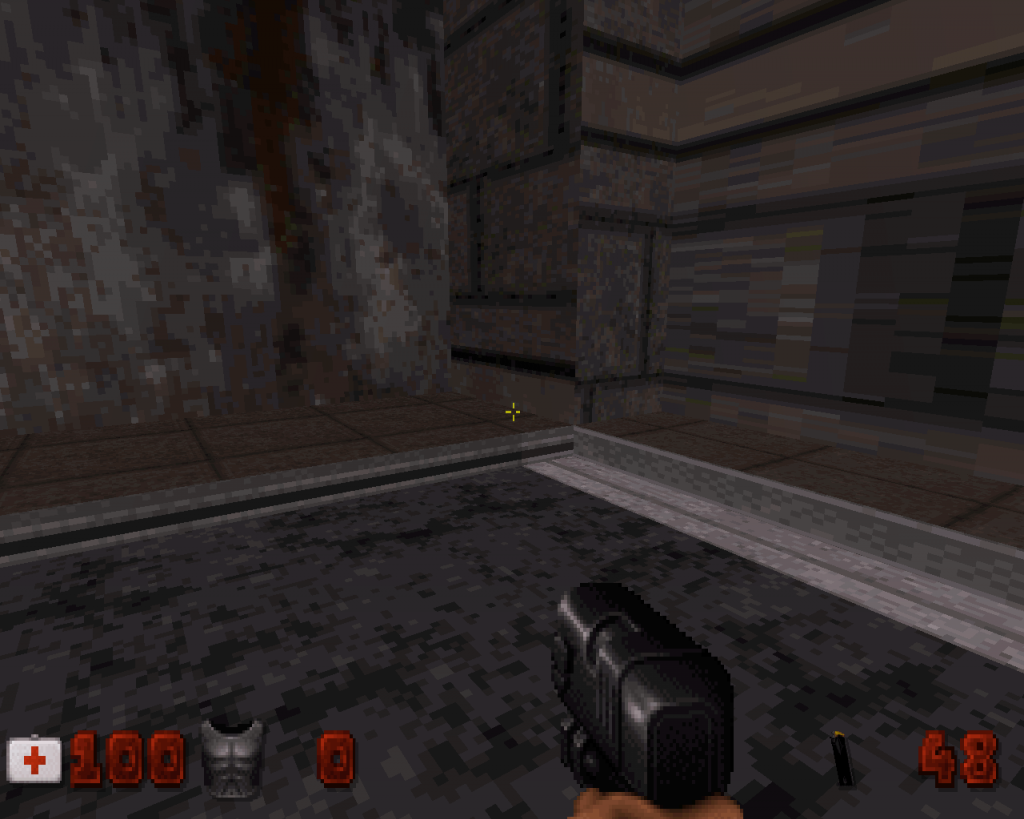
Here is the thing, some textures get misaligned when switching to 32bit mode.
Check the metal texture against the pavement at the bottom, here is how it looks in 8bit (how I built it) :
http://i101.photobuc...zps49113ec7.png
and here is how it looks in 32bit:
http://i101.photobuc...zpsd51a4eaf.png
That's the 3rd time this happens to me, I used to 'fix' this issue simply by pasting a non glitchy texture (in this example, the same texture on the right doesn't glitch) onto the glitchy ones; however that doesn't even work anymore, or at least not in this case.
Any idea ? That trimming texture is actually around almost all of this map and now it's glitchy most of the times in 32bit so it's pretty bad in this case for me...
Joined is an example map with the glitch occuring. All I know is that it's "32-bit" specific, and not just Eduke32, it also appears glitchy in Megaton. Meanwhile I'll try to find another way to get around the issue...
Edit: forgot to mention but obviously, if you align those textures so that they look right in 32bit, it will be the contrary and they'll look off in 8bit
Attached File(s)
-
ALIGNGLITCH.rar (575bytes)
Number of downloads: 390
This post has been edited by MetHy: 24 May 2014 - 01:48 PM
#4678 Posted 25 May 2014 - 12:04 PM
MetHy, on 24 May 2014 - 01:20 PM, said:
In r4482 in mapster, sometimes when I left-click to select a sprite in the textures list (the list of all textures), it actually gives me the sprite next to the one I chose rather than the one I want. Sometimes it happens, sometimes it doesn't, but it seems to happen whenever I just used the mousewheel to go through the list.
Edit : also, now the helicopter ambientsound (ambient sound#279) has much lower volume (or radius?) than before
This post has been edited by MetHy: 25 May 2014 - 12:40 PM

#4679 Posted 25 May 2014 - 03:23 PM
MetHy, on 24 May 2014 - 01:20 PM, said:
32 bit modes always draw textures accurately and 8 bit is to blame (or rather the textures) for not being power of two.
MetHy, on 25 May 2014 - 12:04 PM, said:
Another SDL 2.0 problem (same category as rAlt etc), been pissing me off ever since the SDL switch.
#4680 Posted 26 May 2014 - 02:58 AM
Daedolon, on 25 May 2014 - 03:23 PM, said:
Then how comes the same texture used in the same manner sometimes will look off and sometimes not ? (that's what happens in my example) I also wonder why the fix that I had found no longer works...The only solution I've thought of is replacing that texture by one alike that doesn't glitch in 32bit but that one looks a bit worse so I'm tempted to say "fuck you 32bit" and leave the glitchy stuff in the map (I also thought of using a hundred sprites all over the map that would go over the glitchy textures, but due to the alignment for the texture i used I can't do that).
Btw "8bit" being to blame when everything looks right in 8bit doesn't make much sense to me. If it looks right in DOS Duke but doesn't in 32bit, whatever the issue comes from, I'll take that as a problem with the 32bit renderer.
Edit : it seems that the reason why I can't fix the glitchy textures simply by pasting the same non glitchy texture onto it, is because in this case the glichty textures are at the bottom of a texture swap bit (=2 textures on the same wall).
I just tried drawing a new wall (with no bottom texture swap on this new wall), and then pasting the glitchy texture onto it. So, it appears glitchy in 32bit, as expected. Then, I pasted a non glitchy version of the texture on this new wall, and that fixed it for this wall.
However, if I do the bottom texture swap bit, it can no longer be fixed this way.
(then I thought perhaps the issue was dependant to the top texture in those cases? But apparently not.)
So in other words, I have found a solution to my problem : I'll have to waste tons of walls and sectors and add tiny new sectors everywhere so that the top and bottom textures are different walls, like this no need for bottom texture swap and I can paste the non glitchy textures. (Because, yes, the previous solution, using another texture, didn't satisfy me because that would be sacrificing the maps looks even in 8bit)
That's how much effort I'm willing to make the map look not glitchy for all the tasteless and clueless people who play Duke3D in 32bit and that the said 32bit makes things look glitchy (Yes, I'm pissed, I had to let this out). You know, I think that after that I'll only care about my how my maps look and play in dos Duke, everything else is just a painfull mess.
This post has been edited by MetHy: 26 May 2014 - 03:33 AM

#4681 Posted 26 May 2014 - 03:30 AM
#4682 Posted 26 May 2014 - 03:42 AM
Mickey C, on 26 May 2014 - 03:30 AM, said:
That's assuming that the issue do come from the fact that the texture isn't power of two; by if that was the case I'm inclined to think ALL the use of that textures would look glitchy; except only about half do (like I said, the same non power of two texture used in the same manner, only about half look glitchy).
This post has been edited by MetHy: 26 May 2014 - 03:43 AM
#4683 Posted 26 May 2014 - 04:17 AM
This post has been edited by Fox: 26 May 2014 - 04:19 AM
#4684 Posted 26 May 2014 - 04:20 AM
http://forums.duke4....post__p__196956
They're all bottom aligned, but only half glitch.
#4685 Posted 26 May 2014 - 04:33 AM
This post has been edited by Fox: 26 May 2014 - 04:34 AM
#4686 Posted 26 May 2014 - 06:42 AM
#4687 Posted 26 May 2014 - 07:07 AM
MetHy, on 26 May 2014 - 02:58 AM, said:
The way I get around this is just change the texture from top/bottom to the other one. Sometimes moving the sector just by a notch vertically helps too (alt and mouse or just changing the Z in 2D mode).
EDIT: So yeah, I took a look at the map and the Cstat for the walls with the bug were different from the working ones, looks like they were flipped. I'm thinking since it's not power-by-two, the wall still gets shifted either way in 8bit because of the rendering issue. I just think due to sheer luck it ended up being shifted to the correct place on the wall to the right, but because of the vertical flipping the wall on the left had, it got shifted in a different way and ended up being rendered wrong always in one of the renderers.
This post has been edited by Daedolon: 26 May 2014 - 07:59 AM
#4689 Posted 26 May 2014 - 08:14 AM
#4690 Posted 26 May 2014 - 08:21 AM
Daedolon, on 26 May 2014 - 07:07 AM, said:
EDIT: So yeah, I took a look at the map and the Cstat for the walls with the bug were different from the working ones, looks like they were flipped. I'm thinking since it's not power-by-two, the wall still gets shifted either way in 8bit because of the rendering issue. I just think due to sheer luck it ended up being shifted to the correct place on the wall to the right, but because of the vertical flipping the wall on the left had, it got shifted in a different way and ended up being rendered wrong always in one of the renderers.
I'm not certain the flipping is related to the glitch. I've seen other textures glitch while they weren't flipped and while the same texture, same flipping, just next to it, didn't glitch. I also don't believe it's by luck that it ended up being correct; in the map there were a few of those all the around the map which didn't glitch, while all the glitchy ones glitched in the same way.
It's the 4th time I see this glitch, to me it's completely random. Thanks for finding a way to get around the problem though.
This post has been edited by MetHy: 26 May 2014 - 08:22 AM
#4691 Posted 26 May 2014 - 06:20 PM
Daedolon, on 26 May 2014 - 07:07 AM, said:
Helixhorned: Basically what this means, is that when pasting textures (tab->enter) on the lower portion of a two-textured wall segment (created by pressing 2), the cstat (slash flip) information isn't pasted among other info.
I'd count this as a bug.
#4692 Posted 30 May 2014 - 06:29 AM
So, could this be something that could be implemented in eduke32? I don't believe it would influence already existing maps (wether from the original game or usermaps) in a negative way. If anything, I don't think wall aligned sprites and SE8 are used together very often or else somebody would have noticed this sooner...
Rather than being automatic though, perhaps it could be added as a feature the mapper has to 'turn on' by pressing a key on the sprite. I know that would make things more complicated but at least we'd be sure it wouldn't have unwanted consequences on already existing maps...
This post has been edited by MetHy: 30 May 2014 - 06:32 AM
#4693 Posted 30 May 2014 - 10:03 AM
MetHy, on 30 May 2014 - 06:29 AM, said:
That they're not affected by the shade change has nothing to do with SE8, but with the fact that wall-aligned sprites in particular don't take over the ceiling/floor shade. The code path responsible for this is in G_DoSpriteAnimations(). Note that this means that it's tsprite shade, not sprite shade:
for (j=spritesortcnt-1; j>=0; j--) // Loop over drawn sprites
{
spritetype *const t = &tsprite[j]; // 't' is a pointer to a drawn sprite
(...)
if (t->picnum < GREENSLIME || t->picnum > GREENSLIME+7)
switch (DYNAMICTILEMAP(t->picnum))
{
(...)
default:
// NOTE: wall-aligned sprites will never take on ceiling/floor shade...
if ((t->cstat&16) || (A_CheckEnemySprite(t) && t->extra > 0) || t->statnum == STAT_PLAYER)
continue;
}
// ... since this is not reached:
(Code that potentially takes over a ceiling/floor shade to 't'...)
}
In contrast, the SE12 handling code explicitly sets the shades of wall-aligned (and only those) sprites contained in sectors affected by it. In G_MoveEffectors():
case SE_12_LIGHT_SWITCH:
if (t[0] == 3 || t[3] == 1) //Lights going off
{
(...)
for (SPRITES_OF_SECT(SECT, j))
if (sprite[j].cstat&16 && A_CheckSpriteFlags(j,SFLAG_NOSHADE) == 0)
{
if (sc->ceilingstat&1)
sprite[j].shade = sc->ceilingshade;
else sprite[j].shade = sc->floorshade;
}
(...)
}
^ That potential taking over of shade + SFLAG_NOSHADE check is repeated a couple of times throughout actors.c, but in slightly different variations. Yuck!
Quote
Rather than being automatic though, perhaps it could be added as a feature the mapper has to 'turn on' by pressing a key on the sprite. I know that would make things more complicated but at least we'd be sure it wouldn't have unwanted consequences on already existing maps...
In principle it could be implemented as another cstat bit. The problem is, this is really ugly... we'd be assigning meaning to a bit of an engine-side structure (sprite[]) in order to work around deficiencies in game code. Maybe these kind of things are good candidates for a (not yet implemented or even thought out) feature of the map-text format to carry ancillary data for map constituents.
#4694 Posted 30 May 2014 - 11:41 AM
Daedolon, on 26 May 2014 - 06:20 PM, said:
I'd count this as a bug.
Yup, kind of. With r4493:
Quote
Note that x-flipping is determined by the cstat of the upper part of the wall
(that is, the wall facing the player, not the nextwall, from which the picnum
for the bottom part is taken.)
So, if we were to take over x-flipping, it would affect the top part too.
#4695 Posted 30 May 2014 - 11:29 PM
#4696 Posted 30 May 2014 - 11:35 PM
#4697 Posted 31 May 2014 - 04:37 AM
This has nothing to do with scripting for the time being, or CON likely ever.
The main impetus for this was making the menus Android-ready. Otherwise, there are not many changes that are visible but I'll point out the improvements I did make.
First off, all menus will automatically scroll if their contents exceed the page. You can see this with the Game Setup page, which is two screens merged into one, and the Keyboard Key and Joystick Button menus.

Slider bars will generally display a numerical value to their side. (I added a separate music on/off.)

You can press Enter on some menu option toggles to bring up a menu of possible choices. This was initially created for the mouse/joystick button menus, but I thought it natural to extend the functionality to places that could benefit.

In addition to this, you can press left/right on options you may not have been able to before, such as mouse/joystick input screens.
Smoothed out/improved joystick menu, though the underlying functionality is still broken and needs to be addressed.

One final thing is that you can enter the color escape sequences in a visible manner (like markup) while entering a string, then they will take effect when you exit the editing mode.

I still have yet to implement mouse/touch/pointer support, which is its own can of worms due to gesturing and whatnot.
Please test this thoroughly, and report any crashes or misbehavior.
#4698 Posted 31 May 2014 - 04:52 AM
Hendricks266, on 31 May 2014 - 04:37 AM, said:
An enormous effort indeed, but one that will hopefully pay off in the long run. I guess reviewing it will take a while (git --stat shows 8334 changed lines in menus.c!). If I recall properly, you did all of your development in one file, and then kind of merged that in with menus.c, right? I'm asking because it would have been a bit easier to see commits broken down a bit more. But I can understand if that was too cumbersome to pull off given that this was to a large extent coding with a chainsaw.
Right now, it's failing to compile for me:
$ LTO=0 WITHOUT_GTK=1 RELEASE=0 LUNATIC=0 make -j4
(...)
source/menus.c: In function ‘M_MenuEntryOptionModify’:
source/menus.c:2475:24: error: ‘ME_GAMESETUP_UPDATES’ undeclared (first use in this function)
else if (entry == &ME_GAMESETUP_UPDATES)
^
source/menus.c:2475:24: note: each undeclared identifier is reported only once for each function it appears in
Edit: OK, that one only needed an #ifdef _WIN32. Looks good.
#4699 Posted 31 May 2014 - 08:51 AM
Hendricks266, on 31 May 2014 - 04:37 AM, said:

Would it be feasible to classify it by aspect ratio?
Aesthetically, the text should be in the left corner, or center-aligned, or being aligned with the x in the center.

Help
Duke4.net
DNF #1
Duke 3D #1