Duke4.net Forums: Redneck DosBox Launcher - Duke4.net Forums

Jump to content

  • 4 Pages +
  • 1
  • 2
  • 3
  • 4
  • You cannot start a new topic
  • You cannot reply to this topic

Redneck DosBox Launcher

User is offline   Skulldog 

#61

View PostDustFalcon85, on 06 May 2013 - 07:18 PM, said:

The feature I'm waiting for is the CD-installation method like on Duke 3D, but if that can't be done then that's ok. I'll just stick to the current version of the Blood & Redneck DOSLauncher available, using the GOG versions. And also is there an Rise of the Triad DOSLauncher in the works?


You will be happy to know I found a way to extract the game files from the REDNECK.INS for the new installation method. Adding Custom addons Menu.
And I am adding a Instaall GOG version from the main menu to copy files over to the Redneck launcher folder, so that the gog installation is kept clean.

0

User is offline   irukanjji 

#62

View PostSkulldog, on 07 May 2013 - 04:22 AM, said:

You will be happy to know I found a way to extract the game files from the REDNECK.INS for the new installation method. Adding Custom addons Menu.
And I am adding a Instaall GOG version from the main menu to copy files over to the Redneck launcher folder, so that the gog installation is kept clean.


I´m waiting for this update (Adding Custom addons Menu), thanks m8
0

User is offline   Skulldog 

#63

View Postirukanjji, on 08 May 2013 - 01:36 PM, said:

I´m waiting for this update (Adding Custom addons Menu), thanks m8


Working on that too.
0

#64

One thing SkullDog. The Update GOG.com builds came w/ new scaling & resolution options. Will you include them in future builds? Keep the 0x0 in the resolution options. Here's a pic:


0

User is offline   Skulldog 

#65

I will look in to it. I just have to test on vista and I will be uploading the new release.


Edit
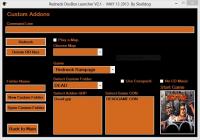
Here are some progress screenshots .


Attached File  Custom.JPG (51.87K)
Number of downloads: 175

Attached File  Main Menu.JPG (72.14K)
Number of downloads: 164

Attached File  VideoSound.JPG (71.31K)
Number of downloads: 165


New version available.

Redneck Dosbox Launcher V2.1
http://buildgamedosb...x-launcher.html

V2.1 5-15-2013

Redneck Dosbox Launcher no longer gets installed in GOG Redneck
Rampage Collection folder. Install Redneck Dosbox Launcher in a
separate folder by itself.
Added Custom addons menu.
New CD- Rom installation method. Copies the files over to Redneck Dosbox folder.
New GOG installation method. Copies the files over to Redneck Dosbox folder.
New GameFly installation method. Copies the files over to Redneck Dosbox folder.
Removed Default folder saves in favor of new Options Menu.
Renamed Video\Sound Menu to Option Settings Menu.
New Option Menu reprogramed with new options and works the way it should.
Fixed a few bugs.

This post has been edited by Skulldog: 15 May 2013 - 06:15 PM

1

#66

Got a problem w/ downloading the DosBox launcher from ADrive. It's takes 2-3 hours to download the launcher from ADrive and the download speed is 50kb/sec; where I download a game from GOG.com is 200kb/sec. Are you getting this slow download speed?
0

User is offline   Skulldog 

#67

View PostDustFalcon85, on 16 May 2013 - 09:58 AM, said:

Got a problem w/ downloading the DosBox launcher from ADrive. It's takes 2-3 hours to download the launcher from ADrive and the download speed is 50kb/sec; where I download a game from GOG.com is 200kb/sec. Are you getting this slow download speed?


It took me 30 min. Must be a problem on ADrives server side. Looking at your speed at GOG.com 200kb/sec. Your internet
is slow. I get 2mb/sec. But when I upload to ADrive I only get 156kb/sec

This post has been edited by Skulldog: 16 May 2013 - 11:36 AM

0

User is offline   irukanjji 

#68

View PostSkulldog, on 16 May 2013 - 11:29 AM, said:

It took me 30 min. Must be a problem on ADrives server side. Looking at your speed at GOG.com 200kb/sec. Your internet
is slow. I get 2mb/sec. But when I upload to ADrive I only get 156kb/sec


Here is the update link ? In the site just have the full version, in both links... I want download just the update version.

Thanks for your hard work
0

User is offline   irukanjji 

#69

View PostSkulldog, on 13 May 2013 - 11:43 AM, said:

Posted Image


Can you add the posibility to run bat files, please ?
0

User is offline   Skulldog 

#70

Yes, I can do that on next release. No Update version this time, too many changes for that. This needs to be installed
in a separate folder by the way.

This post has been edited by Skulldog: 16 May 2013 - 03:34 PM

0

User is offline   irukanjji 

#71

View PostSkulldog, on 16 May 2013 - 03:29 PM, said:

Yes, I can do that on next release. No Update version this time, too many changes for that. This needs to be installed
in a separate folder by the way.


Thanks anyway
0

User is offline   irukanjji 

#72

View PostSkulldog, on 16 May 2013 - 03:29 PM, said:

Yes, I can do that on next release. No Update version this time, too many changes for that. This needs to be installed
in a separate folder by the way.


Hey Skulldog, can i overwrite all files, or i have to unzip to a fresh folder ?
0

User is offline   Skulldog 

#73

View Postirukanjji, on 23 May 2013 - 03:41 PM, said:

Hey Skulldog, can i overwrite all files, or i have to unzip to a fresh folder ?


I would install to new folder. This version has a new install method for everything. I made this change so that GOG Redneck Rampage Collection install or
uninstall will not mess up Redneck Dosbox Launcher files and vice versa. Next version will have a update zip.

This post has been edited by Skulldog: 23 May 2013 - 07:09 PM

0

User is offline   irukanjji 

#74

View PostSkulldog, on 23 May 2013 - 07:06 PM, said:

I would install to new folder. This version has a new install method for everything. I made this change so that GOG Redneck Rampage Collection install or
uninstall will not mess up Redneck Dosbox Launcher files and vice versa. Next version will have a update zip.


Dont say, i´ve to reinstall everything again
0

User is offline   Skulldog 

#75

View Postirukanjji, on 24 May 2013 - 12:43 PM, said:

Dont say, i´ve to reinstall everything again


OK I want say it.
0

#76

Updates in the works?
0

User is offline   Skulldog 

#77

View PostDustFalcon85, on 22 July 2013 - 02:58 PM, said:

Updates in the works?


I have a update for Redneck Launcher comming soon.

Added Batch file support in Custom Menu.
Added Brightness control in Options.
Added Mouse Sensitivity control in Options.
Added Mouse X-axis control in Options.
Added Mouse Y-axis control in Options.
Added Dosbox memsize control in Options.
1

User is offline   supergoofy 

#78

Redneck DosBox Launcher V2.2 (7-23-2013) is out

Thank you Skulldog
0

User is offline   Skulldog 

#79

View Postsupergoofy, on 24 July 2013 - 04:26 AM, said:

Redneck DosBox Launcher V2.2 (7-23-2013) is out

Thank you Skulldog


Thanks Supergoofy. BTW you should take that free key.
0

User is offline   irukanjji 

#80

Great, thanks m8
0

User is offline   X-Vector 

#81

Hey Skulldog, thanks for your continued work on this launcher.

I've got a question regarding volume control of the music; I've come across suggestions to add a "mixer cdaudio xx:xx" (where xx is a number between 1 and 99) after the imgmount line in one of the conf files (traditionally "dosboxRR_settings", which I can't find in the launcher folders), but so far I've had no luck with this.
Any idea if this can be solved?
0

User is offline   Skulldog 

#82

View PostX-Vector, on 30 July 2013 - 07:07 AM, said:

Hey Skulldog, thanks for your continued work on this launcher.

I've got a question regarding volume control of the music; I've come across suggestions to add a "mixer cdaudio xx:xx" (where xx is a number between 1 and 99) after the imgmount line in one of the conf files (traditionally "dosboxRR_settings", which I can't find in the launcher folders), but so far I've had no luck with this.
Any idea if this can be solved?


I could program that in with a control bar in options. The launcher writes a new conf (SPRR.conf) in order to launch addons, levels, maps, or even a cd image file. I can add the line of code with a control bar in Options. Does this line come after the cd mount like "mixer cdaudio xx:xx" and what does the 1st xx do, and what does the 2nd xx do?

This post has been edited by Skulldog: 30 July 2013 - 07:45 AM

0

User is offline   X-Vector 

#83

These are the references I found:

http://www.gog.com/f..._too_loud/page1
http://www.gog.com/f...es/music_volume
http://3dsl.game-hos...132&view=unread

Apparently, the "xx:xx" numbers stand for left and right channel volume percentages (i.e. 50:50 sets the volume to half the standard level).
0

User is offline   Skulldog 

#84

View PostX-Vector, on 30 July 2013 - 08:05 AM, said:

These are the references I found:

http://www.gog.com/f..._too_loud/page1
http://www.gog.com/f...es/music_volume
http://3dsl.game-hos...132&view=unread

Apparently, the "xx:xx" numbers stand for left and right channel volume percentages (i.e. 50:50 sets the volume to half the standard level).


I'll get to work on that.


Edit:
I added the code for this, and a control bar in options. It will be available on next release. I olny made one control bar, so if you select 25 then
the left and right channel volume percentages would be 25:25. Don't really see a need for separate left and right control. I'm glad you posted
this dosbox config option. Now redneck rampage has music volume control. :P :P :D

This post has been edited by Skulldog: 30 July 2013 - 11:22 AM

0

#85

View PostSkulldog, on 30 July 2013 - 08:21 AM, said:

I'll get to work on that.


Edit:
I added the code for this, and a control bar in options. It will be available on next release. I olny made one control bar, so if you select 25 then
the left and right channel volume percentages would be 25:25. Don't really see a need for separate left and right control. I'm glad you posted
this dosbox config option. Now redneck rampage has music volume control. :P :P :D


Make sure the CD music volume applies to Blood and Shadow Warrior too and the launchers downloadable from Mega.co.nz.

This post has been edited by DustFalcon85: 30 July 2013 - 12:36 PM

0

User is offline   Skulldog 

#86

View PostDustFalcon85, on 30 July 2013 - 12:35 PM, said:

Make sure the CD music volume applies to Blood and Shadow Warrior too and the launchers downloadable from Mega.co.nz.


Yep. Already started, except for the mega site uploads. I put them on for each new releases then.
0

User is offline   zirkoni 

#87

View PostX-Vector, on 30 July 2013 - 07:07 AM, said:

... "mixer cdaudio xx:xx" (where xx is a number between 1 and 99) ...

The number can also be higher than 100 if you want to increase the volume from the default. For example,
mixer master 200:200
would increase the master volume about 6 dB.
0

User is offline   X-Vector 

#88

Can't imagine that anyone would want to do that, though.
Besides, you could achieve the same effect by lowering the game sound level from maximum.
0

User is offline   Skulldog 

#89

Redneck doesn't need it (Cause it was so load to start with.), but the other games do.
I'll try 200 range and see what happens.

No changes above 99.


Redneck Dosbox Launcher v2.3 is available.
http://buildgamedosb...x-launcher.html

Changelog:

V2.3 8-6-2013
Added CD Music volume control.

This post has been edited by Skulldog: 06 August 2013 - 03:41 PM

1

#90

I'm getting this annoying Security Warning when I start up the RR launcher. Happens on my OS Win 7 Pro. You getting this too Skulldog?

EDIT: The Duke & Blood launchers doesn't have this Security Warning.

This post has been edited by DustFalcon85: 09 August 2013 - 07:31 AM

0

Share this topic:


  • 4 Pages +
  • 1
  • 2
  • 3
  • 4
  • You cannot start a new topic
  • You cannot reply to this topic


All copyrights and trademarks not owned by Voidpoint, LLC are the sole property of their respective owners. Play Ion Fury! ;) © Voidpoint, LLC

Enter your sign in name and password


Sign in options