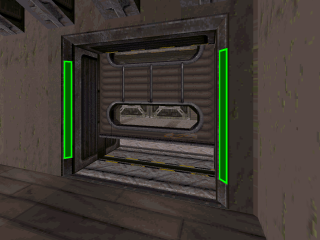
I decided to write short tutorial how to create such doors. It is actually very simple, like most things in Duke, however it require some work. Let's start.
1. Create two sectors - one for each part of door, like in regular slide door, however - they
cannot be connected.
2. Create small sector at each end of each part of the door. Just like on the screens.


3. Select the single door's part end, and move them as close as possible to the center of whole door (with grid lock disabled - for better effect) Just like on the screen, and create sector, by connecting the sectors, we have created in previous point, which is shown on this screen as well (you can see small space between the base door sector, and newly created sector)

4. Now switch to 3D mode and raise the newly created sector floor, and lower it's ceiling, like on the screen.

5. Split the newly created sector on two parts, like on the screen - this will be our glass.

6. Add sprites, that are required for regular slide doors on each sector. In this case you should use 6 SEs, 6 GPSpeeds and 6 Music And SFXs. You may also add some details on the sectors, so it will look better.

My design may be little different than classic slide door design, however i ensure - it works. I've attached the sample map i've been working while writing this post.

 Help
Help
 Duke4.net
 DNF #1
 Duke 3D #1






 .
.


 .
.