Duke4.net Forums: Basic question about menu tiles - Duke4.net Forums

Jump to content

Page 1 of 1
  • You cannot start a new topic
  • You cannot reply to this topic

Basic question about menu tiles

User is offline   Freudstein 

#1

Hi, I'm new to Duke3D modding. I've installed Atomic Edition from ZOOM Platform alongside with eDuke32 20260203, Group File Studio 3.1, and Build ART Files Editor 2.3.

As a small experiment I've been following the indications in https://wiki.eduke32.../Packaging_mods to try replacing the game's main menu screen (tile 2493 "betascreen") with a custom image using the following .DEF code:

texture 2493 { pal 0 { file "my_menu.png" nocompress nodownsize } }

This works fine. However, my intent is now to replace tile 2456 ("menuscreen") with the stock 2493 so that both menu screens look the same. I've tried a number of different things and in all cases, the 2456 menuscreen has really bad colors:
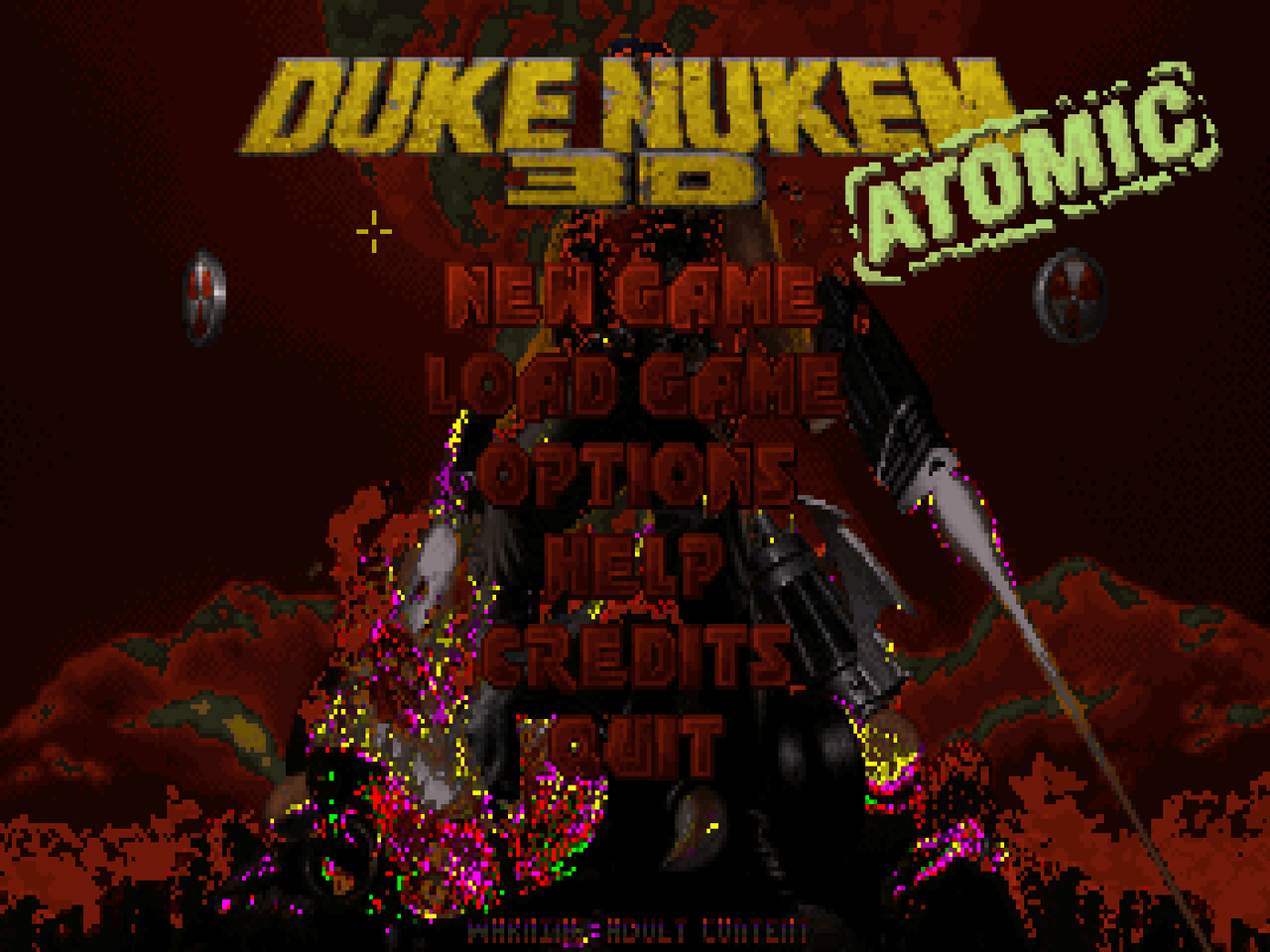
Posted Image

Here's what I've tried so far:

1. Extract TILES009.ART from DUKE3D.GRP, then 2493.png from it and use the following:

tilefromtexture 2456 { pal 0 { file "2493.png" nocompress nodownsize } }

2. The same but using texture instead.
3. Creating a new .ART file with 2493.png at index 2456, then importing it:

artfile { file "my_art.ART" }

but the same happens.

4. Replacing tile 2456 with 2493 directly inside TILES009.ART, then importing it as above.

I haven't tried adding my TILES009.ART to DUKE3D.GRP, but I suspect it'll have the same result.

I've also noticed that Group File Studio and BAFed both show tile 2493 with those wrong colors, and the extracted .png looks the same. Strangely enough, however, doing tilefromtexture 2496 { pal 0 { file "2493.png" nocompress nodownsize } } still displays it fine as tile 2496, though I don't understand why.

Am I doing something wrong? Thanks.
0

User is offline   Freudstein 

#2

Here's a response by ck3D regarding this (thanks!):

View Postck3D, on 15 July 2026 - 02:38 AM, said:

This exact problem someone else will have to fill in the details, but I can confirm that specific image and a couple of others exist in the game in that state with the wrong colors. What makes them display correctly in the game is it knows when they are supposed to display and is hardcoded to temporarily switch to a unique palette/mode just for them to look right, and then back to normal game palette. Thus by extension, using them 'out of sequencing' will result in no automatic correction happening. I wouldn't doubt you can manipulate and edit that in some way with EDuke but an actual programmer would have to chime in. My own understanding is a bit of a simplification. Naively I suspect you might run into a conflict by nature anyway just trying to run that image as background of another game event (the menu) that operates in normal game palette. Your best bet probably is to reimport a corrected image (to fit game palette) that also would be exempt of any funny behavior chained to it.

Those tiles are particular also for mappers because (since they need a game side correction to look right) means you technically can use them around levels as textures on the same level as any other game art, but seeing as it looks downright broken no one is ever really doing it, which is remarkable given every other available visual asset in the game by now has been rinsed and tweaked by generations, but those seem straight up unsalvageable (solely relying on the mapping side).

1

User is offline   Freudstein 

#3

Update on this: I managed to fix the issue by using a (cropped) version of the 2493 tile as provided by the wonderful TileFix mod by JimmyGnosis: https://www.moddb.com/mods/tile-fix

I set this as tile 2456 using tilefromtexture:

tilefromtexture 2456 { file "common/art/2456.png" }

and it works fine now.

Here's a zip containing both Jimmy's original file, as well as my cropped version in case anyone finds it useful: https://www.mediafir.../menus.zip/file

This post has been edited by Freudstein: 21 July 2026 - 12:17 PM

0

Share this topic:


Page 1 of 1
  • You cannot start a new topic
  • You cannot reply to this topic


All copyrights and trademarks not owned by Voidpoint, LLC are the sole property of their respective owners. Play Ion Fury! ;) © Voidpoint, LLC

Enter your sign in name and password


Sign in options