Duke4.net Forums: Issues with custom textures - Duke4.net Forums

Jump to content

Page 1 of 1
  • You cannot start a new topic
  • You cannot reply to this topic

Issues with custom textures

User is online   RevDeej 

#1

Hey I was wondering if anyone could help me regarding setting up and using custom .PNG files in Duke3D.

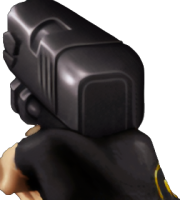
I want to eventually make some custom weapon sprites, but as a test first I decided just to try a simple AI upscale of the first Pistol frame.

I used this mod as a base/starting point to learn about DEF files and folder structure. The mod contains the sprites in a 32bit .png format read from a DEF file.

https://www.moddb.co...led-duke-gloves

The mod loads absolutely fine. I decided to start upscaling the Pistol sprite. So took the pistol's first frame into ComfyUI and upscaled it nicely.

But after replacing it in the mod package and loading the game the first Pistol frame is completely invisible. All the other sprites work fine still, just not the one I replaced.

I was scratching my head about it last night and couldn't figure out why it wasn't showing up. The only thing I've noticed was in the packaged.ZIP file the images compression ratio is a higher number than all the other files. I wondered if the image I've got from ComfyUI isn't formatted properly?

I've had no problem with changing/adding new wall textures with bump and spec maps. It's just sprites aren't playing nice for some reason.

Any explanation would be greatly appreciated. I'm assuming I'm just forgetting something painfully obvious.
0

User is offline   blizzart 

#2

Can you show the line in the DEF-file before and after you replaced it?
0

User is online   RevDeej 

#3

I can later. If it helps I haven't altered the DEF file much from the initial mod because I renamed the png file I made to match the original.

This post has been edited by RevDeej: Today, 09:45 AM

0

User is online   RevDeej 

#4

Here is the code from the DEF file; specifically the first line.

tilefromtexture 2524 { pal 0 { file "tiles/gloves/Pistol_01.png" xoffset -35 yoffset 0 } }

The other frames;
tilefromtexture 2525 { pal 0 { file "tiles/gloves/Pistol_02.png" xoffset -34 yoffset 12 } }
tilefromtexture 2526 { pal 0 { file "tiles/gloves/Pistol_03.png" xoffset -34 yoffset 9 } }
tilefromtexture 2528 { pal 0 { file "tiles/gloves/Pistol_04.png" xoffset -28 yoffset 2 } }
tilefromtexture 2529 { pal 0 { file "tiles/gloves/Pistol_05.png" xoffset -70 yoffset 8 } }
tilefromtexture 2531 { pal 0 { file "tiles/gloves/Pistol_06.png" xoffset -15 yoffset 33 } }
tilefromtexture 2532 { pal 0 { file "tiles/gloves/Pistol_07.png" xoffset -29 yoffset 0 } }

I don't THINK it's an issue with the DEF file as once I drop in the original .png file that came with the mod it shows up again. Also I haven't made any changes to the DEF file now I think about it. I'm assuming it's something wrong with the actual .png I've made.

I've attached the quick upscale I did and the original file for reference.

Attached thumbnail(s)

  • Attached Image: pistol_01.png
  • Attached Image: pistol_01.png

0

Share this topic:


Page 1 of 1
  • You cannot start a new topic
  • You cannot reply to this topic


All copyrights and trademarks not owned by Voidpoint, LLC are the sole property of their respective owners. Play Ion Fury! ;) © Voidpoint, LLC

Enter your sign in name and password


Sign in options