Duke4.net Forums: SE 49 & 50 - Duke4.net Forums

Jump to content

Page 1 of 1
  • You cannot start a new topic
  • You cannot reply to this topic

SE 49 & 50  "???"

User is offline   Awesomebob 

#1

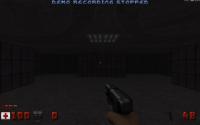
Read DT's sticky on polymer, and saw that I can make lights with sector effectors. So I build a small map to try this and they didn't work in game. Mapster recognized and labeled them right, but in game I just had a couple dark rooms.

Is there a trick to making them work?

This post has been edited by Awesomebob: 14 August 2010 - 08:31 PM

0

User is offline   The Commander 

  • I used to be a Brown Fuzzy Fruit, but I've changed bro...

#2

I trust that you did tick the Polymer box when you went to run the game right?

If they are still not working then you have left the xvel yvel and zvel at -1 which means that they have no colour, hence no light.
0

User is offline   Awesomebob 

#3

View PostThe Commander, on Aug 14 2010, 08:32 PM, said:

I trust that you did tick the Polymer box when you went to run the game right?

If they are still not working then you have left the xvel yvel and zvel at -1 which means that they have no colour, hence no light.


I assume the xyzvel is velocity, if so I set all three to "1" and still no dice. I do have polymer box checked. Refer to screen shots e1l1 to show poly is on, and user map showing where the light should be, but ain't)

Attached thumbnail(s)

  • Attached Image: duke0000.jpg
  • Attached Image: duke0001.jpg

0

User is offline   The Commander 

  • I used to be a Brown Fuzzy Fruit, but I've changed bro...

#4

View PostAwesomebob, on Aug 15 2010, 04:56 PM, said:

I assume the xyzvel is velocity, if so I set all three to "1" and still no dice. I do have polymer box checked. Refer to screen shots e1l1 to show poly is on, and user map showing where the light should be, but ain't)

You said you read DT's post, it would seem you did not read it fully.

View PostDeeperThought, on May 8 2009, 08:00 AM, said:

...
XVEL/YVEL/ZVEL = RGB values
To edit these, press F8 on the SE in 2D mode, then select them and type in numbers. Numbers should be in the range 0-255

http://www.shortcut-...olour-table.php
You want to look at the table on the right.

This post has been edited by The Commander: 14 August 2010 - 09:04 PM

0

User is offline   Awesomebob 

#5

I saw RGB values, but it just didn't register. Thank you.
0

User is offline   MIKE SIMS 

#6

I was just about to ask the same question.. I was getting the same issues.
0

#7

Heh, me too. I will try it in a couple days. Thanks!
0

User is offline   MusicallyInspired 

  • The Sarien Encounter

#8

That's 2 people who've come out and shown everybody that they don't read FAQs or Readmes. :wacko:
0

User is offline   TerminX 

  • el fundador

  #9

They don't pay attention to which forum they're posting in either--there's a specific mapping related forum here and a specific bug report/random questions forum. This is neither of them. :wacko:
0

User is offline   ReaperMan 

#10

View PostTX, on Aug 16 2010, 12:36 AM, said:

They don't pay attention to which forum they're posting in either--there's a specific mapping related forum here and a specific bug report/random questions forum. This is neither of them. :)


We have a mapping section? I knew something looked different. :wacko:
0

Share this topic:


Page 1 of 1
  • You cannot start a new topic
  • You cannot reply to this topic


All copyrights and trademarks not owned by Voidpoint, LLC are the sole property of their respective owners. Play Ion Fury! ;) © Voidpoint, LLC

Enter your sign in name and password


Sign in options