megatextures?
#1 Posted 14 April 2012 - 01:14 PM
But if you specify the texture with more than 256x256 pixel in the def file, the wall texture alignment is false.
Large textures would be very usefull for creating rocks and big landscapes.
I've tested one texture with 1024 pixels in vertical direction set in the def file and it looks great.
But horizontral direction doesn't work with more than 256 pixels.
Is there a chance to fix this?
#2 Posted 14 April 2012 - 01:34 PM
As long as the base 8-bit texture is a power of two like 256x256 (it should not really go much higher than that, TX quoted the max as being 1024x512) everything should be fine. To my knowledge hightile textures do not have any arbitrary limit in EDuke32 itself but I can only guess that a 40MB 4096x4096 whopper would hurt performance.
This post has been edited by Hendricks266: 14 April 2012 - 01:34 PM
#3 Posted 14 April 2012 - 09:34 PM
Also it cannot aligned manually as it always jumbs to the beginning if it reaches the middle of the texture (sorry for my bad english)
512 pixel or 1024 would be enough for me.
About the performance:
I'm already using some 2056x2056 textures and I haven't noticed any performance drop down.
This is why I think eduke32 would be ideal for megatextures and can render them better than other games.
The compressed size of an 2056x2056 image with 80% quality in jpg format is about 1 MB.
So if you are using just a few megatextures, there shouldn't be problems with the file size and load times.
#4 Posted 14 April 2012 - 10:18 PM
Mia Max, on 14 April 2012 - 09:34 PM, said:
My question to you is.... Where do you draw the line? =P
#5 Posted 14 April 2012 - 11:40 PM
But then, the texture will be too small for ceilings and floors, so I will have to make the same texture with different def file. Also shouldn't be a problem.
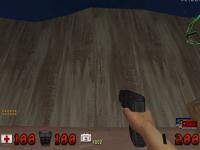
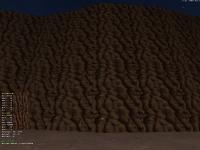
So this is what I'm talking about:
The original rock textures are far too small for big walls and wouldn't look good if they are stretched.
#6 Posted 15 April 2012 - 07:12 AM
Mia Max, on 14 April 2012 - 11:40 PM, said:
But then, the texture will be too small for ceilings and floors, so I will have to make the same texture with different def file. Also shouldn't be a problem.
So this is what I'm talking about:
The original rock textures are far too small for big walls and wouldn't look good if they are stretched.
Im confused on what you mean by "Megatexture". Megatexture in terms of Id Software's implementation is simply just clipmapping with a awesome DXT decompression/compression engine. This is not be confused with Virtual Texturing(which I implemented here in idTech 4 http://bmgame.googlecode.com/svn/). Last time I checked anyway eduke didn't have support for either. If you just putting a single 2048x2048 texture on terrain and it looks like that, off hand I would say your UV's are trashed(I haven't kept up with build in a long time so idk what restrictions are imposed in eduke32).
Quote
Unless you have a old graphics card it wouldn't hurt performance at all. But a single 4096x4096 texture wouldn't give you the results you want if you plan on using it for terrain.
This post has been edited by icecoldduke: 15 April 2012 - 07:16 AM
#7 Posted 15 April 2012 - 07:28 AM
#8 Posted 15 April 2012 - 07:34 AM
I think it is my english that is confusing the people.
About 'megatextures', I was thinking about Rage and its landscapes with large textures.
Well, let's call it Kilotextures instead
This post has been edited by Mia Max: 15 April 2012 - 07:35 AM
#9 Posted 15 April 2012 - 09:38 AM
Trooper Dan, on 15 April 2012 - 07:28 AM, said:
As Hendricks266 wrote, the maximum tile size is 1024x512, where the image size needs to be in the power of two [Geometric sequence 2]: 2, 4, 8, 16, 32, 64, 128, 256, 512 and 1024 - no other dimension, or it will not aligned as a pattern with the wall.
The maximum size for a .art file is 512x512. (this is the limit for floor/ ceiling)
You can try to use a 1024x512 texture for large mountains, but it exceeds the intent of the original 8bit game engine.
@ Mia Max, a 512x512 sized tile for the original Duke 3D 8bit engine is like 'terra' size. All orignal floor tiles were 64x64, maximum. And do not mention Rage, otherwise we will have a very long topic indeed.
#10 Posted 15 April 2012 - 04:23 PM
I'm already using 1024x1024 and it works fine for ceiling/floors.
But 512 width doesn't work for walls.
But anyway, if I make 256x256 wall textures and stretch them it works fine.
And for floor and ceiling, I use same texture just with different def.
So I've already got a solution for my problem.
Now, let's talk about Rage
#11 Posted 15 April 2012 - 05:16 PM
Mia Max, on 15 April 2012 - 04:23 PM, said:
I'm already using 1024x1024 and it works fine for ceiling/floors.
But 512 width doesn't work for walls.
But anyway, if I make 256x256 wall textures and stretch them it works fine.
And for floor and ceiling, I use same texture just with different def.
So I've already got a solution for my problem.
Now, let's talk about Rage
1. How do you make a .art file, as in tiles035.art ?
2. Rage - ha, have you heard any whisper about a TC or seen a link for a map to download? I'm talking PC here. You know Tim, he said, press on "~" type "id studio" and up comes the mod tools.
#12 Posted 15 April 2012 - 10:15 PM
Trooper Dan, on 15 April 2012 - 07:28 AM, said:
Has Mia Max told you this himself? He has never specifically said that he is using "tilefromtexture", only "texture", which is ambiguous between 8-bit and hightile.
Now, given that he is still saying 2056x2056 even when I corrected him to 2048x2048, I doubt there is really a problem at all. I am assuming that Ken's alignment code will work for any proper power of two, even past 256x256. If not, then I guess we will have to delve into Ken's asm, also known as programming on Damn I'm Good difficulty.
Mia Max: Please attach your .def file so we can properly diagnose your problem.
This post has been edited by Hendricks266: 15 April 2012 - 10:16 PM
#13 Posted 16 April 2012 - 02:55 AM
dummytile 5632 256 256 if it is more than that (512 512), texture won't align correctly on walls in x direction; the original texture size is 2048x2048
texture 5632 {
pal 0 { file "DUKEPLUS_RESOURCES/GRAPHICS/TEXTURES/5632.png" }
}
// megatextures (floor,ceiling)
dummytilerange 5650 5660 1024 1024 I use those only for walls and ceilings
texture 5650 {
pal 0 { file "DUKEPLUS_RESOURCES/GRAPHICS/TEXTURES/5617.png" }
}
texture 5651 {
pal 0 { file "DUKEPLUS_RESOURCES/GRAPHICS/TEXTURES/5622.png" }
}
texture 5652 {
pal 0 { file "DUKEPLUS_RESOURCES/GRAPHICS/TEXTURES/5623.png" }
}
texture 5653 {
pal 0 { file "DUKEPLUS_RESOURCES/GRAPHICS/TEXTURES/5632.png" }
}
texture 5654 {
pal 0 { file "DUKEPLUS_RESOURCES/GRAPHICS/TEXTURES/5624.png" }
}
#14 Posted 17 April 2012 - 08:36 AM
This post has been edited by Diaz: 17 April 2012 - 08:41 AM
#15 Posted 17 April 2012 - 08:55 AM
I really don't like it when rock textures repeat too often.
And yes, 1024x1024 works fine for floors and ceilings.
And anyway, as it is possible to stretch wall textures, there's no problem for me anymore.
Everything works fine already.
This post has been edited by Mia Max: 17 April 2012 - 08:56 AM
#16 Posted 10 May 2012 - 05:28 PM
1024 x 512 (editart).
Probably same in other programs.
But limit in high res textures. gif, png, jpg etc. dunno the limit.
But making them big doesn't expand the size in the game, stretching the texture makes it "less blocky"
Soo far my longest texture is.
4096 x 256 (vhs tapes in the video store) they're a small texture in game but stretched.
Well biggest and widest soo far is 1280 x 1280 (CPU core in the tower)
Sprite is around 128x128 or 256x256.
Like he said, making a big HPR texture and ingame you stretch it.

Help
Duke4.net
DNF #1
Duke 3D #1